
Adding two 8-bit numbers is the entry point into 8086 assembly arithmetic — simpler than 16-bit addition in operand size, but identical in structure. You will see the same segment setup, the same register-first constraint, and the same result-storage pattern. This post covers a working implementation in three environments: MASM/TASM (classic DOS toolchain), emu8086 (the Windows emulator used in most college labs), and NASM (modern open-source assembler). All versions are tested and produce verifiable output.
Prerequisites: Familiarity with 8086 registers and hexadecimal notation. New to assembly? Read Understanding DW and DB in 8086 Assembly first.
The Problem: Adding 09h and 02h
We want to add two 8-bit values — 09h and 02h — and store the result in a memory variable. The expected result is 0Bh (decimal 11). Quick mental check: 9 + 2 = 11 = 0Bh. Always confirm the expected result before you run the program — it makes debugging much faster.
AX and BX, we use AL and BL — the lower 8-bit halves of those registers. The ADD instruction, the segment setup, and the result-storage pattern are identical.
Version 1 — MASM / TASM (Classic DOS Toolchain)
This is the canonical version assembled with Microsoft MASM or Borland TASM. The full assembler, linker, and debugger session output is shown in the Output section below.
data segment
    a db 09h        ; 8-bit variable 'a' initialized with 09h
    b db 02h        ; 8-bit variable 'b' initialized with 02h
    c dw ?          ; 16-bit variable 'c' to store the result
data ends

code segment
assume cs:code, ds:data
start:
    mov ax, data    ; Load data segment address into AX
    mov ds, ax      ; Initialize the DS register

    mov al, a       ; Load 8-bit value of 'a' into AL
    mov bl, b       ; Load 8-bit value of 'b' into BL
    add al, bl      ; AL = AL + BL (result: 0Bh)

    mov c, ax       ; Store result (AX) into variable 'c'

    int 3           ; Halt for debugging

code ends
end start
Adding 8-bit numbers in 8086 assembly is like using a tiny abacus 🧮 – simple in concept, yet foundational to more complex calculations 💡.
Related Links:
Understanding the Code
The program is divided into a data segment and a code segment:
Data Segment:
- a db 09h: Declares an 8-bit byte variable
ainitialized to09h(hexadecimal). - b db 02h: Declares an 8-bit byte variable
binitialized to02h. - c dw ?: Declares a 16-bit word variable
cto store the sum. We use a 16-bit variable to handle potential overflow if the sum exceeds 255 (FFh).
c declared as dw and not db? The maximum result of adding two 8-bit numbers is FFh + FFh = 1FEh, which requires 9 bits — one more than a byte can hold. Declaring c as a word (dw, 16 bits) gives enough room to store any possible sum without truncation. If you declare c db ?, the high byte of the result silently overwrites the next byte in memory.
Code Segment:
- assume cs:code, ds:data: Tells the assembler that the
CSregister points to the code segment and theDSregister points to the data segment. - mov ax, data: Loads the address of the data segment into the
AXregister. - mov ds, ax: Sets the
DSregister to point to the data segment. This is crucial for accessing the variablesaandb. - mov al, a: Loads the value of
a(09h) into theALregister (the lower 8 bits ofAX). - mov bl, b: Loads the value of
b(02h) into theBLregister (the lower 8 bits ofBX). - add al, bl: Adds the contents of
BLtoAL. The result (0Bh) is stored inAL. - mov c, ax: Moves the contents of
AX(which contains the sum in its lower byteAL) into the variablec. - int 3: The breakpoint instruction halts execution for debugging purposes.
mov ax, a instead of mov al, a: Writing mov ax, a attempts to load a 16-bit word from the address of a. Since a is only 1 byte wide, the second byte read is actually the first byte of b — giving you garbage in AH and a corrupted BX load on the next line. Always match the register size to the variable size: db variables load into byte registers like AL, BL, CL, or DL.
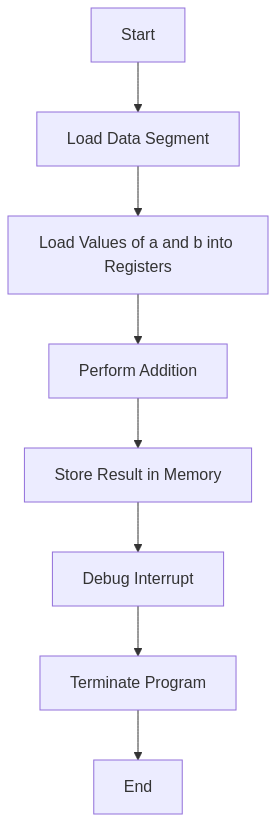
Flowchart
High-Level Overview
- Data Initialization: Variables
aandbare initialized. Space is allocated forc. - Segment Setup: The data segment is made accessible to the processor.
- Value Loading: The 8-bit values are loaded into the
ALandBLregisters. - Addition: The
ADDinstruction performs the 8-bit addition. - Result Storage: The result is stored in
c. - Program Termination: The program halts.
Output
C:TASM>masm an8add.asm
Microsoft (R) Macro Assembler Version 5.00
Copyright (C) Microsoft Corp 1981-1985, 1987.  All rights reserved.

Object filename [an8add.OBJ]:
Source listing  [NUL.LST]:
Cross-reference [NUL.CRF]:

  50402 + 450254 Bytes symbol space free

      0 Warning Errors
      0 Severe  Errors

C:TASM>link an8add.obj

Microsoft (R) Overlay Linker  Version 3.60
Copyright (C) Microsoft Corp 1983-1987.  All rights reserved.

Run File [AN8ADD.EXE]:
List File [NUL.MAP]:
Libraries [.LIB]:
LINK : warning L4021: no stack segment

C:TASM>debug an8add.exe
-g

AX=0B0B  BX=0002  CX=0022  DX=0000  SP=0000  BP=0000  SI=0000  DI=0000
DS=0B97  ES=0B87  SS=0B97  CS=0B98  IP=0011   NV UP EI PL NZ NA PO NC
0B98:0011 CC            INT     3
-d 0B97:0000
0B97:0000  09 02 0B 0B 00 00 00 00-00 00 00 00 00 00 00 00   ................
0B97:0010  B8 97 0B 8E D8 A0 00 00-8A 1E 01 00 02 C3 A3 02   ................
0B97:0020  00 CC 86 72 FF 77 15 8A-86 70 FF 2A E4 50 B8 FD   ...r.w...p.*.P..
0B97:0030  05 50 FF 36 24 21 E8 77-63 83 C4 06 FF 36 24 21   .P.6$!.wc....6$!
0B97:0040  B8 0A 00 50 E8 47 5E 83-C4 04 5E 8B E5 5D C3 90   ...P.G^...^..]..
0B97:0050  55 8B EC 81 EC 84 00 C4-5E 04 26 80 7F 0A 00 74   U.......^.&....t
0B97:0060  3E 8B 46 08 8B 56 0A 89-46 FC 89 56 FE C4 5E FC   >.F..V..F..V..^.
0B97:0070  26 8A 47 0C 2A E4 40 50-8B C3 05 0C 00 52 50 E8   &.G.*[email protected].
-q
AX=0B0B and not AX=000B? This surprises almost every student. The sequence mov ax, data loads the segment address 0B97h into AX — so AH = 0Bh. The next instruction mov al, a only touches the lower byte AL, leaving AH = 0Bh intact. After add al, bl, AL becomes 0Bh and AH is still 0Bh, giving AX = 0B0Bh. The actual result of the addition is only in AL. To get a clean 16-bit result in AX, add xor ah, ah (or mov ah, 0) before storing — the emu8086 and NASM versions below do exactly that.
Understanding the Memory Dump
This is the memory dump starting from address 0B97:0000, showing the contents of memory:
0B97:0000 09 02 0B 0B 00 00 00 00-00 00 00 00 00 00 00 00
09: The valuea = 09h.02: The valueb = 02h.0B 0B: The 16-bit value stored inc. The low byte0Bhis the addition result. The high byte0Bhis the leftover AH value from the segment address setup — not part of the true sum. In little-endian format, low byte comes first, so you see0Bthen0B.
c holds the clean result 000Bh: It does not in this version — c holds 0B0Bh because AH was never cleared. This is harmless for a lab exercise where you read only AL, but in production code it is a bug. Always zero out AH with xor ah, ah before storing AX into a word variable when the computation is 8-bit.
Version 2 — emu8086 (Windows Emulator)
The emu8086 version uses COM format via the #make_COM# directive, skipping the linker step. It also adds xor ah, ah before storing the result — so c correctly holds 000Bh instead of 0B0Bh.
Tested with: emu8086 v4.08 on Windows 10.
; emu8086 version -- 8086 Assembly Program for Addition of Two 8-bit Numbers
; Assemble as COM file using: #make_COM#

#make_COM#

org 100h            ; COM programs start at offset 100h

; --- Code ---
start:
    mov al, a       ; Load first operand into AL (09h)
    mov bl, b       ; Load second operand into BL (02h)
    add al, bl      ; AL = AL + BL (result: 0Bh)
    xor ah, ah      ; Clear AH so AX holds the clean 16-bit result (000Bh)
    mov c, ax       ; Store clean result in c

    mov ax, 4c00h   ; AH = 4Ch (exit), AL = 00h (return code)
    int 21h         ; DOS exit

; --- Data declarations ---
a db 09h            ; First 8-bit operand
b db 02h            ; Second 8-bit operand
c dw 0000h          ; 16-bit result variable
xor ah, ah is the idiomatic zero: You could write mov ah, 0 to clear AH, and it works. But xor ah, ah is the standard idiom in x86 assembly because it encodes to fewer bytes and executes in a single clock cycle on most processors. You will see this pattern everywhere in real-world x86 code.
How to Run in emu8086
- Open emu8086, paste the code and click Compile and Run (or press F5).
- After execution stops, open the Registers panel. You should see
AX = 000B— the clean 16-bit result. - Open the Memory panel and navigate to variable
c. You should see bytes0B 00— that is000Bhin little-endian order.
Why no segment setup in this version? COM programs load into a single 64 KB segment and DOS pre-sets all segment registers to point to it. DS already points to the right place, so the mov ax, data / mov ds, ax pair from the MASM version is unnecessary.
Version 3 — NASM (Modern Open-Source Assembler)
The NASM version uses flat binary COM format. Remember: all memory operands in NASM require square brackets — mov al, [a] not mov al, a.
Tested with: NASM 2.16.01, executed in DOSBox 0.74-3.
; NASM version -- 8086 Assembly Program for Addition of Two 8-bit Numbers
; Assemble:  nasm -f bin an8add.asm -o an8add.com
; Run:       Place an8add.com in DOSBox and execute it

bits 16             ; 16-bit mode
org  100h           ; COM file origin

; --- Code ---
start:
    mov al, [a]     ; Load first 8-bit operand into AL  (09h)
    mov bl, [b]     ; Load second 8-bit operand into BL (02h)
    add al, bl      ; AL = AL + BL  (result: 0Bh)
    xor ah, ah      ; Clear AH for a clean 16-bit result in AX (000Bh)
    mov [c], ax     ; Store result in variable c

    mov ax, 4c00h   ; Exit via DOS
    int 21h

; --- Data ---
a db 09h            ; First 8-bit operand
b db 02h            ; Second 8-bit operand
c dw 0000h          ; 16-bit result storage
mov al, a in NASM: Unlike MASM, NASM does not implicitly dereference variable names. mov al, a in NASM loads the offset address of a — a small number like 0Dh — into AL, not the byte value stored at a. The program assembles without error, the result in AL is completely wrong, and the bug is invisible until you inspect registers. Always write mov al, [a] in NASM.
Build and Run Steps
# Assemble to flat binary COM format
nasm -f bin an8add.asm -o an8add.com

# Run inside DOSBox
# Inside DOSBox:
#   mount c .
#   c:
#   an8add.com
Register State After Execution (All Three Versions)
After the ADD instruction executes, the registers hold:
| Register | MASM/TASM value | emu8086 / NASM value | Meaning |
|---|---|---|---|
| AL | 0B | 0B | Sum of 09h + 02h — the true result |
| AH | 0B (leftover) | 00 (cleared) | Zeroed by xor ah, ah in emu8086/NASM |
| AX | 0B0B | 000B | Full 16-bit accumulator |
| BL | 02 | 02 | Second operand — unchanged after ADD |
| CF (Carry Flag) | 0 | 0 | No carry — result fits in 8 bits |
Frequently Asked Questions
Why is c declared as dw if the inputs are only 8 bits wide?
Because the maximum possible sum of two 8-bit numbers is FFh + FFh = 1FEh, which is 9 bits wide and does not fit in a single byte. Declaring c as dw (16 bits) gives enough room for any result. If you used db for c and the sum exceeded FFh, the high byte of AX would spill into the next byte of memory, silently corrupting whatever variable sits there.
What is the difference between AL and AX?
AX is a 16-bit general-purpose register. It is split into two 8-bit halves: AH (high byte) and AL (low byte). Reading or writing AL only affects the lower 8 bits — AH is untouched. Similarly, BX splits into BH and BL. For 8-bit arithmetic you use AL and BL; for 16-bit arithmetic you use the full AX and BX. The ADD AL, BL instruction is a pure 8-bit operation — it sets the Carry Flag if the 8-bit result overflows, and it never touches AH.
Can I use CL or DL instead of AL and BL?
Yes. CL (low byte of CX) and DL (low byte of DX) are fully valid 8-bit operands for ADD. The choice of AL and BL in this program is conventional — AL is the accumulator and the natural home of arithmetic results, so it reads most naturally to other programmers. There is no performance difference on the 8086 between the four byte registers.
Conclusion
8-bit addition in 8086 assembly follows the same three-step rhythm as every other arithmetic operation: load operands into registers, compute, store the result. The details to watch are register sizing (AL/BL for byte operands, not AX/BX), the AH leftover issue when storing AX into a word variable, and the mandatory bracket syntax in NASM. Get those right and the pattern scales cleanly to subtraction, multiplication, and beyond.
See Also
- Understanding DW and DB in 8086 Assembly — data declaration reference
- 8086 Assembly Program to Add Two 16-bit Numbers — the 16-bit equivalent of this program
- 8086 Assembly: Adding 16-bit Numbers with Carry Handling — handling overflow correctly
It will be if you will explian the program using comment lines…dont mind.
Added explanation