
In this post, we’ll walk through an 8086 assembly program that calculates the factorial of a given integer. This program highlights the power of the 8086’s loop instruction and the use of general-purpose registers for iterative calculations. We’ll use the AX register as an accumulator for the result and the CX register as a loop counter, which is its special-purpose function. Let’s get to the code!
data segment
    n   dw 5      ; The number to find the factorial of
    fact dw ?     ; To store the 16-bit result
data ends

code segment
    assume ds:data, cs:code
start:
    mov ax, data
    mov ds, ax

    mov cx, n     ; Load N (5) into the counter register CX
    mov ax, 1     ; Initialize factorial result (AX) to 1

fact_loop:
    mul cx        ; Multiply AX by CX. Result in DX:AX
    loop fact_loop ; Decrement CX, jump to fact_loop if CX != 0

    mov fact, ax  ; Store the final result from AX into 'fact'

    int 3         ; Halt execution (breakpoint for debugging)
code ends
end start
“Writing a factorial loop in 8086 assembly is like setting up a line of dominoes—you give the first one a push (initialize to 1), and the loop instruction just keeps knocking them down (multiplying) until CX runs out!”
Understanding the Code
Data Segment
data segment: Declares the area for storing variables.n dw 5: Defines a 16-bit variable (dwfor “define word”) namednand initializes it with the value 5. This is the number we’ll find the factorial of.fact dw ?: Defines a 16-bit variablefactto store the final result. The?means it’s uninitialized.
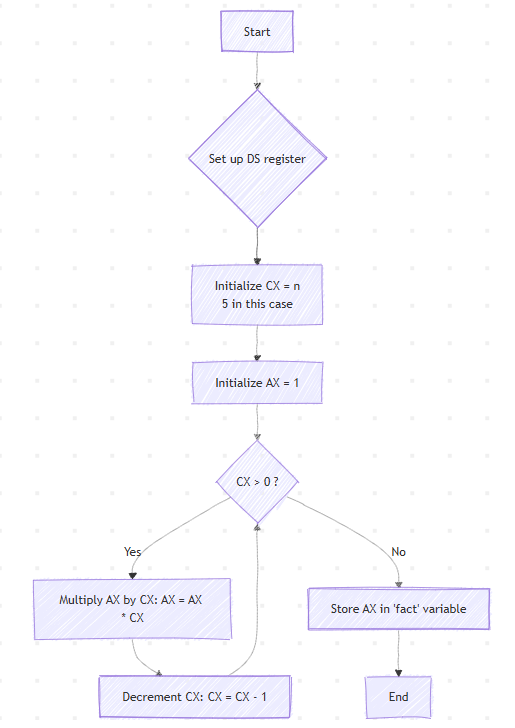
Flowchart
Code Segment
code segment: Declares the area for the program’s instructions.assume ds:data, cs:code: Tells the assembler to link theDSregister with ourdatasegment and theCSregister with ourcodesegment.start:: A label marking the program’s starting point.mov ax, data/mov ds, ax: This two-step process initializes the Data Segment (DS) register. We must do this to access our variables (nandfact).mov cx, n: Loads our number (5) from the variableninto theCXregister.CXis used as the counter for theloopinstruction.mov ax, 1: Initializes theAXregister to 1.AXwill act as our accumulator, holding the factorial result as it’s calculated. This is the base case (0! = 1).fact_loop:: A label marking the beginning of our loop.mul cx: This is the core of our calculation. It multiplies the value inAXby the value inCX. The 8086 stores the 32-bit result across two registers: the upper 16 bits inDXand the lower 16 bits inAX. (For 5!, the result is 120, which fits inAX, soDXwill be 0).loop fact_loop: This powerful instruction does three things at once:- It decrements
CXby 1. - It checks if
CXis 0. - If
CXis not 0, it jumps back to thefact_looplabel.
- It decrements
mov fact, ax: After the loop finishes (CXbecomes 0), this instruction copies the final result fromAXinto ourfactvariable in the data segment.int 3: This is a software interrupt used to stop the program, acting as a breakpoint for the debugger.
On High Level
- The program sets up the
DSregister to access its data. - It initializes the counter
CXwith the numbern(5). - It initializes the result register
AXto 1. - It enters a loop that multiplies
AXbyCX, then decrementsCX. - This loop repeats until
CXreaches 0. - The final value in
AX(the factorial) is stored in thefactvariable.
Output
Here’s a sample session using MASM and DEBUG to assemble, link, and run the program.
C:\TASM>masm an1fact.asm
Microsoft (R) Macro Assembler Version 5.00
Copyright (C) Microsoft Corp 1981-1985, 1987.  All rights reserved.

Object filename [an1fact.OBJ]:
Source listing  [NUL.LST]:
Cross-reference [NUL.CRF]:

   50326 + 450330 Bytes symbol space free

       0 Warning Errors
       0 Severe  Errors

C:\TASM>link an1fact.obj

Microsoft (R) Overlay Linker  Version 3.60
Copyright (C) Microsoft Corp 1983-1987.  All rights reserved.

Run File [AN1FACT.EXE]:
List File [NUL.MAP]:
Libraries [.LIB]:
LINK : warning L4021: no stack segment

C:\TASM>debug an1fact.exe
-g

AX=0078  BX=0000  CX=0000  DX=0000  SP=0000  BP=0000  SI=0000  DI=0000
DS=0B97  ES=0B87  SS=0B97  CS=0B98  IP=0012   OV UP EI PL NZ NA PO NC
0B98:0012 CC          INT     3
-d 0B97:0000
0B97:0000  05 00 78 00 00 00 00 00-00 00 00 00 00 00 00 00   ..x.............
0B97:0010  B8 97 0B 8E D8 8B 0E 00-00 B8 01 00 F7 E1 E2 FB   ................
0B97:0020  A3 02 00 CC 15 8A 86 70-FF 2A E4 50 B8 FD 05 50   .....p.*.P...P
...
-q
Understanding the Output
- Register State (
-g):AX=0078: This is the final result. 78h (hexadecimal) is equal to 120 (decimal).CX=0000: This shows theloopinstruction completed successfully, as the counter has reached 0.DX=0000: This confirms that the result (120) was small enough to fit inAX, and no overflow intoDXoccurred.IP=0012: The instruction pointer is at theINT 3instruction, right after storing the result.
- Memory Dump (
-d 0B97:0000):05 00: This is the variablen(5) stored in little-endian format.78 00: This is the variablefact(120 or 78h) stored in little-endian format, confirming the value fromAXwas saved correctly.
Factorial Breakdown
The program calculates 5! (5-factorial). Let’s trace the loop:
5! = 5 X 4 X 3 X 2 X 1 = 120
The loop executes as follows (values are shown before the mul instruction):
- Start:
CX = 5,AX = 1 mul cx-> $AX = 1 \times 5 = 5$.loop(CX becomes 4).- Loop 2:
CX = 4,AX = 5 mul cx-> $AX = 5 \times 4 = 20$ (14h).loop(CX becomes 3).- Loop 3:
CX = 3,AX = 20 mul cx-> $AX = 20 \times 3 = 60$ (3Ch).loop(CX becomes 2).- Loop 4:
CX = 2,AX = 60 mul cx-> $AX = 60 \times 2 = 120$ (78h).loop(CX becomes 1).- Loop 5:
CX = 1,AX = 120 mul cx-> $AX = 120 \times 1 = 120$ (78h).loop(CX becomes 0).- End:
CXis 0, the loop terminates. mov fact, axstores78hinto thefactvariable.
This confirms our program correctly calculated the factorial.
No Comments yet!