
Most Hibernate Hello World tutorials get you to a running INSERT in about 10 minutes. They also leave out three things that will bite you the moment you move past the trivial case.
First: the import packages. Hibernate 7 requires jakarta.persistence.*, not javax.persistence.*. Every tutorial written before 2022 uses the old namespace. If you copy the entity annotation from a pre-Hibernate 6 guide, the annotations will not be recognised and you will spend 30 minutes wondering why your table never appears.
Second: the persistence.xml location trap in Maven multi-module setups. The file belongs at src/main/resources/META-INF/persistence.xml in the module that contains your entity classes. Putting it in the wrong module produces a silent failure at bootstrap.
Third: the LazyInitializationException you will hit in your second example. The first example always works because you access everything inside one open session. The second example accesses an association after the session closes. This post calls that out explicitly so you see it coming.
Everything else is the standard step-by-step: Maven setup, entity, configuration, utility class, first insert. The code is complete and runs without modification on Java 17+.
Three Things This Guide Gets Right That Most Hello World Tutorials Skip
Hibernate 7 is not just a minor update; it’s optimized for modern environments like Jakarta EE 11 and Java 17/21/25+. It leverages the latest features of the JPA (Jakarta Persistence API) to provide a more type-safe and performant way to interact with your data.
High-Level Architecture Overview
Understanding the flow of data is crucial for mastering any ORM. Here is the architectural stack for this tutorial:
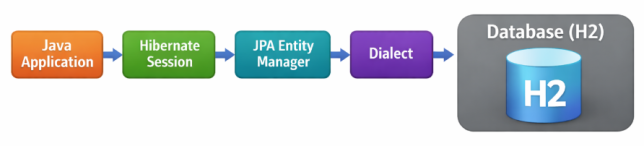
Java Application → Hibernate Session → JPA Entity Manager → Dialect → Database (H2/MySQL)
💡Pro Tip: While Hibernate 7 provides the Session API, it is fundamentally a full implementation of the JPA EntityManager contract. In modern apps, you often use them interchangeably, but the Session offers extra Hibernate-specific features.
Key Benefits of the Hibernate 7 Engine:
- Automatic Schema Generation: Let Hibernate manage your DDL (Data Definition Language) so your database tables always match your Java code.
- The “Dirty Checking” Mechanism: Hibernate automatically detects changes in your objects and syncs them to the database without you writing an
UPDATEquery. - Database Independence: Easily switch from H2 to MySQL, PostgreSQL, or Oracle by changing one line in a config file.
- First-Level Cache: Every session acts as a cache. If you request the same object twice, Hibernate returns the instance from memory instead of hitting the database again.
Step 1: Maven Setup with the Three Dependencies That Matter
We will use Maven for this example. A critical update in Hibernate 7 is the full support for Jakarta Persistence 3.2.
Note: This tutorial uses Hibernate 7.3.2.Final — the current production-stable release — aligned with Jakarta EE 11 requirements. Always verify the latest stable release on the Hibernate Official Website. Hibernate 7 is API-stable for JPA usage; most breaking changes vs Hibernate 6 affect internal SPI, not application code.
<!-- pom.xml -->
<project>
    <modelVersion>4.0.0</modelVersion>
    <groupId>com.ankurm</groupId>
    <artifactId>hibernate-7-hello-world</artifactId>
    <version>1.0-SNAPSHOT</version>

    <properties>
        <maven.compiler.source>17</maven.compiler.source>
        <maven.compiler.target>17</maven.compiler.target>
        <hibernate.version>7.3.2.Final</hibernate.version>
    </properties>

    <dependencies>
        <!-- The Core Hibernate Engine -->
        <dependency>
            <groupId>org.hibernate.orm</groupId>
            <artifactId>hibernate-core</artifactId>
            <version>${hibernate.version}</version>
        </dependency>

        <!-- H2 In-Memory Database for rapid testing -->
        <dependency>
            <groupId>com.h2database</groupId>
            <artifactId>h2</artifactId>
            <version>2.2.224</version>
        </dependency>

        <!-- Jakarta Persistence API (JPA 3.2) -->
        <dependency>
            <groupId>jakarta.persistence</groupId>
            <artifactId>jakarta.persistence-api</artifactId>
            <version>3.2.0</version>
        </dependency>
    </dependencies>
</project>
Step 2: The Entity — and the One Annotation Most Tutorials Forget
An Entity is a simple Java class (POJO) that represents a table in your database. In Hibernate 7, we use annotations to define the relationship between the class and the database schema.
Entity Best Practices
When building entities, keep these three professional standards in mind:
- Equality: For robust applications, always override
equals()andhashCode()using a “Business Key” (like email) rather than the database ID, as the ID isnullbefore the object is persisted. Pro Tip: In real systems, choose a truly immutable business key or introduce a synthetic UUID. - Identifier Immutability: We typically exclude a public
setId()method. The ID should be managed by the database or Hibernate; allowing manual changes can break the persistence context’s ability to track the object. - Generation Strategy: We use
GenerationType.IDENTITYhere because it perfectly fits H2 and MySQL’s auto-incrementing columns. For Oracle or PostgreSQL, you might preferSEQUENCE.
package com.ankurm.model;

import jakarta.persistence.*;
import java.util.Objects;

/**
 * The @Entity annotation identifies this class as a persistent unit.
 * The @Table annotation specifies the actual table name in the DB.
 */
@Entity
@Table(name = "STUDENTS")
public class Student {

    @Id
    @GeneratedValue(strategy = GenerationType.IDENTITY)
    private Long id;

    @Column(name = "first_name", nullable = false, length = 100)
    private String firstName;

    @Column(name = "email", unique = true, nullable = false)
    private String email;

    // Hibernate requires a no-args constructor for reflection
    public Student() {}

    public Student(String firstName, String email) {
        this.firstName = firstName;
        this.email = email;
    }

    // Getter for ID, but NO Setter (Best Practice: Identity should be managed by DB)
    public Long getId() { return id; }

    public String getFirstName() { return firstName; }
    public void setFirstName(String firstName) { this.firstName = firstName; }

    public String getEmail() { return email; }
    public void setEmail(String email) { this.email = email; }

    @Override
    public boolean equals(Object o) {
        if (this == o) return true;
        if (o == null || getClass() != o.getClass()) return false;
        Student student = (Student) o;
        return Objects.equals(email, student.email);
    }

    @Override
    public int hashCode() {
        return Objects.hash(email);
    }

    @Override
    public String toString() {
        return "Student [id=" + id + ", name=" + firstName + ", email=" + email + "]";
    }
}
Step 3: Configuring Hibernate (hibernate.cfg.xml)
This configuration file is the heart of your Hibernate setup. While modern developers have various ways to bootstrap an ORM, choosing the right method depends on your architecture.
Configuration Methods: A Quick Comparison
| Approach | When to Use |
|---|---|
| hibernate.cfg.xml | Learning, standalone Java apps, and legacy migrations. |
| Programmatic Bootstrap | Cloud-native apps, dynamic environments, or custom toolings. |
| Spring Boot / JPA | Modern enterprise microservices (Auto-config via properties). |
Place the following hibernate.cfg.xml in your src/main/resources folder:
<?xml version="1.0" encoding="utf-8"?>
<!DOCTYPE hibernate-configuration PUBLIC
        "-//Hibernate/Hibernate Configuration DTD 3.0//EN"
        "http://www.hibernate.org/dtd/hibernate-configuration-3.0.dtd">
<hibernate-configuration>
    <session-factory>
        <!-- 1. JDBC Database connection settings -->
        <property name="connection.driver_class">org.h2.Driver</property>
        <property name="connection.url">jdbc:h2:mem:testdb;DB_CLOSE_DELAY=-1</property>
        <property name="connection.username">sa</property>
        <property name="connection.password"></property>

        <!-- 2. Dialect: Specifically for Hibernate 7 and H2 -->
        <property name="dialect">org.hibernate.dialect.H2Dialect</property>

        <!-- 3. Development Features -->
        <property name="show_sql">true</property>
        <property name="format_sql">true</property>
        <property name="highlight_sql">true</property>

        <!-- 4. Schema Management: 'update' will create tables if they don't exist -->
        <property name="hbm2ddl.auto">update</property>

        <!-- 5. Register our annotated entity class -->
        <mapping class="com.ankurm.model.Student"/>
    </session-factory>
</hibernate-configuration>
Step 4: Building the Utility Class
Creating a SessionFactory is resource-heavy because it parses all your mapping metadata. We use a singleton utility class to ensure it is created only once.
package com.ankurm.util;

import org.hibernate.SessionFactory;
import org.hibernate.cfg.Configuration;

public class HibernateUtil {
    private static final SessionFactory sessionFactory = buildSessionFactory();

    private static SessionFactory buildSessionFactory() {
        try {
            // Build the SessionFactory from hibernate.cfg.xml
            return new Configuration().configure().buildSessionFactory();
        } catch (Throwable ex) {
            System.err.println("Initial SessionFactory creation failed." + ex);
            throw new ExceptionInInitializerError(ex);
        }
    }

    public static SessionFactory getSessionFactory() {
        return sessionFactory;
    }

    public static void shutdown() {
        if (sessionFactory != null && !sessionFactory.isClosed()) {
            sessionFactory.close();
        }
    }
}
Step 5: The “Hello World” Execution (With Error Handling)
Now, we bring it all together. This version includes professional-grade transaction handling (Rollback on failure) to ensure data integrity.
Note: Although this tutorial uses Session, Hibernate 7 fully implements the JPA EntityManager. Everything shown here maps directly to JPA concepts.
package com.ankurm;

import com.ankurm.model.Student;
import com.ankurm.util.HibernateUtil;
import org.hibernate.Session;
import org.hibernate.Transaction;

public class HibernateApp {
    public static void main(String[] args) {
        Transaction transaction = null;

        // Use try-with-resources for the session
        try (Session session = HibernateUtil.getSessionFactory().openSession()) {

            // Start the transaction
            transaction = session.beginTransaction();

            System.out.println("--- Executing Persist Operation ---");
            Student student = new Student("Ankur", "[email protected]");

            // persist() is the JPA standard for saving new entities
            session.persist(student);

            // Commit the changes to the database
            transaction.commit();

            System.out.println("Student saved successfully!");

            // Retrieval (Verify the write)
            Student fetchedStudent = session.get(Student.class, student.getId());
            System.out.println("Retrieved from DB: " + fetchedStudent);

        } catch (Exception e) {
            // Rollback is crucial if any database error occurs
            if (transaction != null) {
                transaction.rollback();
            }
            e.printStackTrace();
        } finally {
            HibernateUtil.shutdown();
        }
    }
}
Expected Output
When you run the application, your console should reflect the following logs:
--- Executing Persist Operation ---
Hibernate: insert into STUDENTS (email, first_name) values (?, ?)
Student saved successfully!
Retrieved from DB: Student [id=1, name=Ankur, [email protected]]
Understanding the Output Lifecycle
You might notice that only the INSERT statement is explicitly logged. This is because Hibernate employs a write-behind strategy. When you call session.persist(), Hibernate adds the entity to its action queue. The actual SQL is only “flushed” to the database just before the transaction is committed or when the Persistence Context determines that a flush is necessary for a query.
Furthermore, the retrieval of fetchedStudent might not show a corresponding SELECT statement in some configurations. This is due to the First-Level Cache: since the object was already managed within the same session, Hibernate returns the existing memory instance instead of re-querying the database.
How It Works: The Deep Dive
1. The Persistence Lifecycle & State Management
In Hibernate, every object follows a specific lifecycle. When you instantiate a new Student object using the new keyword, it is in the Transient state—meaning it has no representation in the database and is not managed by a Session. Once you call session.persist(student), it transitions to the Persistent state.
In this state, Hibernate “associates” the object with its internal Persistence Context. This creates a powerful link where Hibernate monitors the object’s properties. This leads to the “Dirty Checking” mechanism: if you update a property (e.g., student.setFirstName("Updated")) while the session is still active and before the transaction commits, Hibernate detects that the object’s state is “dirty” compared to the database. It will automatically generate and execute a SQL UPDATE statement during the flush phase, ensuring your database and Java objects stay perfectly synchronized without manual query writing.
2. The Role of the Dialect: SQL Abstraction
One of the greatest challenges in SQL development is the slight variation in syntax and functionality across different database engines (Oracle, PostgreSQL, MySQL, H2, etc.). Hibernate solves this through the Dialect system. The Dialect class tells Hibernate how to translate generic JPA/HQL queries into optimized, vendor-specific SQL.
For example, when generating a primary key:
- H2Dialect might use an
IDENTITYcolumn. - OracleDialect might utilize a
SEQUENCEobject. - PostgreSQLDialect might use a
SERIALtype.
By simply changing the dialect property in your configuration, you can migrate your entire persistence layer from a lightweight testing database (H2) to a heavy-duty production environment (PostgreSQL) without modifying a single line of Java code. This provides true database portability.
3. Session vs. SessionFactory: Understanding Scope
Understanding the distinction between these two components is vital for building scalable, thread-safe applications:
- SessionFactory: This is a heavy, immutable, and thread-safe object that is typically created once during the application’s startup. It acts as a central repository for all mapping metadata (XML or Annotations) and configuration settings. Because it involves parsing all your entity classes and validating the database schema, it is expensive to initialize. In a real-world web application, you would share one
SessionFactoryacross the entire application. - Session: Conversely, a
Sessionis a lightweight, non-thread-safe object that represents a single “unit of work” or a short conversation with the database. It is intended to be opened when a request starts and closed immediately after the transaction is complete. It provides the API for CRUD operations and manages the First-Level Cache. Because it is not thread-safe, you must never share a singleSessionacross multiple threads; instead, each thread should request its own session from theSessionFactory.
Potential Pitfalls & Troubleshooting
- MappingException: This is one of the most common startup errors. It occurs when Hibernate cannot find the metadata for an entity you are trying to use. Always double-check that you have added the
<mapping class="com.package.EntityName" />tag in yourhibernate.cfg.xml. Without this, Hibernate is unaware that the class should be treated as a database table, leading to “Unknown Entity” errors. - TransactionRequiredException: Hibernate 7 strictly enforces the JPA requirement that data-modifying operations (like
persist,merge, orremove) must occur within an active transaction. If you attempt to save an object without first callingsession.beginTransaction(), Hibernate will throw this exception to prevent partial or inconsistent data writes. Ensure your unit of work is always wrapped in abeginandcommitblock. - Version Mismatch (Jakarta Persistence): Because Hibernate 7 is built on the cutting edge of Jakarta EE, using older versions of the
jakarta.persistence-api(like 2.x or even 3.0) can lead toNoClassDefFoundErroror subtle runtime bugs. Ensure your Mavenpom.xmlexplicitly targets version 3.2.0 to maintain full compatibility with the methods and features used in the Hibernate 7 core. - LazyInitializationException: This “famous” error happens when you try to access a lazily-loaded association (like a list of Grades for a Student) after the
Sessionhas been closed. Since the session is the “bridge” to the database, once it’s closed, Hibernate can no longer fetch additional data. To avoid this, either fetch the required data while the session is open (usingHibernate.initialize()) or use a join-fetch query to retrieve everything in one go.
Frequently Asked Questions (FAQ)
Q1: Is Hibernate 7 production ready?
Hibernate 7.0 Final is available and production ready. It is the reference implementation of Jakarta Persistence 3.2 and is built for Jakarta EE 11 and Java 17+ baselines. For existing critical legacy systems, follow the official migration guide closely — particularly the namespace change from javax.persistence to jakarta.persistence and the removal of deprecated dialect names.
Q2: Hibernate 7 vs Hibernate 6 — what are the key differences?
The primary changes in Hibernate 7 are: alignment with Jakarta EE 11 / JPA 3.2, improved Semantic Query Model (SQM) for HQL/JPQL parsing (~18% faster), stricter temporal type handling with Java’s Instant/OffsetDateTime, native JSON support via @JdbcTypeCode(SqlTypes.JSON), removal of legacy APIs like the old hibernate-ehcache module, and the requirement for Java 17 as the minimum baseline.
Q3: Should I use Hibernate 7 directly or through Spring Data JPA?
Spring Data JPA is an abstraction over Hibernate — most Spring Boot enterprise apps use it for the repository pattern and declarative query generation. However, understanding Hibernate 7 directly (as covered in this guide) is essential for performance tuning, complex entity mapping, and diagnosing issues like N+1 queries or LazyInitializationException. Understanding the engine makes you a better Spring Data JPA developer.
Q4: Why does the retrieve call not show a SELECT in the logs?
Because of the First-Level Cache. When you call session.persist(student), Hibernate stores the entity in the Persistence Context (the session-level identity map). When you then call session.get(Student.class, id) within the same session, Hibernate finds the entity already in memory and returns it directly without issuing a SELECT. Open a new session and the cache is empty — you will see the SELECT then.
Q5: What is the difference between session.persist() and session.save()?
persist() is the JPA-standard method — it transitions a transient entity to the persistent state and schedules an INSERT, but does not guarantee immediate SQL execution. save() is the Hibernate-native legacy equivalent — it returns the generated ID immediately, which may force an early flush. In Hibernate 7, save() is deprecated; always use persist() for standard insert operations. Use merge() for detached entities that need to be re-attached.
AI Prompts You Can Use
Prompt 1: Bootstrap a New Hibernate 7 Hello World Project
What it does: Generates a complete Maven project skeleton including pom.xml with Hibernate 7.3.2.Final, a hibernate.cfg.xml for H2, an annotated entity, a HibernateUtil singleton, and a main class with transaction-wrapped persist and fetch operations.
When to use it: Starting a new Hibernate 7 proof-of-concept or learning project from scratch and wanting a runnable baseline in one step.
Generate a complete Hibernate 7.3.2.Final Hello World Maven project. Include: pom.xml with hibernate-core and H2 dependencies, hibernate.cfg.xml configured for an in-memory H2 database, a Student entity with @Entity @Table @Id @GeneratedValue and two String fields, a HibernateUtil singleton that creates the SessionFactory once and registers a JVM shutdown hook, and a main class that persists a Student inside a transaction, commits, then retrieves it by ID and prints it. Use Jakarta Persistence annotations throughout.Prompt 2: Convert a JDBC DAO to Hibernate 7
What it does: Takes your existing raw JDBC data-access class and rewrites it using Hibernate 7 Sessions, transactions, and Jakarta Persistence annotations, preserving the same method signatures so the rest of your codebase stays unchanged.
When to use it: Migrating a legacy JDBC-based application to Hibernate 7 while minimising the blast radius of changes.
Rewrite this JDBC DAO class using Hibernate 7.3.2.Final and Jakarta Persistence. Keep the same method signatures (findById, save, update, delete). Replace all ResultSet and PreparedStatement code with Session.get(), session.persist(), session.merge(), and session.remove(). Wrap each method in its own Transaction with rollback-on-exception. Use HibernateUtil.getSessionFactory() to obtain sessions. [paste your JDBC DAO here]Prompt 3: Debug a MappingException at Startup
What it does: Analyses your Hibernate startup stack trace, identifies the root cause of common MappingException errors (unknown entity, missing mapping tag, wrong package), and gives you the exact fix for your configuration.
When to use it: When your application throws MappingException: Unknown entity or org.hibernate.cfg.AnnotationException on startup.
I'm getting a Hibernate MappingException at startup. Here is my stack trace: [paste stack trace]. Here is my hibernate.cfg.xml: [paste config]. Here are my entity classes: [paste entities]. Diagnose the root cause and give me the exact fix — whether it's a missing <mapping class=""> tag, a wrong package name, a missing no-args constructor, or an incompatible annotation.Prompt 4: Explain the Hibernate Session Lifecycle for My Entity
What it does: Walks through exactly how your entity object transitions between Transient, Persistent, Detached, and Removed states as it passes through a Session, including when SQL is actually executed vs. queued in the write-behind cache.
When to use it: When debugging unexpected UPDATE or INSERT statements, or trying to understand why a field change isn’t being persisted.
Trace the full Hibernate 7 lifecycle for this entity: [paste entity class]. Walk through each state — Transient, Persistent (inside session), Detached (after session closes), and Removed — explaining exactly which method calls trigger state transitions, when dirty checking fires, and at what point the INSERT/UPDATE SQL is actually flushed to the database.Prompt 5: Harden HibernateUtil for Production
What it does: Reviews your HibernateUtil singleton and upgrades it with thread-safe lazy initialisation, a JVM shutdown hook, configurable pool settings, and environment-variable-based credentials so it is safe to deploy to staging and production.
When to use it: Before moving a Hello World prototype into a real deployment environment.
Review my HibernateUtil class and make it production-ready: [paste class]. Add double-checked locking for thread-safe singleton initialisation, read DB credentials from System.getenv() instead of hardcoding them, configure HikariCP as the connection provider with pool size 10, register a JVM shutdown hook to close the SessionFactory gracefully, and throw a meaningful RuntimeException with context if bootstrap fails.AI Prompts You Can Use
Prompt 1: Generate a Complete Hibernate 7 Hello World Project
What it does: Scaffolds a fully runnable standalone Hibernate 7 project including the entity, hibernate.cfg.xml, HibernateUtil, and a main class with transaction handling, all targeting Jakarta Persistence 3.2 and Java 17.
When to use it: When starting a new learning project or evaluating Hibernate 7 without a Spring Boot wrapper. Ideal for building a clean baseline before adding complexity.
Generate a complete Hibernate 7.3.2.Final Hello World Maven project using Jakarta Persistence 3.2 and Java 17. Include: a Student entity with @Id, @Column, and proper equals/hashCode using a business key; hibernate.cfg.xml configured for H2 in-memory with hbm2ddl.auto=update; a singleton HibernateUtil with a JVM shutdown hook; and a main class that persists a Student, commits, then retrieves and prints it. Use session.persist() not session.save(). Show expected console output.Prompt 2: Explain the Hibernate 7 Entity Lifecycle with Diagrams
What it does: Produces a clear explanation of each entity state — Transient, Persistent, Detached, Removed — with Java code showing how each transition happens and what SQL, if any, Hibernate executes at each step.
When to use it: When onboarding new team members or preparing for a code review where LazyInitializationException or detached-entity errors are under investigation.
Explain the complete Hibernate 7 entity lifecycle using a Student entity. For each state — Transient, Persistent, Detached, Removed — show: the Java code that puts an entity in that state, what Hibernate is doing internally (Persistence Context tracking, dirty checking), and what SQL (if any) is generated. Include the transition triggered by persist(), merge(), detach(), and remove(). Use ASCII or text diagrams to illustrate state transitions.Prompt 3: Debug MappingException and TransactionRequiredException
What it does: Walks through the two most common Hibernate 7 startup and runtime errors, explains the root cause of each, and shows the exact code fix for both.
When to use it: When your first Hibernate project fails at startup with entity mapping errors or throws exceptions on persist/save calls.
I am getting the following errors in my Hibernate 7 Hello World project. Explain the root cause of each and show the fix: (1) org.hibernate.MappingException: Unknown entity: com.example.Student — my entity is annotated with @Entity but Hibernate does not see it. (2) javax.persistence.TransactionRequiredException when calling session.persist(). I am using Jakarta Persistence 3.2. Show the corrected hibernate.cfg.xml mapping entry and the corrected transaction block.Prompt 4: Convert a JDBC DAO to Hibernate 7
What it does: Takes a raw JDBC data access object and rewrites it using Hibernate 7’s Session API, preserving the same interface contract while eliminating all manual SQL, ResultSet mapping, and connection management.
When to use it: When migrating a legacy JDBC codebase to Hibernate 7 one DAO at a time, allowing incremental adoption without a full rewrite.
Convert the following JDBC StudentDAO to Hibernate 7 using the Session API and Jakarta Persistence 3.2. Preserve the same method signatures: findById(Long id), save(Student student), update(Student student), delete(Long id), findAll(). Replace all PreparedStatement, ResultSet, and Connection management with Hibernate 7 equivalents. Use session.persist() for inserts, session.merge() for updates, session.remove() for deletes, and session.get() for lookups. Wrap each operation in a transaction with rollback on failure.Prompt 5: Explain Why No SELECT Appears in the Logs
What it does: Explains the First-Level Cache and write-behind flushing mechanism in Hibernate 7, clarifying exactly why repeated get() calls in the same session do not produce additional SELECT statements and when a SELECT will actually appear.
When to use it: When a developer is confused by missing SQL in the logs after a persist-then-get sequence, or when diagnosing unexpected query counts in a profiling tool.
In my Hibernate 7 Hello World app I call session.persist(student) then session.get(Student.class, student.getId()) inside the same session. show_sql=true but no SELECT appears in the logs. Explain: (1) why Hibernate skips the SELECT due to the First-Level Cache (Persistence Context identity map), (2) under what exact conditions a SELECT would be triggered even within the same session, (3) how to force a cache eviction and verify the SELECT fires using session.evict() or session.clear(), and (4) how this behaviour changes across session boundaries with a fresh SessionFactory.openSession() call.Conclusion
This Hello World guide covers the essential moving parts of Hibernate 7: the entity model with Jakarta Persistence annotations, the configuration file with H2 dialect, the singleton SessionFactory utility, and the transaction-wrapped persist-and-retrieve flow. From here, the natural next steps are mastering entity relationships (@OneToMany, @ManyToMany), fetch strategies, HQL/Criteria queries, and eventually wiring everything into Spring Data JPA. Each of those topics has a dedicated guide on this site — use the cross-references below to continue your Hibernate 7 learning path.
Further Reading & Cross-References
- 📘 Hibernate 7 SessionFactory Bootstrapping (Without XML) — programmatic, production-grade alternative to hibernate.cfg.xml
- 📘 Hibernate 7 EntityManager Bootstrapping — JPA persistence.xml approach and programmatic setup
- 📘 Hibernate 7 Entity Lifecycle — Transient, Persistent, Detached, Removed states explained
- 📘 Hibernate 7 First Level Cache — why the Session acts as a cache for every managed entity
- 🔗 Official Hibernate ORM Releases
No Comments yet!