
A file system has files and directories. A directory can contain files and other directories. When your UI asks “how big is this item?”, it shouldn’t need to check whether it’s talking to a file or a directory — it should just call getSize() and get a number back. The Composite pattern makes that possible by giving both leaves (files) and composites (directories) the same interface, so callers never need to distinguish between them.
This guide builds a file system tree from scratch, explains how the recursive structure works, and maps the pattern to real examples in the JDK. If you’ve ever wondered how Swing’s component hierarchy, XML DOM trees, or expression evaluators work under the hood, this is the pattern behind all of them.
All code compiles and runs with Java 25. No external dependencies required.
The Problem: Treating Leaves and Containers Uniformly
Without Composite, code that walks a tree ends up littered with type checks:
// Without Composite — type checks everywhere
long computeSize(Object item) {
    if (item instanceof File) {
        return ((File) item).size();
    } else if (item instanceof Directory) {
        long total = 0;
        for (Object child : ((Directory) item).getChildren()) {
            total += computeSize(child);  // recursive call, but brittle
        }
        return total;
    }
    throw new IllegalArgumentException("Unknown type: " + item.getClass());
}
This snippet is illustrative only — it shows the problem Composite solves, but it is not part of this repository’s runnable example.
Every time you add a new node type (symlink, archive, network mount), you must find and update every method that does this kind of dispatch. Composite eliminates the problem by moving the recursion into each node type, behind a shared interface. The caller just calls getSize() and the object itself knows what to do.
Pattern Structure
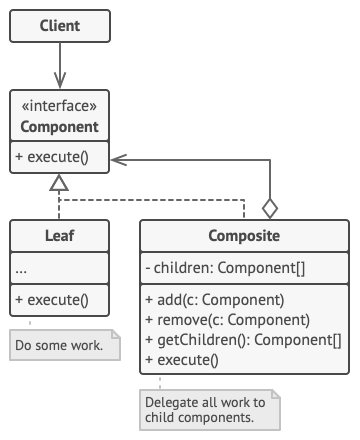
Three roles make up the Composite pattern:
- Component — the common interface for both simple and complex nodes. Declares the operations that make sense for both. In our example:
FileSystemItem. - Leaf — a node with no children. Implements Component directly. In our example:
File. - Composite — a node that can contain other Components (both Leaves and other Composites). Implements Component by delegating to its children. In our example:
Directory.
Step 1 — The Component Interface
This is the contract that every node in the tree — whether a single file or a directory with thousands of children — must satisfy. Clients hold references of this type and never need to downcast.
FileSystemItem.java
package composite;
/**
 * Component — the common interface for both files (leaves) and directories (composites).
 * Clients work through this interface and never need to know which type they're dealing with.
 */
public interface FileSystemItem {
    String getName();
    long getSize();           // total size in bytes — recursive for directories
    void print(String indent); // display the tree at the given indentation level
}
The print(String indent) signature is worth noting: it accepts an indent string so each level of the tree can render deeper than the one above it. That indentation logic belongs here on the interface because both leaves and composites need to participate in it.
Step 2 — The Leaf (File)
A file is the simplest node. It has a fixed size and no children. Its getSize() returns its own byte count; its print() just formats a single line. There’s no recursion here — that’s the defining characteristic of a leaf.
File.java
package composite;
/**
 * Leaf — a single file with no children.
 * getSize() returns its own bytes. print() outputs a single line.
 * No knowledge of directories or nesting exists in this class.
 */
public class File implements FileSystemItem {
    private final String name;
    private final long size;
    public File(String name, long sizeBytes) {
        this.name = name;
        this.size = sizeBytes;
    }
    @Override public String getName() { return name; }
    @Override public long   getSize() { return size; }
    @Override
    public void print(String indent) {
        System.out.printf("%s[FILE] %s (%,d bytes)%n", indent, name, size);
    }
}
Step 3 — The Composite (Directory)
This is where the pattern’s power lives. A directory implements FileSystemItem exactly like a file does — but its getSize() and print() work by delegating to each child. The children can be files, other directories, or any future node type that implements FileSystemItem. The directory doesn’t care.
Directory.java
package composite;
import java.util.ArrayList;
import java.util.List;
/**
 * Composite — a directory that holds both Files (leaves) and other Directories.
 *
 * getSize() is recursive: asks each child for its size and sums them.
 * print() recurses with deeper indentation.
 *
 * The caller doesn't care whether a child is a File or Directory —
 * both answer getSize() and print() the same way.
 */
public class Directory implements FileSystemItem {
    private final String name;
    private final List<FileSystemItem> children = new ArrayList<>();
    public Directory(String name) { this.name = name; }
    // Fluent add() — allows chaining: dir.add(file1).add(file2).add(subDir)
    public Directory add(FileSystemItem item) {
        children.add(item);
        return this;
    }
    public void remove(FileSystemItem item) { children.remove(item); }
    @Override public String getName() { return name; }
    @Override
    public long getSize() {
        // Each child knows its own size: files return bytes, directories recurse.
        // This is the Composite's core: uniform delegation down the tree.
        return children.stream()
                       .mapToLong(FileSystemItem::getSize)
                       .sum();
    }
    @Override
    public void print(String indent) {
        System.out.printf("%s[DIR]  %s/ (%,d bytes total)%n", indent, name, getSize());
        for (FileSystemItem child : children) {
            child.print(indent + "    ");  // each level indents 4 more spaces
        }
    }
}
💡 The Recursion is in the Composite, Not the Client: Notice that neither the client code nor the File class contains any recursion. Directory.getSize() calls getSize() on each child; if the child is another Directory, that child’s getSize() calls its children, and so on. The tree walks itself. The client just calls root.getSize() once and gets the entire tree’s total back. This is the essential shift that Composite enables.
Building and Using the Tree
Main.java
package composite;
public class Main {
    public static void main(String[] args) {
        System.out.println("=== Composite Design Pattern Demo ===\n");
        // Build the tree — mix files and directories freely
        Directory root = new Directory("project");
        Directory src = new Directory("src");
        Directory main = new Directory("main");
        main.add(new File("App.java",         4_200))
            .add(new File("Config.java",      1_800))
            .add(new File("Application.yml",  3_100));
        Directory test = new Directory("test");
        test.add(new File("AppTest.java",    2_600))
            .add(new File("ConfigTest.java", 1_200));
        src.add(main).add(test);
        Directory resources = new Directory("resources");
        resources.add(new File("application.yml", 1_500))
                 .add(new File("logback.xml",       900))
                 .add(new File("banner.txt",         200));
        root.add(src)
            .add(resources)
            .add(new File("pom.xml",   8_400))
            .add(new File("README.md", 2_100));
        // Print the entire tree — recursion is automatic
        System.out.println("File system tree:");
        root.print("");
        System.out.printf("%nTotal project size: %,d bytes%n", root.getSize());
        // The key demonstration: File and Directory through the same interface
        System.out.println("\n-- Treating File and Directory uniformly --");
        FileSystemItem[] items = { new File("standalone.txt", 500), src };
        for (FileSystemItem item : items) {
            System.out.printf("%s -> size: %,d bytes%n", item.getName(), item.getSize());
        }
        System.out.println("\n=== Demo complete ===");
    }
}
Console Output
File system tree:
[DIR] project/ (26,000 bytes total)
[DIR] src/ (12,900 bytes total)
[DIR] main/ (9,100 bytes total)
[FILE] App.java (4,200 bytes)
[FILE] Config.java (1,800 bytes)
[FILE] Application.yml (3,100 bytes)
[DIR] test/ (3,800 bytes total)
[FILE] AppTest.java (2,600 bytes)
[FILE] ConfigTest.java (1,200 bytes)
[DIR] resources/ (2,600 bytes total)
[FILE] application.yml (1,500 bytes)
[FILE] logback.xml (900 bytes)
[FILE] banner.txt (200 bytes)
[FILE] pom.xml (8,400 bytes)
[FILE] README.md (2,100 bytes)
Total project size: 26,000 bytes
— Treating File and Directory uniformly —
standalone.txt -> size: 500 bytes
src -> size: 12,900 bytes
=== Demo complete ===
Should the Component Interface Include Child-Management Methods?
This is the classic Composite design question. Should FileSystemItem include add() and remove()? There are two camps:
Transparency (GoF preference): Put add(), remove(), and getChildren() on the Component interface. Every node has them — Leaf nodes throw UnsupportedOperationException. This maximises uniformity: callers never need to know or cast to add children. The tradeoff is that you can call file.add(something) and only discover the error at runtime.
Safety: Put child-management only on Directory. Callers know at compile time that they can only add to a directory. The tradeoff is that code that builds the tree must hold a Directory reference for those calls, losing some uniformity.
In Java, the Safety approach is usually preferred. Compile-time type checking is one of Java’s strengths; voluntarily trading it away for interface uniformity that matters only at build time (not query time) is a poor deal. Keep add() and remove() on Directory. Callers that only query the tree (get size, print, search) work through FileSystemItem and are fully uniform.
Composite in the JDK and Frameworks
Swing’s component hierarchy is the JDK’s most complete Composite implementation. Component is the interface; JButton, JLabel, and JTextField are leaves; JPanel, JFrame, and JScrollPane are composites. When you call panel.setEnabled(false), Swing walks the entire subtree and disables every child. Your code called one method on one component; the pattern handled the rest.
The XML DOM is another example. Node is the Component; Text and Attr are leaves; Element and Document are composites. Methods like getTextContent() recursively gather text from all descendants; normalize() recursively merges adjacent text nodes.
Java’s java.awt.Container extends Component and holds a list of Component children — the exact Composite structure. Every layout manager in the JDK relies on this to measure and place nested containers without knowing their concrete types.
✅ Best Practice — Iterator over the tree: For non-trivial traversals (search by name, filter by size, collect all leaves), add a separate stream() or walk() method to your Composite rather than forcing clients to manually recurse. A depth-first stream from Directory can flat-map each child’s stream, giving callers clean Java Stream API usage: root.walk().filter(f -> f.getSize() > 1_000_000).forEach(...). This keeps traversal logic in one place and clients remain oblivious to the tree structure.
When to Use Composite
Reach for Composite when: your domain has a natural part-whole hierarchy (file systems, org charts, expression trees, UI component trees, menu systems, bill of materials). Clients need to treat individual items and collections of items the same way. You need to add new node types without touching existing traversal code. The recursive structure is inherent to the domain, not an implementation detail.
Avoid it when: your tree is very shallow (rarely more than one level deep) and the uniformity isn’t buying you much — a simpler list may be clearer. The Component interface becomes a lowest-common-denominator that forces unnatural methods onto Leaf nodes. Each node type is so behaviourally different that sharing an interface actually misleads readers about the relationship.
⚠️ Watch for Composite + Decorator confusion: Both patterns involve an object that wraps another object of the same type. The difference is intent: Composite builds a tree of peers where each node contributes to a whole-tree result. Decorator builds a chain where each layer adds behaviour to a single object. A directory that holds files is Composite. A buffered, logged, authenticated stream wrapper is Decorator. When an object both contains multiple children and adds behaviour, you may be mixing the patterns — which is usually a sign to split the responsibilities.
Runnable Code on GitHub
The complete source for this article is at ankurm.com/git.app/asmhatre/design-patterns under 02-structural/composite/. Run it with:
javac composite/*.java -d out/composite
java -cp out/composite composite.Main
See Also
- Decorator Design Pattern in Java — often confused with Composite; wraps a single object to add behaviour rather than building a tree
- Iterator Design Pattern in Java — pairs naturally with Composite for traversing the tree without exposing its structure
- Bridge Design Pattern in Java — another structural pattern dealing with hierarchies, but focused on decoupling two independent dimensions of variation
Further Reading
- Composite — Refactoring.Guru
- The Composite Pattern in Java — Baeldung
- Design Patterns: Elements of Reusable Object-Oriented Software — Gamma, Helm, Johnson, Vlissides, Chapter 4
No Comments yet!