
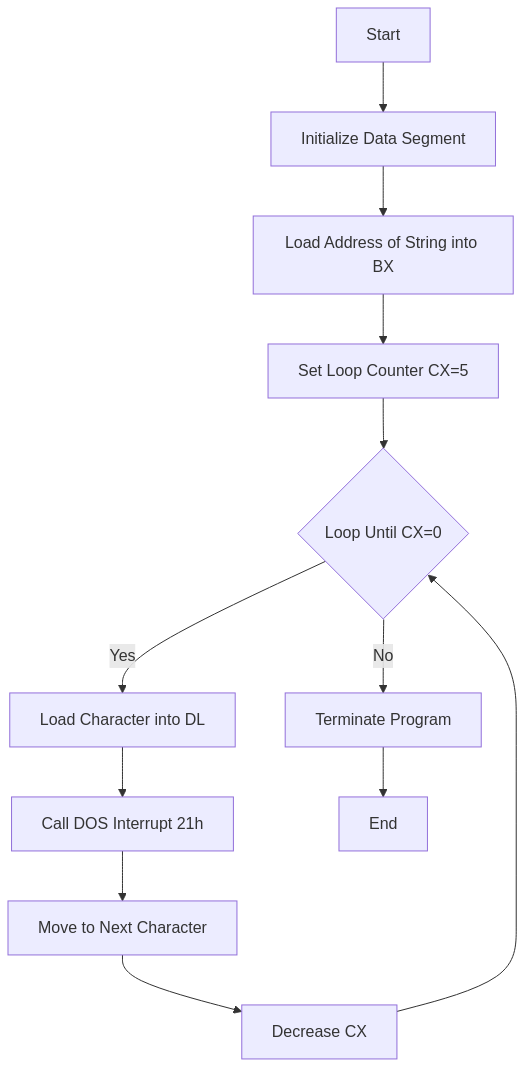
There are two ways to print a string in 8086 DOS assembly. One is the clean, one-call approach using INT 21h function 09h. The other — shown here — is the character-by-character loop using function 02h. It’s more verbose, but it gives you a clear picture of how string output actually works at the hardware level: load a character into DL, call INT 21h, move to the next character, repeat. Once you understand this version, the shortcut function 09h makes a lot more sense.
Prerequisites: Basic familiarity with 8086 registers and DOS interrupts. New to assembly? Read Understanding DW and DB in 8086 Assembly first.
data segment
    msg1 db 'hello'      ; string to print (no $ terminator needed here)
data ends

code segment
assume cs:code, ds:data
start:
    mov ax, data
    mov ds, ax
    mov sp, 0d000h           ; set up stack pointer
    mov bx, offset msg1      ; BX points to first character of string
    mov cx, 0005h            ; loop 5 times (length of 'hello')
move:
    mov ah, 02h              ; INT 21h function 02h = display character in DL
    mov dl, [bx]             ; load current character into DL
    int 21h                  ; print the character
    inc bx                   ; advance pointer to next character
    dec cx                   ; decrement counter
    jnz move                 ; if CX != 0, loop back
    mov ax, 4c00h
    int 21h
code ends
end start
Related Links:
- 8086 Assembly Program to Print ‘hello’ using 09H — the shorter one-call approach
- 8086 Assembly Program to Search an Element in an Array
How it works
The data segment holds the string 'hello' as five consecutive bytes — the ASCII codes for h, e, l, l, o. There’s no $ terminator because this version doesn’t use function 09h; it counts characters manually with CX instead.
After segment setup, BX is loaded with the address of the first character (offset msg1) and CX is set to 5. Each loop iteration does three things: loads the byte at [bx] into DL, calls INT 21h with AH=02h to print that character, then advances BX and decrements CX. The jnz move keeps looping until CX hits zero.
mov ah, 02h must be inside the loop: AH gets clobbered by INT 21h during execution. If you move mov ah, 02h outside the loop (before move:), it works on the first iteration but AH will be trashed by the interrupt on subsequent passes, and the wrong DOS function gets called. Keep it inside the loop.
Flowchart
Output
C:TASM>debug an_hello.exe
-g
hello
Program terminated normally
-q
emu8086 version
Tested with: emu8086 v4.08, Windows 10.
; emu8086 -- print 'hello' character by character using INT 21h function 02h
#make_COM#
org 100h

start:
    mov bx, offset msg1  ; BX = address of first character
    mov cx, 0005h        ; loop counter = 5 (length of 'hello')
move:
    mov ah, 02h          ; function 02h: display character in DL
    mov dl, [bx]         ; load current character
    int 21h              ; print it
    inc bx               ; next character
    dec cx
    jnz move             ; loop until CX = 0
    mov ax, 4c00h
    int 21h

; --- Data after code ---
msg1 db 'hello'
NASM version
Tested with: NASM 2.16.01, DOSBox 0.74-3.
; NASM -- print 'hello' character by character
; nasm -f bin hello.asm -o hello.com
bits 16
org  100h

start:
    mov bx, msg1         ; BX = offset of first character
    mov cx, 5            ; 5 characters to print
move:
    mov ah, 02h
    mov dl, [bx]         ; load character from memory
    int 21h
    inc bx
    dec cx
    jnz move
    mov ax, 4c00h
    int 21h

; --- Data after code ---
msg1 db 'hello'
Function 02h vs 09h — which should you use?
Function 02h (character output) is useful when you’re printing characters one at a time — useful for formatted output, building strings dynamically, or printing values you compute at runtime. Function 09h (string output) is simpler for fixed strings since it handles the loop internally, but it requires a $ terminator and expects DX to already point to the string. For beginners, the function 02h loop is worth understanding first because it makes the mechanics visible. The function 09h version is covered in this post.
Frequently Asked Questions
Why does the string not need a $ terminator?
Because this program doesn’t use function 09h. The $ terminator is only required by INT 21h function 09h, which scans forward from DX until it finds a $ byte. This version uses a manual counter in CX instead — it prints exactly 5 characters and stops, regardless of what byte follows the string.
What does INT 21h function 02h actually do?
It outputs a single character to the standard output. The character is whatever is in DL when the interrupt is called. The function also echoes the character to the screen and handles special characters like backspace (08h) and carriage return (0Dh). After the call, AX contains the character that was printed (for confirmation), which is why AH gets modified and must be reset inside the loop.
Can I use SI instead of BX as the pointer register?
Yes. SI (Source Index) is specifically designed for indexed memory access and works just as well here. You’d write mov si, offset msg1, then mov dl, [si], then inc si. Using SI would arguably be more idiomatic for a string loop, since LODS-type thinking naturally uses SI. BX (Base Register) is more general-purpose. Both work on the 8086 — pick whichever is more readable to you.
Conclusion
The function 02h character loop is the long way to print a string — but it is also the most instructive. You can see exactly what is happening at each step: load a byte, call the interrupt, move the pointer, count down. Once you are comfortable with this pattern you will understand every other DOS output routine. The one rule to never forget: mov ah, 02h goes inside the loop, not before it, because INT 21h clobbers AH on return.
See Also
- 8086 Assembly Program to Print ‘hello’ using 09H — the cleaner one-call version
- 8086 Assembly Program to Search an Element in an Array — uses the same pointer-loop pattern
- Understanding DW and DB in 8086 Assembly
I don’t why this stuff has to be so difficult, Everyone writes different and difficult codes, I think I will never understand this. I think I have to start from very Basic.