
Data directives are assembler instructions, not CPU instructions — they tell the assembler how much memory to reserve and what value to store there at load time. The CPU never executes a DB or DW; it simply finds the bytes already in memory when it accesses that address at runtime. Choosing the right directive matters: use DB for bytes and strings, DW for 16-bit integers and addresses, DD for far pointers and 32-bit values, and DUP to initialise arrays without typing each value individually.
Memory Layout: How Directives Sit in the .data Segment
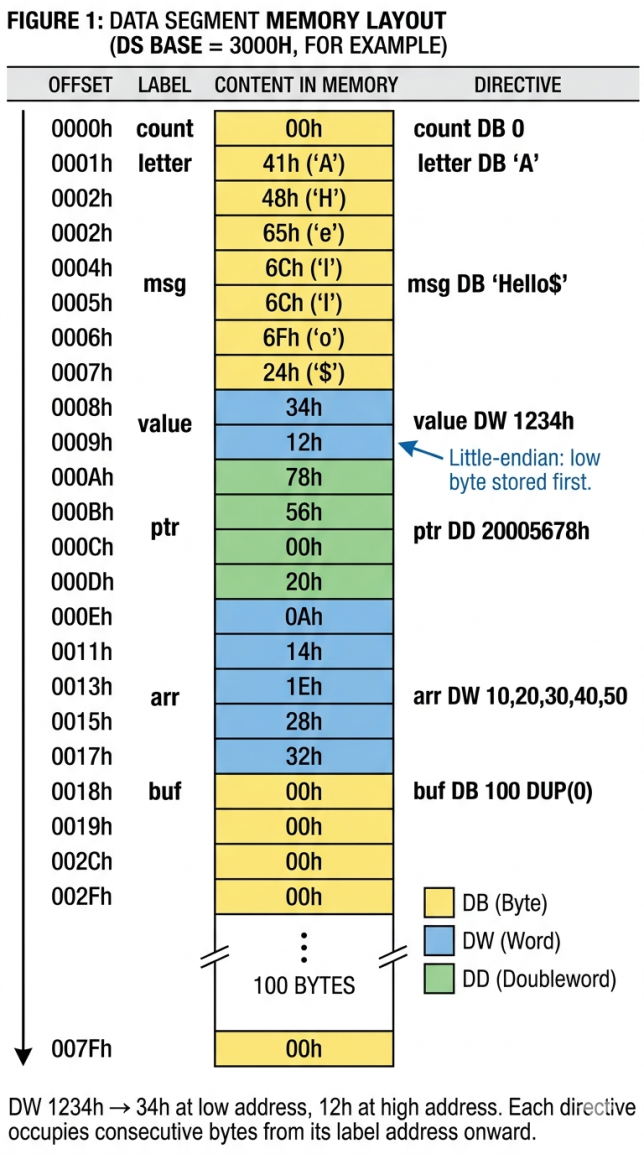
DB — Define Byte
DB reserves one byte per value. It handles integers (0–255), signed values (−128 to 127), ASCII character literals, and strings (stored as consecutive bytes with no automatic null terminator).
.data
    ; Single bytes
    status   DB 0          ; byte at offset 0, value 00h
    flag     DB 0FFh       ; byte, value FFh
    newline  DB 0Ah        ; ASCII line feed
    letter   DB 'A'        ; same as DB 41h

    ; Strings: DB stores each character as one byte, sequentially
    ; No null terminator is added automatically
    msg_dos  DB 'Hello, World!', '$'   ; 14 bytes; $ for INT 21h AH=09h
    msg_c    DB 'Hello', 0             ; 6 bytes; 0 for C-style strings
    crlf     DB 13, 10, '$'            ; carriage return + line feed

    ; Arrays of bytes
    digits   DB 0,1,2,3,4,5,6,7,8,9

    ; Uninitialized (no initial value written to output file)
    scratch  DB ?
DW — Define Word
DW reserves two bytes (one 16-bit word) per value, stored in little-endian order. Use DW for 16-bit integers, near procedure addresses (OFFSET label), and word arrays.
.data
    counter  DW 0             ; 2 bytes: 00h 00h
    limit    DW 1000h         ; 2 bytes: 00h 10h  (little-endian!)
    neg_one  DW -1            ; 2 bytes: FFh FFh  (0xFFFF)
    result   DW ?             ; 2 bytes, uninitialized

    ; Array of words
    scores   DW 95, 87, 72, 100, 63   ; 10 bytes total

    ; Near procedure pointer
    fn_ptr   DW OFFSET my_proc        ; offset of my_proc in CS

.code
    ; Accessing word array elements:
    MOV BX, OFFSET scores
    MOV AX, [BX]        ; AX = scores[0] = 95
    MOV AX, [BX+2]      ; AX = scores[1] = 87
MOV AX, [BX+4] ; AX = scores[2] = 72The 8086 stores multi-byte values low byte first: DW 1234h writes 34h at the lower address and 12h at the next address. MOV AX, [addr] reassembles them correctly — but if you read with MOV AL, BYTE PTR [addr] you get the low byte, not the high one. Separately: always declare DW variables at even offsets. A DW at an odd address costs two bus cycles instead of one. If you mix DB and DW, insert a padding DB 0 before each DW to keep it word-aligned.
DD, DQ, DT — Larger Sizes
| Directive | Bytes | Bits | Primary use on 8086 |
|---|---|---|---|
| DD | 4 | 32 | Far pointers (segment:offset = 2+2 bytes), 32-bit integers, single-precision floats (8087) |
| DQ | 8 | 64 | Double-precision floats for 8087 FPU, large integers |
| DT | 10 | 80 | 8087 extended-precision floats, packed BCD (18 digits) |
.data
    ; DD — far pointer: offset word first, then segment word (little-endian each)
    old_isr  DD 0          ; 4 bytes to hold saved CS:IP of an ISR
    big_num  DD 12345678h  ; bytes: 78h 56h 34h 12h

    ; DD — used with LDS / LES to load segment:offset pairs
    far_ptr  DD 0          ; fill at runtime: WORD PTR far_ptr = IP, [far_ptr+2] = CS

    ; DQ — 8087 double-precision float
    pi_dbl   DQ 3.14159265358979

.code
    ; Load far pointer from DD variable:
    LDS  SI, [far_ptr]   ; SI = word at far_ptr, DS = word at far_ptr+2
    LES  DI, [far_ptr]   ; DI = word at far_ptr, ES = word at far_ptr+2
DUP — Duplicate Values
DUP is the standard way to declare arrays and zero-fill buffers. DB 256 DUP(0) is not just shorter than typing 256 zeros — it also works inside macros with variable counts. Use DUP(?) for uninitialized buffers to keep output file size small.
DUP repeats a value or group of values N times, on any directive. It is the standard way to declare arrays and buffers without typing every element.
.data
    ; 100 bytes all set to 0
    zeros    DB 100 DUP(0)

    ; 50 words all set to FFFFh
    max_arr  DW 50 DUP(0FFFFh)

    ; 256 bytes uninitialized
    buffer   DB 256 DUP(?)

    ; Repeating pattern: 1,2,3,1,2,3,1,2,3,1,2,3 (12 bytes)
    pattern  DB 4 DUP(1, 2, 3)

    ; 2D array: 5 rows × 10 words = 100 bytes, all zero
    matrix   DW 5 DUP(10 DUP(0))

.code
    ; Accessing buffer:
    LEA BX, buffer
    MOV AL, [BX]        ; first byte
    MOV [BX+5], AL      ; sixth byte
EQU and = — Named Constants
EQU defines a symbol the assembler substitutes at assemble time. No memory is reserved. EQU values cannot be redefined; the = operator creates redefinable constants (useful inside macros).
; EQU — assemble-time substitution, no memory allocated
MAX_SIZE  EQU 256
KEYBOARD  EQU 60h
CR        EQU 13
LF        EQU 10

buffer    DB MAX_SIZE DUP(?)

    MOV CX, MAX_SIZE
    IN  AL, KEYBOARD

; = — redefinable constant (useful for loop counters in macros)
idx = 0
var0  DW idx          ; = 0
idx = idx + 1
var1  DW idx          ; = 1
idx = idx + 1
var2  DW idx          ; = 2
PTR, OFFSET, SEG, and LABEL Operators
.data
    my_word  DW 1234h
    buffer   DB 80 DUP(0)

.code
    ; PTR: override the size of a memory operand
    MOV AL, BYTE PTR [my_word]    ; read low byte only (34h)
    MOV AH, BYTE PTR [my_word+1]  ; read high byte (12h)
    MOV AX, WORD PTR [buffer]     ; read 2 bytes of buffer as a word

    ; OFFSET: get the 16-bit offset address of a label (compile-time)
    MOV DX, OFFSET buffer         ; DX = offset of buffer in DS
    MOV DX, OFFSET my_proc        ; DX = offset of a procedure
    ; Equivalent to LEA DX, buffer (but LEA is computed at runtime)

    ; SEG: get the segment value of a label (compile-time)
    MOV AX, SEG my_word           ; AX = segment containing my_word
    MOV DS, AX                    ; same as: MOV AX, @data / MOV DS, AX

    ; LABEL: create an alias to a location with a different size type
    ; Access a word variable as individual bytes:
high_byte LABEL BYTE              ; alias at same address as next definition
my_val    DW 0
    MOV AL, high_byte             ; reads low byte
    MOV AX, my_val                ; reads full word
Quick Reference
| Directive | Bytes | Range / purpose | Typical use |
|---|---|---|---|
| DB | 1 | 0–255 / −128–127 / characters | Bytes, strings, byte arrays |
| DW | 2 | 0–0FFFFh / −8000h–7FFFh | Integers, near pointers, word arrays |
| DD | 4 | 32-bit range | Far pointers, 32-bit integers, single-precision float (8087) |
| DQ | 8 | 64-bit range | Double-precision float (8087) |
| DT | 10 | 80-bit range | Extended-precision float, packed BCD (8087) |
| DUP(v) | N × size | Repeat value v, N times | Array/buffer initialisation |
| EQU | 0 | Compile-time constant, non-redefinable | Named ports, sizes, ASCII codes |
| = | 0 | Compile-time constant, redefinable | Macro loop counters |
| PTR | 0 | Size override operator | Access a DW as bytes; BYTE/WORD/DWORD PTR |
| OFFSET | 0 | Compile-time offset of a label | Load address into register for INT 21h |
| SEG | 0 | Compile-time segment value of a label | Get segment for manual DS loading |
8087 FPU — Floating-Point Coprocessor
The 8087 is a math coprocessor that sits on the same bus as the 8086, monitoring every instruction the CPU fetches. When it sees an ESC opcode (D8h–DFh), it executes the floating-point operation independently. The 8086 can continue with its next instruction while the 8087 works — or the programmer inserts FWAIT to stall the 8086 until the 8087 finishes. The directives DQ, DT, and DD (single-precision) that you have already declared in the .data segment are the primary way to define 8087 operands.
Register Stack and Data Formats
The 8087 holds eight 80-bit floating-point registers (ST(0)–ST(7)) organized as a circular push-down stack. ST(0) is always the top. FLD pushes onto the stack; FSTP pops from it. The 8087 also has a 16-bit Status Word (condition codes C0–C3, stack pointer, exception flags), a Control Word (rounding mode, precision, exception masks), and a Tag Word (marks each register as valid, zero, special, or empty).
| Directive | Size | 8087 Format | Significant Digits | Example |
|---|---|---|---|---|
| DD | 4 bytes | IEEE 754 single precision | ~7 | DD 3.14 |
| DQ | 8 bytes | IEEE 754 double precision | ~15–16 | DQ 3.141592653589793 |
| DT | 10 bytes | 8087 extended precision | ~18–19 | DT 1.0 |
| DT | 10 bytes | Packed BCD integer | 18 digits | DT 123456789012345678 |
8087 Instruction Reference
| Instruction | Operation | Notes |
|---|---|---|
| DATA TRANSFER | ||
| FLD src | Push src onto stack; ST(0) = src | src: mem32/64/80 or ST(i) |
| FST dst | Store ST(0) to dst; stack unchanged | dst: mem32/64 or ST(i) |
| FSTP dst | Store ST(0) to dst and pop stack | dst: mem32/64/80 or ST(i) |
| FXCH ST(i) | Exchange ST(0) with ST(i) | Makes any register accessible as ST(0) |
| FILD src | Load integer from memory, convert to float, push | src: mem16/32/64 integer |
| FIST / FISTP | Store ST(0) as integer (with pop) | Rounds per Control Word setting |
| FBLD / FBSTP | Load / store packed BCD (10 bytes) | Uses DT-declared variables |
| CONSTANTS (push onto stack) | ||
| FLDZ / FLD1 | Push 0.0 / 1.0 | Exact representations |
| FLDPI | Push π (3.14159…) | 80-bit extended precision |
| FLDL2T / FLDL2E | Push log₂10 / log₂e | Logarithm constants |
| FLDLG2 / FLDLN2 | Push log₁₀2 / ln 2 | |
| ARITHMETIC | ||
| FADD / FADDP | ST(0) = ST(0) + src (with optional pop) | src: mem32/64 or ST(i) |
| FSUB / FSUBR | ST(0) = ST(0) − src / src − ST(0) | FSUBR = reversed operand order |
| FMUL / FDIV | ST(0) = ST(0) × / ÷ src | FDIVR available for reversed division |
| FABS | ST(0) = |ST(0)| | Clears sign bit |
| FCHS | ST(0) = −ST(0) | Toggles sign bit |
| FSQRT | ST(0) = √ST(0) | ~180–200 clocks on 8087 |
| FPREM | ST(0) = ST(0) mod ST(1) | Exact remainder, not IEEE remainder |
| TRANSCENDENTAL | ||
| FPTAN | Pushes Y then X such that Y/X = tan(ST(0)) | Input in radians; 0 ≤ ST(0) < π/4 |
| FPATAN | ST(1) = arctan(ST(1)/ST(0)); pop | Use for sin/cos via identities |
| FYL2X | ST(1) = ST(1) × log₂(ST(0)); pop | Natural log: FLDLN2 then FYL2X |
| F2XM1 | ST(0) = 2^ST(0) − 1 | Input: −1 ≤ ST(0) ≤ 1 |
| COMPARISON | ||
| FCOM / FCOMP | Compare ST(0) with src; set C0/C2/C3 | Must transfer SW to AX to use Jcc |
| FTST | Compare ST(0) with 0.0 | Efficient zero check |
| CONTROL | ||
| FINIT / FNINIT | Initialize 8087 to default state | FINIT inserts FWAIT; FNINIT does not |
| FWAIT | 8086 waits until 8087 BUSY pin goes low | Required before reading 8087 results from memory |
| FLDCW / FSTCW | Load / store Control Word | Set rounding mode and precision |
| FSTSW / FNSTSW | Store Status Word to memory | Then SAHF to move C0–C3 into FLAGS for Jcc |
.data
    angle   DQ  0.523598775   ; pi/6 radians (30 degrees)
    result  DQ  0.0           ; storage for answer

.code
    FINIT                     ; initialize 8087
    FLD  angle                ; ST(0) = pi/6
    FPTAN                     ; ST(0) = X, ST(1) = Y  (Y/X = tan(pi/6))
    FDIVP ST(1), ST(0)        ; ST(0) = tan(pi/6) = 0.57735...
    FSTP result               ; store result and pop
    FWAIT                     ; wait for 8087 to finish before 8086 reads result

    ; Branch on 8087 comparison result
    FTST                      ; compare ST(0) with 0.0
    FSTSW [status_word]       ; store Status Word to memory
    FWAIT
    MOV  AX, [status_word]
    SAHF                      ; C0→CF, C2→PF, C3→ZF
    JZ   is_zero              ; ZF=1: ST(0) was 0.0
Procedure and Segment Directives
Data directives define what lives in memory. Procedure and segment directives define the program’s structure — where code lives, how the assembler tracks segment assignments, and how procedures declare their boundaries. These are assembler-only instructions: the CPU never sees them.
.CODE, .DATA, .STACK — Simplified Segment Directives
When you use .MODEL SMALL, MASM provides simplified segment directives that open and name the standard segments automatically. .CODE opens the code segment (named _TEXT), .DATA opens the data segment (named _DATA), and .STACK n reserves n bytes for the stack segment. These are the directives every program on this site uses.
.MODEL SMALL
.STACK 200h         ; reserve 512 bytes for the stack

.DATA
    msg DB 'Hello', 0Dh, 0Ah, '$'

.CODE
main PROC
    MOV AX, @data
    MOV DS, AX
    MOV DX, OFFSET msg
    MOV AH, 09h
    INT 21h
    MOV AH, 4Ch
    INT 21h
main ENDP
END main
SEGMENT / ENDS — Full Segment Control
For multi-module or OS-level code, the full SEGMENT...ENDS syntax gives complete control over segment name, alignment, combine type, and class. The ASSUME directive tells the assembler which segment register corresponds to each segment so it can generate correct addressing.
MYDATA  SEGMENT WORD PUBLIC 'DATA'
    counter DW 0
    buffer  DB 64 DUP(?)
MYDATA  ENDS

MYCODE  SEGMENT WORD PUBLIC 'CODE'
        ASSUME CS:MYCODE, DS:MYDATA, SS:STACK

start:  MOV AX, MYDATA
        MOV DS, AX          ; ASSUME told assembler DS->MYDATA, but we still
                            ; must load DS at runtime
        MOV counter, 42
        MOV AH, 4Ch
        INT 21h

MYCODE  ENDS
END start
PROC / ENDP — Procedure Boundaries
PROC marks the start of a procedure and declares it NEAR (same segment, 2-byte return address) or FAR (cross-segment, 4-byte return address). ENDP marks the end. MASM uses this to validate that RET/RETF matches the PROC type and to generate correct CALL encodings.
; Near procedure: called within same segment
add_words PROC NEAR
    PUSH BP
    MOV  BP, SP
    MOV  AX, [BP+4]     ; param 1
    ADD  AX, [BP+6]     ; param 2
    POP  BP
    RET                 ; near return (pops 2-byte IP)
add_words ENDP

; Far procedure: callable from any segment
print_char PROC FAR
    PUSH AX
    MOV  AH, 0Eh
    INT  10h            ; BIOS teletype
    POP  AX
    RETF                ; far return (pops IP then CS)
print_char ENDP
Macros
A macro is a named block of assembly text that expands inline wherever it is invoked. Unlike a procedure (which costs CALL/RET overhead), a macro pastes its body directly at the call site — making it a zero-overhead abstraction. MASM macros support parameters, local labels, and conditional expansion.
MACRO / ENDM — Definition and Parameters
; Simple macro: save and restore a register pair
SAVE_REGS MACRO reg1, reg2
    PUSH reg1
    PUSH reg2
ENDM

RESTORE_REGS MACRO reg1, reg2
    POP  reg2           ; reverse order
    POP  reg1
ENDM

; Usage — expands to four PUSH/POP instructions, zero call overhead
    SAVE_REGS    AX, BX
    ; ... body ...
    RESTORE_REGS AX, BX
LOCAL — Unique Labels Inside Macros
If a macro contains a label and is invoked more than once, the assembler sees duplicate label definitions. LOCAL generates a unique label (e.g. ??0001, ??0002) for each expansion, avoiding the conflict.
; Macro with a branch: needs LOCAL to avoid duplicate labels
PRINT_IF_NZ MACRO val
    LOCAL not_zero, done
    MOV  AX, val
    CMP  AX, 0
    JNZ  not_zero
    JMP  done
not_zero:
    MOV  AH, 0Eh        ; print AX somehow (simplified)
    INT  10h
done:
ENDM

; Both invocations get unique labels: ??0001/??0002 and ??0003/??0004
    PRINT_IF_NZ counter
    PRINT_IF_NZ result
EXITM — Early Exit from a Macro
EXITM stops macro expansion at that point. It is most useful inside conditional blocks (IF/ENDIF) to skip the rest of the macro body when a condition is not met.
; Macro that only emits code when count > 0
FILL_BUFFER MACRO buf, count
    IF count EQ 0
        EXITM           ; nothing to do; stop expansion here
    ENDIF
    LEA  DI, buf
    MOV  CX, count
    XOR  AL, AL
    REP  STOSB
ENDM

; No code generated for this invocation
    FILL_BUFFER my_buf, 0

; 256-byte zero fill generated for this one
    FILL_BUFFER my_buf, 256
Multi-Module Programming
Any real project beyond a single source file needs to split code across multiple .asm files that are assembled separately and linked together. Three directives make this work: PUBLIC exports a symbol so the linker can see it, EXTRN declares a symbol defined in another module, and INCLUDE inserts another file’s text verbatim at assembly time.
PUBLIC and EXTRN
; --- math.asm: defines procedures used by other modules ---
.MODEL SMALL
.CODE

PUBLIC multiply_words       ; export: linker makes this visible to other obj files
PUBLIC divide_words

multiply_words PROC NEAR
    PUSH BP
    MOV  BP, SP
    MOV  AX, [BP+4]         ; multiplicand
    IMUL WORD PTR [BP+6]    ; AX = AX * arg2 (signed)
    POP  BP
    RET
multiply_words ENDP

divide_words PROC NEAR
    PUSH BP
    MOV  BP, SP
    MOV  AX, [BP+4]         ; dividend
    CWD                     ; sign-extend AX into DX
    IDIV WORD PTR [BP+6]    ; AX = quotient, DX = remainder
    POP  BP
    RET
divide_words ENDP

END
; --- main.asm: uses procedures from math.asm ---
.MODEL SMALL
.STACK 200h
EXTRN multiply_words:NEAR ; import: defined in math.obj
EXTRN divide_words:NEAR
.DATA
result DW 0
.CODE
main PROC
MOV AX, @data
MOV DS, AX
PUSH 7
PUSH 6
CALL multiply_words ; AX = 42
ADD SP, 4
MOV result, AX
MOV AH, 4Ch
INT 21h
main ENDP
END mainAssemble and link: masm math.asm; then masm main.asm; then link main.obj math.obj, main.exe;. The linker resolves EXTRN references by matching them to PUBLIC symbols across all object files.
INCLUDE
INCLUDE filename inserts the named file’s text at that point during assembly — identical to copy-pasting. Use it for shared macro libraries, constant definitions, and structure templates that multiple source files need. INCLUDE runs at assembly time, not link time, so every .asm that includes a file gets its own copy in the object file.
; --- constants.inc: shared constants and macros ---
MAX_BUF EQU 256
CR      EQU 0Dh
LF      EQU 0Ah

NEWLINE MACRO
    MOV DL, CR
    MOV AH, 02h
    INT 21h
    MOV DL, LF
    INT 21h
ENDM

; --- any .asm file that needs these ---
INCLUDE constants.inc       ; pastes the contents of constants.inc here

.DATA
    buf DB MAX_BUF DUP(0)   ; MAX_BUF now known: 256
Read Next & Related Articles
- Read next: ④ BIU/EU Architecture — how the EU executes instructions that access DB/DW variables
- ① Memory Segmentation — how the .data segment maps to physical memory
- ② Register Reference — how registers interact with DB/DW at runtime
- ⑤ Addressing Modes — how [BX+SI+disp] accesses arrays defined with DW
- The Complete 8086 Register Reference — how registers interact with DB/DW at runtime
- 8086 Addressing Modes — how [BX+SI+disp] accesses arrays defined with DW
FAQs
Q: Why does DW 1234h store 34h before 12h?
The 8086 is little-endian: the low byte of any multi-byte value is stored at the lower memory address. MOV AX, [my_word] reads both bytes and assembles AX = 1234h correctly because the CPU knows to reconstruct them in the right order.
Q: What is the difference between DB 0 and DB ?
DB 0 writes a zero byte into the assembled output file. DB ? reserves the byte but writes no initial value — MASM typically still writes 0 in the output for uninitialized .data items, but you should treat the content as undefined and always write before reading.
Q: Can I mix DB and DW in the same .data section?
Yes. The assembler places them sequentially in memory exactly as declared. Watch alignment: if a DB is followed by a DW, the DW may land at an odd address, costing an extra bus cycle on the 8086. Insert a padding DB 0 if needed to keep DW variables on even offsets.
Q: When should I use OFFSET instead of LEA?
OFFSET is a compile-time operator — the address is calculated by the assembler and embedded in the instruction. Use it when the address is known at assemble time (e.g., MOV DX, OFFSET msg). LEA computes the address at runtime using the full effective address calculation, making it necessary when the address involves runtime register values (e.g., LEA BX, [array + SI]).
No Comments yet!