
Java’s I/O API has one of the most recognizable lines in all of Java: new BufferedReader(new InputStreamReader(socket.getInputStream())). That’s three objects stacked inside each other. Each one adds a single capability — buffering, character decoding, raw bytes — and the result is a clean reader your code can use with readLine(). You’ve been using the Decorator pattern since your first Java program. This article explains exactly how it works and how to apply it in your own code.
The Decorator pattern lets you attach new behaviour to an object by wrapping it in another object that implements the same interface. You can stack as many wrappers as you need, in any order, and the outside world sees only the outermost interface. No subclasses. No modification to the original class. No feature flags inside the component itself.
All code compiles and runs with Java 25. No external dependencies required.
Why Not Just Subclass?
The first instinct when you want to add behaviour to a class is subclassing: BufferedTextProcessor extends TextProcessor, UpperCaseTextProcessor extends TextProcessor, and so on. The problem arrives when you want combinations: buffered + uppercase, buffered + filtered, buffered + uppercase + filtered. With N feature variations you need 2N subclasses to cover every combination. And every time you add a new feature you double the count.
Subclassing also has a timing problem: you can’t add or remove behaviours at runtime. A BufferedUpperCaseTextProcessor is always both; you can’t selectively disable the buffering after instantiation. Decorator solves both problems: each behaviour is its own class, and you compose only the ones you need at construction time.
Pattern Structure
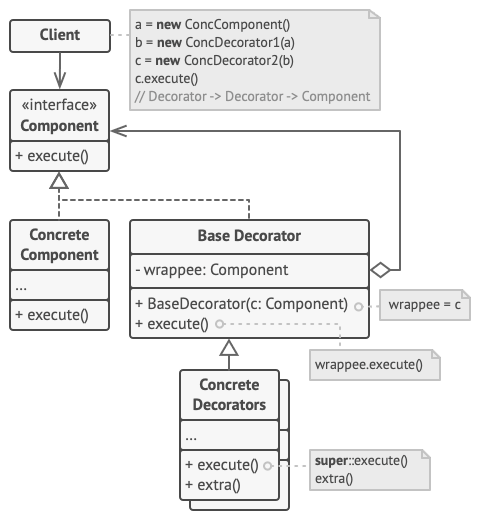
- Component — the interface (or abstract class) that both the concrete component and all decorators implement. In our example:
TextProcessor. - Concrete Component — the base object you’re decorating. Provides the default behaviour that decorators build upon. In our example:
PlainTextProcessor. - Base Decorator — an abstract class that implements Component and holds a reference to the wrapped Component. Handles the delegation boilerplate so concrete decorators only need to add their specific transformation. In our example:
TextDecorator. - Concrete Decorators — each adds exactly one behaviour. In our example:
TrimDecorator,UpperCaseDecorator,ProfanityFilterDecorator.
Step 1 — Component Interface
The interface must be the same for both the concrete component and every decorator. This shared type is what makes stacking work — each wrapper is accepted wherever the interface is expected.
TextProcessor.java
package decorator;
/**
 * Component — defines what all text processors do.
 * Both the base implementation AND every decorator implement this.
 * Sharing this type is what makes decorators stackable.
 */
public interface TextProcessor {
    String process(String text);
}
Step 2 — Concrete Component
The base object that gets decorated. It does the minimum — just returns the text as-is. All transformations live in the decorator layers above it. Notice it knows nothing about decoration; it’s just a simple implementation of the interface.
PlainTextProcessor.java
package decorator;
/**
 * Concrete Component — the starting point for decoration.
 * Returns text unchanged. Decorators wrap around this
 * and transform the result one layer at a time.
 */
public class PlainTextProcessor implements TextProcessor {
    @Override
    public String process(String text) {
        return text;  // no transformation — base case
    }
}
Step 3 — Base Decorator
This is the key structural piece. TextDecorator implements TextProcessor (so it fits anywhere a processor is expected) and holds a TextProcessor reference (so it can delegate to whatever it wraps). The process() method calls the wrapped processor first, giving concrete decorators a clean hook to transform the result.
TextDecorator.java
package decorator;
/**
 * Base Decorator — holds a reference to the wrapped TextProcessor
 * and delegates to it. Concrete decorators extend this class.
 *
 * Why an abstract class rather than another interface implementation?
 * To avoid repeating the wrapping boilerplate (the field + constructor +
 * delegation call) in every single concrete decorator.
 */
public abstract class TextDecorator implements TextProcessor {
    protected final TextProcessor wrapped;
    protected TextDecorator(TextProcessor wrapped) {
        this.wrapped = wrapped;
    }
    @Override
    public String process(String text) {
        // Default: pass through to the wrapped processor.
        // Concrete decorators call super.process(text) to invoke this,
        // then apply their own transformation to the result.
        return wrapped.process(text);
    }
}
💡 Why hold a TextProcessor reference, not a TextDecorator? Because the base object is a PlainTextProcessor, not a decorator. If the field were typed as TextDecorator, you couldn’t wrap the concrete component — only other decorators. Keeping it typed as the Component interface (TextProcessor) is what makes the whole chain work: you can wrap any TextProcessor, whether it’s the bare component or a fully-stacked chain of decorators.
Step 4 — Concrete Decorators
Each concrete decorator extends TextDecorator and adds exactly one transformation. The pattern is always the same: call super.process(text) to get the result from everything below, then apply your transformation to it.
UpperCaseDecorator.java
package decorator;
/** Concrete Decorator: converts result to upper case. */
public class UpperCaseDecorator extends TextDecorator {
    public UpperCaseDecorator(TextProcessor wrapped) {
        super(wrapped);
    }
    @Override
    public String process(String text) {
        // 1. Get result from everything below in the stack
        // 2. Apply OUR transformation: uppercase
        return super.process(text).toUpperCase();
    }
}
TrimDecorator.java
package decorator;
/** Concrete Decorator: trims leading and trailing whitespace. */
public class TrimDecorator extends TextDecorator {
    public TrimDecorator(TextProcessor wrapped) { super(wrapped); }
    @Override
    public String process(String text) {
        return super.process(text).trim();
    }
}
ProfanityFilterDecorator.java
package decorator;
/** Concrete Decorator: replaces profane words with asterisks. */
public class ProfanityFilterDecorator extends TextDecorator {
    private static final String[] BAD_WORDS = {"badword", "spam"};
    public ProfanityFilterDecorator(TextProcessor wrapped) { super(wrapped); }
    @Override
    public String process(String text) {
        String result = super.process(text);
        for (String word : BAD_WORDS) {
            result = result.replaceAll("(?i)" + word, "*".repeat(word.length()));
        }
        return result;
    }
}
Stacking the Decorators — Order Matters
The outermost wrapper runs first. When you call full.process(text), it calls the layer below it, which calls the layer below it, until the base object is reached. Results flow back up through each wrapper in reverse nesting order. This is the same unrolling you see in recursion or a function call stack.
Main.java
package decorator;
public class Main {
    public static void main(String[] args) {
        System.out.println("=== Decorator Design Pattern Demo ===\n");
        String input = "  hello world, badword is here  ";
        System.out.println("Input: \"" + input + "\"\n");
        // Stack 1: just trim
        TextProcessor trimOnly = new TrimDecorator(new PlainTextProcessor());
        System.out.println("Trim only:               \"" + trimOnly.process(input) + "\"");
        // Stack 2: trim first (innermost), then uppercase (outermost)
        // Execution order: PlainText → Trim → UpperCase
        TextProcessor trimThenUpper =
            new UpperCaseDecorator(
                new TrimDecorator(
                    new PlainTextProcessor()));
        System.out.println("Trim + UpperCase:        \"" + trimThenUpper.process(input) + "\"");
        // Stack 3: trim, filter profanity, then uppercase
        TextProcessor full =
            new UpperCaseDecorator(
                new ProfanityFilterDecorator(
                    new TrimDecorator(
                        new PlainTextProcessor())));
        System.out.println("Trim + Filter + Upper:   \"" + full.process(input) + "\"");
        // Stack 4: filter THEN trim — different result because order changed
        TextProcessor filterFirst =
            new TrimDecorator(
                new ProfanityFilterDecorator(
                    new PlainTextProcessor()));
        System.out.println("Filter + Trim:           \"" + filterFirst.process(input) + "\"");
        System.out.println("\n--- JDK equivalent ---");
        System.out.println("new BufferedReader(new InputStreamReader(socket.getInputStream()))");
        System.out.println("Same pattern: each wrapper adds one behaviour, order matters.");
        System.out.println("\n=== Demo complete ===");
    }
}
Console Output
Input: ” hello world, badword is here “
Trim only: “hello world, badword is here”
Trim + UpperCase: “HELLO WORLD, BADWORD IS HERE”
Trim + Filter + Upper: “HELLO WORLD, ******* IS HERE”
Filter + Trim: “hello world, ******* is here”
— JDK equivalent —
new BufferedReader(new InputStreamReader(socket.getInputStream()))
Same pattern: each wrapper adds one behaviour, order matters.
=== Demo complete ===
Look at stacks 3 and 4: both trim and filter, but in different order. In stack 3, trim runs first (innermost), removing whitespace before filter sees the string. In stack 4, filter runs first on the padded string, then trim removes the spaces. The final strings are the same here, but in real scenarios — particularly where filters might depend on surrounding whitespace — order determines output. Compose carefully.
Decorator in the JDK: I/O Streams
Java’s entire java.io package is built on Decorator. InputStream is the Component. FileInputStream, ByteArrayInputStream, and PipedInputStream are concrete components. FilterInputStream is the base decorator — it holds an InputStream reference and delegates by default. BufferedInputStream, DataInputStream, and GZIPInputStream are concrete decorators, each adding exactly one capability.
// JDK Decorator stacking — identical structure to our example
InputStream raw        = new FileInputStream("data.gz");        // Concrete Component
InputStream buffered   = new BufferedInputStream(raw);          // adds buffering
InputStream decompressed = new GZIPInputStream(buffered);       // adds decompression
DataInputStream data   = new DataInputStream(decompressed);     // adds typed reads
// data.readInt(), data.readUTF() — the full stack executes on every call:
// DataInput → decompress → buffer → read bytes from file
This snippet is illustrative only — it shows where the Decorator pattern appears in the JDK, but it is not part of this repository’s runnable example.
Each layer is independent. You can buffer without decompressing. You can decompress without buffering (though performance will suffer). You can wrap any InputStream source — a file, a socket, a byte array — and the same decorators work on all of them. This flexibility is exactly why Java’s I/O library scales across so many contexts.
✅ Best Practice — Keep Decorators Single-Responsibility: Each decorator should do exactly one thing. The moment a decorator checks what it’s wrapping or applies conditional logic based on the wrapped type, it’s no longer a clean decorator — it’s a compound object with hidden coupling. If you find yourself writing if (wrapped instanceof SomeDecorator) inside a decorator’s process(), step back and redesign. The power of Decorator comes from the guarantee that each layer is completely independent.
Decorator vs Inheritance vs Strategy
vs Inheritance: Subclassing binds behaviour at compile time and creates a class for every combination. Decorator composes behaviour at runtime from orthogonal pieces. Use Decorator when the number of combinations would make a subclass hierarchy unwieldy, or when you need to add and remove behaviours at runtime.
vs Strategy: Strategy swaps out a core algorithm — one at a time. Decorator adds behaviour on top of an existing algorithm — multiple layers simultaneously. A SortStrategy chooses between merge sort and quicksort; a decorator might add timing and logging around whichever sort strategy you chose. The two patterns work well together.
vs Composite: Both patterns involve an object holding a reference of the same type. The distinction is intent: Decorator wraps a single object to add behaviour; Composite holds multiple children to build a whole-is-more-than-sum-of-parts structure. A logging decorator wraps one payment gateway. An order that contains multiple line items is a Composite.
When to Use Decorator
Reach for Decorator when: you have combinations of features that would explode into a subclass for every combination. You need to add or remove behaviour at runtime without changing the object’s class. You can’t (or shouldn’t) modify the original class — it’s final, it’s third-party, or it has too many existing callers. You want to enforce a principle of single responsibility by giving each concern its own class.
Avoid it when: the chain of decorators becomes so deep that debugging is difficult — a stack trace through 10 decorators is hard to read. The Component interface is large (many methods) and every decorator must implement or override all of them — consider a base decorator carefully, but even then it’s verbose. You need decorators to communicate with each other or be aware of their position in the chain — that’s not Decorator’s job and breaks its invariants.
⚠️ Watch Out for Identity Issues: Decorated objects are not the same reference as the original. If you store a reference to the base PlainTextProcessor and later wrap it in decorators, the reference you stored is still the unwrapped object. More subtly: decorated.equals(original) may return unexpected results if the decorator doesn’t override equals(). If object identity matters in your design (sets, maps, identity-checked caches), think carefully about where you hold references and whether you need to override equals() and hashCode().
Runnable Code on GitHub
The complete source for this article is at ankurm.com/git.app/asmhatre/design-patterns under 02-structural/decorator/. Run it with:
javac decorator/*.java -d out/decorator
java -cp out/decorator decorator.Main
See Also
- Composite Design Pattern in Java — often compared to Decorator; builds trees of peers rather than stacking behaviours on a single object
- Proxy Design Pattern in Java — also wraps an object behind the same interface, but for access control, lazy init, or remote delegation rather than additive behaviour
- Strategy Design Pattern in Java — swaps core algorithm; pairs naturally with Decorator (decorate any strategy)
Further Reading
- Decorator — Refactoring.Guru
- The Decorator Pattern in Java — Baeldung
- Design Patterns: Elements of Reusable Object-Oriented Software — Gamma, Helm, Johnson, Vlissides, Chapter 4
- Head First Design Patterns — Freeman & Robson, Chapter 3 (the coffee/condiments example is a classic)
No Comments yet!