
Converting a video file involves opening the source, detecting its codec, selecting a destination codec, reading bitrate data, converting the buffer, and fixing the audio tracks. Six steps across six classes. When your application needs to convert videos, it shouldn’t have to orchestrate all six steps every time — that knowledge belongs in one place. The Facade pattern packages complex multi-step workflows behind a simple interface, so callers do it in one line instead of six.
Unlike the Adapter (which translates an interface) or the Decorator (which adds behaviour to an interface), the Facade doesn’t change any interfaces at all. It just creates a new, simpler entry point to an existing subsystem. The subsystem stays unchanged and remains fully accessible to callers who need more control.
All code compiles and runs with Java 25. No external dependencies required.
The Problem: Orchestration Scattered Across Callers
Without a facade, every caller that needs video conversion has to know the full sequence: instantiate VideoFile, call CodecFactory.extract(), construct the right codec, call BitrateReader.read() then BitrateReader.convert(), call AudioMixer.fix(), and construct the output path. When that sequence changes — say, a new audio normalization step is added — you have to find and update every caller. The orchestration logic has leaked into clients that don’t care about it.
Pattern Structure
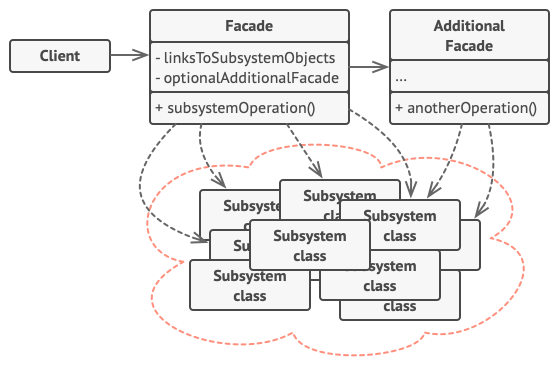
Facade is one of the simpler structural patterns structurally: it’s a class that knows about a bunch of subsystem classes and orchestrates them in useful ways. There are no new interfaces to define and no inheritance hierarchy to set up. The value comes from centralising knowledge, not from the structural mechanics.
The Subsystem (Complex, But Unchanged)
These classes model a video conversion pipeline. They’re realistic in their complexity: VideoFile detects the codec from the filename, CodecFactory extracts the right codec implementation, BitrateReader handles reading and converting the buffer, and AudioMixer fixes the audio tracks. Each class is doing real work and has its own concerns. Each one lives in its own file in the repository, listed below.
VideoFile.java
package facade;

/**
 * Complex subsystem classes — these are what the Facade hides.
 * Each class has its own complex API; clients shouldn't need to know all of them.
 */
class VideoFile {
    private final String filename;
    private final String codecType;

    VideoFile(String filename) {
        this(filename, filename.endsWith(".mp4") ? "mpeg4" : "ogg");
    }

    VideoFile(String filename, String codec) {
        this.filename  = filename;
        this.codecType = codec;
        System.out.println("  VideoFile: " + filename + " [codec: " + codecType + "]");
    }

    public String getFilename()  { return filename; }
    public String getCodecType() { return codecType; }
}
VideoFile is a plain data holder that also detects its own codec from the filename — it’s the type the rest of the subsystem passes around.
Codec.java
package facade;

/** Codec — common interface implemented by each concrete compression codec. */
interface Codec {
    String getName();
}
MPEG4CompressionCodec.java
package facade;

/** Concrete Codec: MPEG-4 compression. */
class MPEG4CompressionCodec implements Codec {
    @Override public String getName() { return "mpeg4"; }
}
OggCompressionCodec.java
package facade;

/** Concrete Codec: Ogg compression. */
class OggCompressionCodec implements Codec {
    @Override public String getName() { return "ogg"; }
}
CodecFactory inspects a VideoFile and returns the matching Codec implementation.
CodecFactory.java
package facade;

/** CodecFactory — inspects a VideoFile and returns the matching Codec. */
class CodecFactory {
    static Codec extract(VideoFile file) {
        System.out.println("  CodecFactory: extracting codec from " + file.getFilename());
        if ("mpeg4".equals(file.getCodecType())) return new MPEG4CompressionCodec();
        return new OggCompressionCodec();
    }
}
BitrateReader reads the video buffer and converts it between codecs — two static methods used one after the other.
BitrateReader.java
package facade;

/** BitrateReader — reads the video buffer and converts it between codecs. */
class BitrateReader {
    static VideoFile read(VideoFile file, Codec codec) {
        System.out.println("  BitrateReader: reading " + file.getFilename()
                + " with codec " + codec.getName());
        return new VideoFile(file.getFilename());
    }

    static VideoFile convert(VideoFile buffer, Codec codec) {
        System.out.println("  BitrateReader: converting to " + codec.getName());
        return new VideoFile(buffer.getFilename());
    }
}
AudioMixer is the final step: it normalises the audio track after the video conversion completes.
AudioMixer.java
package facade;

/** AudioMixer — normalises audio tracks after conversion. */
class AudioMixer {
    static VideoFile fix(VideoFile result) {
        System.out.println("  AudioMixer: fixing audio tracks");
        return new VideoFile(result.getFilename());
    }
}
Six classes. If you had to use them directly every time you wanted to convert a video, you’d need to understand all of them. That’s the problem the facade solves.
The Facade
This is the entire pattern in practice: one class that knows the right sequence, owns the orchestration, and exposes a single method. All the subsystem complexity — codec detection, buffer conversion, audio fixing — is encapsulated here.
VideoConversionFacade.java
package facade;

/**
 * Facade — the single, simple entry point to a complex video subsystem.
 *
 * Without this class, clients need to know about CodecFactory,
 * BitrateReader, AudioMixer, and VideoFile — 4 classes, dozens of methods.
 * The facade reduces that to ONE method call.
 *
 * The subsystem classes still exist and can be used directly
 * by advanced users who need fine-grained control.
 */
public class VideoConversionFacade {

    public String convertVideo(String inputFile, String targetFormat) {
        System.out.println("VideoConversionFacade: starting conversion of " + inputFile);

        // Step 1: open the file and detect codec
        VideoFile file = new VideoFile(inputFile);
        Codec sourceCodec = CodecFactory.extract(file);

        // Step 2: prepare destination codec
        Codec destCodec;
        if ("mp4".equals(targetFormat)) {
            destCodec = new MPEG4CompressionCodec();
        } else {
            destCodec = new OggCompressionCodec();
        }

        // Step 3: read, mix audio, encode
        VideoFile buffer = BitrateReader.read(file, sourceCodec);
        VideoFile intermediateResult = BitrateReader.convert(buffer, destCodec);
        VideoFile result = AudioMixer.fix(intermediateResult);

        String outputFilename = inputFile.replaceAll("\\.[^.]+$", "." + targetFormat);
        System.out.println("VideoConversionFacade: conversion complete -> " + outputFilename);
        return outputFilename;
    }
}
Client Code: One Line
Main.java
package facade;

/**
 * Facade Design Pattern — Runnable Demo
 *
 * Demonstrates reducing a complex video conversion subsystem
 * to a single method call via a Facade.
 *
 * Run: javac facade/*.java && java facade.Main
 * Article: https://ankurm.com/facade-design-pattern-java/
 */
public class Main {

    public static void main(String[] args) {
        System.out.println("=== Facade Design Pattern Demo ===\n");

        VideoConversionFacade converter = new VideoConversionFacade();

        System.out.println("-- Client: just one method call --");
        String result1 = converter.convertVideo("holiday.ogg", "mp4");
        System.out.println("Output: " + result1);

        System.out.println();
        String result2 = converter.convertVideo("presentation.mp4", "ogg");
        System.out.println("Output: " + result2);

        System.out.println("\nClient code: 1 line. Subsystem: 6 classes. Facade hides the complexity.");
        System.out.println("\n=== Demo complete ===");
    }
}
Console Output
— Client: just one method call —
VideoConversionFacade: starting conversion of holiday.ogg
VideoFile: holiday.ogg [codec: ogg]
CodecFactory: extracting codec from holiday.ogg
VideoFile: holiday.ogg [codec: ogg]
BitrateReader: reading holiday.ogg with codec ogg
VideoFile: holiday.ogg [codec: ogg]
BitrateReader: converting to mpeg4
VideoFile: holiday.ogg [codec: ogg]
AudioMixer: fixing audio tracks
VideoFile: holiday.ogg [codec: ogg]
VideoConversionFacade: conversion complete -> holiday.mp4
Output: holiday.mp4
VideoConversionFacade: starting conversion of presentation.mp4
[…subsystem steps…]
VideoConversionFacade: conversion complete -> presentation.ogg
Output: presentation.ogg
Client code: 1 line. Subsystem: 6 classes. Facade hides the complexity.
=== Demo complete ===
The indented lines are the subsystem doing its work — the client never sees or triggers these directly. From the client’s perspective, it called one method and got a filename back. All the orchestration, codec selection, and step sequencing lived inside the facade.
Facade in the JDK and Real Frameworks
SLF4J’s LoggerFactory is a textbook facade. Instead of requiring you to configure a logging implementation (Log4j, Logback, java.util.logging), choose an appender, set up formatters, and manage handler registration, it gives you LoggerFactory.getLogger(MyClass.class). One call. The binding to the actual logging framework happens at deployment time behind the scenes.
JDBC’s DriverManager facades the complexity of loading a driver, registering it, opening a socket to the database, and negotiating the connection protocol. You call DriverManager.getConnection(url, user, pass). It returns a Connection. All the negotiation is hidden.
Spring’s JdbcTemplate is a higher-level facade over raw JDBC. Raw JDBC requires you to get a connection, create a statement, execute the query, iterate the ResultSet, handle SQLExceptions at every step, and close resources in a finally block. JdbcTemplate.query() takes a SQL string and a row mapper — everything else is handled for you.
💡 Keep the Subsystem Accessible: A Facade should simplify access to a subsystem, not lock it down. The subsystem classes should remain public and usable directly for callers that need fine-grained control — perhaps they need a custom codec not supported by the facade, or they want to skip the audio-fix step for performance. The facade is the easy path; direct subsystem access is the power-user path. Never make the facade the only way in.
Facade vs Adapter vs Mediator
These three patterns all simplify how things interact, so it’s worth distinguishing them clearly.
Facade vs Adapter: Adapter translates an existing interface into another existing interface — it bridges two incompatible things. Facade creates a new simplified interface over a subsystem. Adapter is a retrofit; Facade is a convenience layer. You’d use Adapter to wrap a Stripe SDK behind your PaymentGateway; you’d use Facade to package the five steps of a payment workflow behind a checkout(Cart cart) method.
Facade vs Mediator: Both reduce direct dependencies between objects, but differently. Mediator manages communication between peer components (they know the mediator but not each other). Facade provides a simplified interface to a subsystem (the subsystem components don’t know the facade exists — they’re just called by it). Facade is one-directional; Mediator is bidirectional coordination.
When to Use Facade
Reach for Facade when: you have a complex subsystem with many classes and callers only ever need 80% of the functionality in a predictable sequence. You want to provide a clean API layer for a library or module you’re building. You need to decouple application code from a complex third-party library so you can replace it later. Your code reviews keep showing the same multi-step boilerplate duplicated across callers.
Avoid it when: the subsystem is simple enough that a facade adds no real value — it just adds an indirection layer with no payoff. You need the facade to do significantly different things for different callers — that’s a sign the subsystem needs redesigning, not a facade. The “facade” ends up as a God Object that knows too much about the entire application rather than a specific subsystem.
✅ Layered Architecture and Facade: Facade is the pattern that naturally emerges from good layered architecture. In a Spring application, the Service layer is a set of facades over the Repository and Domain layers. The Controller doesn’t know about JPA queries or domain object manipulation — it calls orderService.checkout(cartId). That’s a Facade. If you’re building a module for other teams to consume, the public API you expose is almost always a set of facade classes. Package-private everything else; expose only the facades.
Runnable Code on GitHub
The complete source for this article is at ankurm.com/git.app/asmhatre/design-patterns under 02-structural/facade/. Run it with:
javac facade/*.java -d out/facade
java -cp out/facade facade.Main
See Also
- Adapter Design Pattern in Java — translates incompatible interfaces; Facade creates a new simplified one
- Mediator Design Pattern in Java — coordinates peer components; Facade simplifies access to a subsystem
- Proxy Design Pattern in Java — wraps a single object with the same interface; Facade wraps a subsystem with a new simpler interface
Further Reading
- Facade — Refactoring.Guru
- The Facade Pattern in Java — Baeldung
- Design Patterns: Elements of Reusable Object-Oriented Software — Gamma, Helm, Johnson, Vlissides, Chapter 4
No Comments yet!