
A game renders a forest of 100,000 trees. Each tree has a position, but also a species name, color values, and a texture bitmap that might be several megabytes. Storing that texture in every tree object would exhaust memory for any meaningful forest. The Flyweight pattern solves this by separating the data that’s unique to each object (position) from the data that’s shared across thousands of identical objects (species, texture) — and storing the shared part only once.
Flyweight is the most performance-oriented structural pattern in the GoF catalogue. It’s not about flexibility or interface design — it’s about fitting more objects into the same memory by eliminating duplication. When you know a large number of objects will share most of their state, Flyweight gives you a principled way to exploit that sharing.
All code compiles and runs with Java 25. No external dependencies required.
Intrinsic vs Extrinsic State
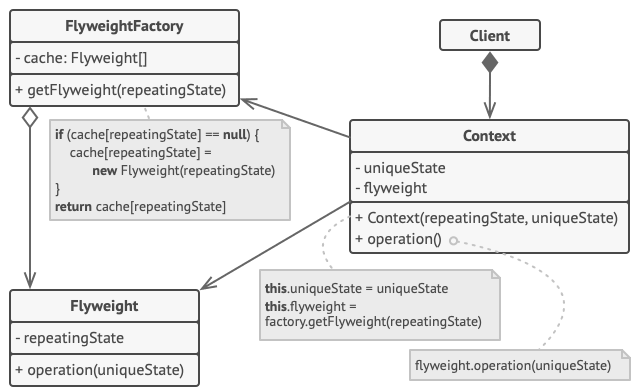
Flyweight’s core concept is splitting object state into two categories:
Intrinsic state — the data that is the same across all objects of a certain “type.” For a tree: species name, color, texture bitmap. This state is independent of context; an oak’s texture doesn’t change based on where the tree is planted. Intrinsic state goes into the flyweight object and is shared.
Extrinsic state — the data that’s unique to each individual object. For a tree: X and Y coordinates on the map. This state depends on the specific instance and cannot be shared. Extrinsic state stays in the lightweight context object (the Tree) and is passed to the flyweight at operation time.
The split is the whole design exercise. If you draw it right, you end up with a small number of flyweight objects holding the heavy data, and a large number of thin context objects holding only their unique identifiers.
Step 1 — The Flyweight (TreeType)
This object holds all the heavy, shared state. Notice that it accepts the extrinsic state (position) as a parameter to draw() rather than storing it. This is the defining characteristic of a flyweight method: the unique context gets passed in, not stored.
TreeType.java
package flyweight;

/**
 * Flyweight — holds the SHARED (intrinsic) state.
 * TreeType is shared between all trees of the same species.
 *
 * If you have 10,000 oak trees, there's ONE OakType object in memory.
 * Each individual tree only stores its unique position (extrinsic state).
 */
public class TreeType {

    // Intrinsic (shared) state — same for all trees of this species
    private final String name;
    private final String color;
    private final String texture;  // imagine a large texture bitmap here

    public TreeType(String name, String color, String texture) {
        this.name    = name;
        this.color   = color;
        this.texture = texture;
        System.out.println("  [TreeType created: " + name + "]");  // see how few are created
    }

    // Extrinsic state (x, y) is passed IN at render time — NOT stored here
    public void draw(int x, int y) {
        System.out.printf("  Drawing %s tree [%s/%s] at (%d, %d)%n",
                name, color, texture, x, y);
    }
}
Step 2 — The Factory (TreeFactory)
The factory is what actually makes Flyweight work. Without it, callers would create new TreeType() each time and get no sharing. The factory intercepts creation requests, checks its pool, and returns an existing instance if one matches. Map.computeIfAbsent() does this elegantly: create only if absent, return whatever’s there.
TreeFactory.java
package flyweight;

import java.util.HashMap;
import java.util.Map;

/**
 * Flyweight Factory — the cache that ensures each unique TreeType
 * is only created once, no matter how many trees use it.
 *
 * This is the piece that makes Flyweight work:
 * it intercepts creation requests and returns an existing
 * shared instance if one already exists.
 */
public class TreeFactory {

    // The pool of shared flyweights
    private static final Map<String, TreeType> treeTypes = new HashMap<>();

    public static TreeType getTreeType(String name, String color, String texture) {
        String key = name + "_" + color + "_" + texture;

        // Only create a new TreeType if we haven't seen this combination before
        return treeTypes.computeIfAbsent(key, k -> new TreeType(name, color, texture));
    }

    public static int getPoolSize() {
        return treeTypes.size();
    }
}
Step 3 — The Context (Tree)
This is the lightweight per-instance object. It stores only what’s unique about each tree (position) and holds a reference to its shared TreeType. When asked to draw itself, it delegates to the flyweight and passes its position as an argument. This object is cheap to create — just two ints and a reference.
Tree.java
package flyweight;

/**
 * Context — stores the UNIQUE (extrinsic) state for each tree instance.
 * This is NOT the flyweight itself; it's the lightweight object that
 * holds position data and delegates rendering to a shared TreeType.
 *
 * 10,000 Tree objects × (x:4 bytes + y:4 bytes + reference:8 bytes) = ~160 KB
 * vs.
 * 10,000 Tree objects × (name + color + texture + x + y) = potentially MBs
 */
public class Tree {

    // Extrinsic (unique) state — different per tree
    private final int x;
    private final int y;

    // Reference to the SHARED flyweight
    private final TreeType type;

    public Tree(int x, int y, TreeType type) {
        this.x    = x;
        this.y    = y;
        this.type = type;
    }

    public void draw() {
        // Passes extrinsic state (position) into the shared flyweight
        type.draw(x, y);
    }
}
Putting the Forest Together
Main.java
package flyweight;

import java.util.ArrayList;
import java.util.List;
import java.util.Random;

/**
 * Flyweight Design Pattern — Runnable Demo
 *
 * Creates 1000 trees of only 3 species. Without Flyweight: 1000 TreeType
 * objects. With Flyweight: 3 TreeType objects (one per species), shared.
 *
 * Run: javac flyweight/*.java && java flyweight.Main
 * Article: https://ankurm.com/flyweight-design-pattern-java/
 */
public class Main {

    public static void main(String[] args) {
        System.out.println("=== Flyweight Design Pattern Demo ===\n");

        List<Tree> forest = new ArrayList<>();
        Random rnd = new Random(42);

        String[][] treeSpecs = {
            {"Oak",  "dark-green", "rough-bark"},
            {"Pine", "blue-green", "needle-texture"},
            {"Birch","light-green","smooth-white-bark"}
        };

        System.out.println("Creating 1,000 trees (only 3 TreeType objects should be created):");
        for (int i = 0; i < 1000; i++) {
            String[] spec = treeSpecs[i % 3];
            TreeType type = TreeFactory.getTreeType(spec[0], spec[1], spec[2]);
            forest.add(new Tree(rnd.nextInt(800), rnd.nextInt(600), type));
        }

        System.out.println("\nForest created. Drawing first 5 trees:");
        for (int i = 0; i < 5; i++) {
            forest.get(i).draw();
        }

        System.out.println("\n--- Memory summary ---");
        System.out.println("Trees in forest    : " + forest.size());
        System.out.println("Unique TreeType objects in pool: " + TreeFactory.getPoolSize());
        System.out.println("Without Flyweight  : 1,000 TreeType objects");
        System.out.println("With Flyweight     : " + TreeFactory.getPoolSize() + " TreeType objects shared");

        System.out.println("\n=== Demo complete ===");
    }
}
Console Output
Creating 1,000 trees (only 3 TreeType objects should be created):
[TreeType created: Oak]
[TreeType created: Pine]
[TreeType created: Birch]
Forest created. Drawing first 5 trees:
Drawing Oak tree [dark-green/rough-bark] at (730, 363)
Drawing Pine tree [blue-green/needle-texture] at (48, 284)
Drawing Birch tree [light-green/smooth-white-bark] at (370, 325)
Drawing Oak tree [dark-green/rough-bark] at (705, 518)
Drawing Pine tree [blue-green/needle-texture] at (319, 293)
— Memory summary —
Trees in forest : 1000
Unique TreeType objects in pool: 3
Without Flyweight : 1,000 TreeType objects
With Flyweight : 3 TreeType objects shared
=== Demo complete ===
Three [TreeType created] lines appear for 1,000 trees. Every subsequent request for “Oak” hits the factory cache and returns the existing instance. The factory’s computeIfAbsent is doing all the work — no special code needed in Tree or TreeType.
Flyweight in the JDK: String Pool and Integer Cache
Java applies Flyweight in its core types. String interning is the most well-known: string literals are stored in a pool, so two variables holding "hello" reference the same object. String.intern() lets you explicitly add strings to the pool.
// String pool — Flyweight for literals
String a = "hello";
String b = "hello";
System.out.println(a == b);      // true — same object from the pool
System.out.println(a == new String("hello")); // false — new explicitly bypasses pool
// Integer cache: -128 to 127 are cached (JLS guarantee)
Integer x = 100;
Integer y = 100;
System.out.println(x == y);      // true — same cached instance
Integer p = 200;
Integer q = 200;
System.out.println(p == q);      // false — outside cache range, new objects
// Always use .equals() for Integer comparison — don't rely on == beyond 127
The valueOf() method on Integer, Short, Byte, Long, Character, and Boolean all use caching — that’s a Flyweight factory. This is why you should always use Integer.valueOf(n) rather than new Integer(n) (now deprecated) when you’re creating boxed values programmatically.
⚠️ Thread Safety: The flyweight factory uses a shared static HashMap in this example. In a multi-threaded environment, multiple threads creating trees simultaneously could corrupt the map or create duplicate instances. Replace HashMap with ConcurrentHashMap — its computeIfAbsent is atomic for this case. Flyweight objects themselves are typically safe to share across threads because their intrinsic state is final (set in the constructor and never changed). The factory is where you need to add synchronisation.
Measuring the Benefit
Flyweight is only worth the added complexity when the memory saving is real and measurable. A quick mental model: multiply the size of the shared data by the number of instances, then compare to the same data multiplied by the number of unique types.
// Scenario: 100,000 trees, 5 species, 2MB texture per species
// Without Flyweight: 100,000 × 2MB = 200,000 MB (~195 GB) — impossible
// With Flyweight:    5 × 2MB = 10MB for textures + 100,000 × ~16 bytes for positions = ~11.5MB
// The savings only kick in when:
// 1. There are many more instances than unique shared states
// 2. The shared (intrinsic) state is significantly larger than the unique (extrinsic) state
When to Use Flyweight
Reach for Flyweight when: your application creates a very large number of similar objects (thousands to millions). The objects share significant amounts of state that could be extracted and shared. Memory consumption is a real concern causing performance problems. You can cleanly separate each object’s state into intrinsic (shareable) and extrinsic (unique per instance) components.
Avoid it when: the number of shared state variations is close to the number of instances — if you have 10,000 trees all with different species combinations, there’s nothing to share. The added complexity (factory, split state, passing extrinsic state at every method call) isn’t justified by the memory savings — don’t add Flyweight speculatively. The extrinsic state is complex enough that passing it in at every method call becomes awkward.
✅ Make Flyweights Immutable: Since a single flyweight instance is shared by potentially thousands of context objects, it must be immutable. If TreeType had a setColor() method, one caller could change the color and it would affect every oak in the forest simultaneously. Declare all intrinsic state fields final, provide no setters, and you eliminate the entire class of sharing bugs. Immutability and Flyweight are natural partners.
Runnable Code on GitHub
The complete source for this article is at ankurm.com/git.app/asmhatre/design-patterns under 02-structural/flyweight/. Run it with:
javac flyweight/*.java -d out/flyweight
java -cp out/flyweight flyweight.Main
See Also
- Singleton Design Pattern in Java — also manages a single shared instance, but for a different reason: global access point vs memory saving
- Prototype Design Pattern in Java — creates new objects by cloning; the opposite direction from Flyweight which shares rather than copies
- Proxy Design Pattern in Java — wraps an object for access control or lazy loading; sometimes used alongside Flyweight for virtual proxies
Further Reading
- Flyweight — Refactoring.Guru
- The Flyweight Pattern in Java — Baeldung
- Design Patterns: Elements of Reusable Object-Oriented Software — Gamma, Helm, Johnson, Vlissides, Chapter 4
No Comments yet!