
You have a BookShelf that stores books in an ArrayList internally. You want callers to be able to iterate over books without knowing it’s an ArrayList. Next month you might change it to a linked list or a tree structure sorted by author. If callers work directly with your internal list, every change to your storage structure breaks them. The Iterator pattern gives callers a stable traversal interface that survives any change to the underlying data structure.
This is one of the patterns you already use every day through Java’s for-each loop. Every class that implements Iterable<T> is participating in this pattern. Understanding the mechanics helps you write cleaner custom collections and explains why certain traversal approaches are more maintainable than others.
All code compiles and runs with Java 25. No external dependencies required.
Pattern Structure
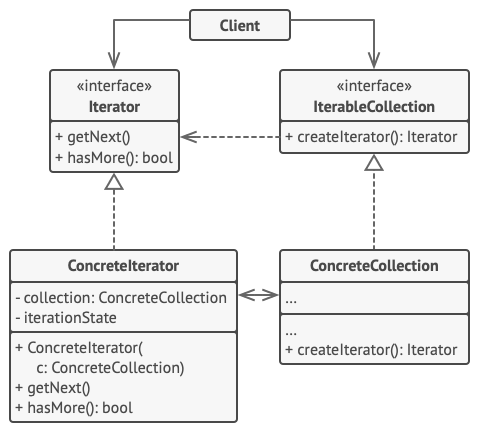
- Iterator — declares
hasNext()andnext(). Callers use only this interface. - Concrete Iterator — implements the traversal algorithm. Can maintain its own traversal state (current index, filter criteria).
- Aggregate (Collection) — declares a factory method that creates an Iterator. Hides internal storage.
Custom Iterator Implementation
BookIterator.java
package iterator;

/** Our custom Iterator interface (mirrors java.util.Iterator) */
public interface BookIterator {
    boolean hasNext();
    Book next();
}
Book is the plain data object the shelf stores.
Book.java
package iterator;

public class Book {
    private final String title;
    private final String author;
    private final int year;

    public Book(String title, String author, int year) {
        this.title = title; this.author = author; this.year = year;
    }
    public String getTitle()  { return title; }
    public int    getYear()   { return year; }
    @Override public String toString() { return "\"" + title + "\" by " + author + " (" + year + ")"; }
}
BookShelf exposes two factory methods that return different iterator types. The DecadeIterator is the interesting one — it applies filtering logic as part of traversal, which would be clunky to implement as an external loop.
BookShelf.java
package iterator;

import java.util.ArrayList;
import java.util.List;

/**
 * Aggregate — the collection. Exposes iterators without
 * revealing its internal storage structure.
 */
public class BookShelf {
    private final List<Book> books = new ArrayList<>();

    public void addBook(Book book) { books.add(book); }

    /** Standard forward iterator */
    public BookIterator iterator() {
        return new ForwardIterator();
    }

    /** Filtered iterator — only books from a specific decade */
    public BookIterator iteratorByDecade(int decade) {
        return new DecadeIterator(decade);
    }

    // --- Inner iterator implementations ---

    private class ForwardIterator implements BookIterator {
        private int index = 0;

        @Override public boolean hasNext() { return index < books.size(); }
        @Override public Book    next()    { return books.get(index++); }
    }

    private class DecadeIterator implements BookIterator {
        private final int decade;
        private int index = 0;
        private Book nextBook;

        DecadeIterator(int decade) {
            this.decade = decade;
            advance();
        }

        private void advance() {
            nextBook = null;
            while (index < books.size()) {
                Book b = books.get(index++);
                if (b.getYear() / 10 * 10 == decade) { nextBook = b; break; }
            }
        }

        @Override public boolean hasNext() { return nextBook != null; }
        @Override public Book next() {
            Book b = nextBook; advance(); return b;
        }
    }
}
Wiring it together — Main populates the shelf and exercises both iterators:
Main.java
package iterator;

/**
 * Iterator Design Pattern — Runnable Demo
 * Run: javac iterator/*.java -d out/iterator && java -cp out/iterator iterator.Main
 * Article: https://ankurm.com/iterator-design-pattern-java/
 */
public class Main {
    public static void main(String[] args) {
        System.out.println("=== Iterator Design Pattern Demo ===\n");

        BookShelf shelf = new BookShelf();
        shelf.addBook(new Book("Clean Code",              "Robert Martin", 2008));
        shelf.addBook(new Book("The Pragmatic Programmer","Andrew Hunt",   1999));
        shelf.addBook(new Book("Effective Java",          "Joshua Bloch",  2001));
        shelf.addBook(new Book("Design Patterns",         "Gang of Four",  1994));
        shelf.addBook(new Book("Refactoring",             "Martin Fowler", 2018));
        shelf.addBook(new Book("Working Effectively with Legacy Code", "Michael Feathers", 2004));

        System.out.println("-- All books (forward iterator) --");
        BookIterator it = shelf.iterator();
        while (it.hasNext()) {
            System.out.println("  " + it.next());
        }

        System.out.println("\n-- Books from the 2000s --");
        BookIterator it2000s = shelf.iteratorByDecade(2000);
        while (it2000s.hasNext()) {
            System.out.println("  " + it2000s.next());
        }

        System.out.println("\n-- JDK Iterable: same pattern, different vocabulary --");
        System.out.println("  java.util.Iterator is our BookIterator; for-each uses it under the hood");

        System.out.println("\n=== Demo complete ===");
    }
}
Console Output
— All books (forward iterator) —
“Clean Code” by Robert Martin (2008)
“The Pragmatic Programmer” by Andrew Hunt (1999)
“Effective Java” by Joshua Bloch (2001)
“Design Patterns” by Gang of Four (1994)
“Refactoring” by Martin Fowler (2018)
“Working Effectively with Legacy Code” by Michael Feathers (2004)
— Books from the 2000s —
“Clean Code” by Robert Martin (2008)
“Effective Java” by Joshua Bloch (2001)
“Working Effectively with Legacy Code” by Michael Feathers (2004)
— JDK Iterable: same pattern, different vocabulary —
java.util.Iterator is our BookIterator; for-each uses it under the hood
=== Demo complete ===
How Java’s For-Each Loop Uses Iterator
The for-each loop is syntactic sugar. for (Book b : shelf) compiles to exactly this:
// What for-each compiles to:
Iterator<Book> it = shelf.iterator();  // calls Iterable.iterator()
while (it.hasNext()) {
    Book b = it.next();
    // loop body
}
// To make BookShelf work with for-each, implement Iterable<Book>:
public class BookShelf implements Iterable<Book> {
    @Override
    public Iterator<Book> iterator() {
        return books.iterator();  // delegate to the internal list's iterator
    }
}
Once BookShelf implements Iterable<Book>, it works natively with for-each, Stream.of(), and any method that accepts an Iterable.
💡 Iterator vs Stream: Java Streams (since Java 8) solve the same traversal problem with more power — lazy evaluation, parallel execution, rich transformation API. When should you write a custom iterator? When you need stateful traversal that Streams can’t express cleanly (cursor-based database iteration, resumable traversal, streaming I/O), or when you’re exposing a collection API that should integrate with for-each without requiring callers to understand Stream APIs. For in-memory collections with filtering and mapping, use Streams.
Iterator in the JDK
java.util.Iterator and java.lang.Iterable are the JDK’s Iterator pattern. Every Collection is Iterable. Scanner implements Iterator<String> — you can iterate over lines of input like any collection. ResultSet in JDBC uses next() and cursor position — the Iterator pattern applied to database rows.
✅ Make Iterators Fail-Fast: Java’s standard collection iterators throw ConcurrentModificationException if the collection is modified during iteration. Implement the same protection in custom iterators by capturing the collection’s modification count when the iterator is created and checking it on every next() call. Without this, mutating the collection mid-iteration produces silent data corruption that’s very hard to debug.
When to Use Iterator
Reach for Iterator when: you want to hide a collection’s internal structure from callers. You need multiple traversal algorithms over the same collection (forward, reverse, filtered). You want your collection to integrate naturally with Java’s for-each and Stream APIs. You’re building a library where clients should not depend on your specific collection implementation.
Avoid building custom iterators when: the collection is a standard java.util type — its built-in iterators already handle everything. The traversal is a one-off query better expressed as a Stream pipeline. You need concurrent access — standard iterators are not thread-safe; use concurrent collections or snapshot iterators instead.
Runnable Code on GitHub
Full source at ankurm.com/git.app/asmhatre/design-patterns under 03-behavioral/iterator/.
javac 03-behavioral/iterator/*.java -d out/iterator
java -cp out/iterator iterator.Main
See Also
- Composite Design Pattern in Java — iterating a tree is a natural use case for custom iterators that flatten recursive structure
- Visitor Design Pattern in Java — another way to traverse a structure without exposing internals, but adds per-type behaviour
Further Reading
- Iterator — Refactoring.Guru
- Design Patterns: Elements of Reusable Object-Oriented Software — Gamma et al., Chapter 5
No Comments yet!