
Every text editor has Ctrl+Z. Every transaction system has rollback. Every task queue has deferred execution. All of them rely on the same underlying idea: wrap a request in an object so you can store it, pass it around, and undo it later. That’s the Command pattern. When an action becomes an object, everything you can do with objects — store in a collection, serialize to disk, execute at a scheduled time, replay in order, reverse — becomes available to your actions.
The pattern separates the code that decides to do something (the Invoker) from the code that knows how to do it (the Receiver) via a Command object that encapsulates the call. This separation is what makes undo possible: the command object knows both how to execute and how to reverse its own effect.
All code compiles and runs with Java 25. No external dependencies required.
Pattern Structure
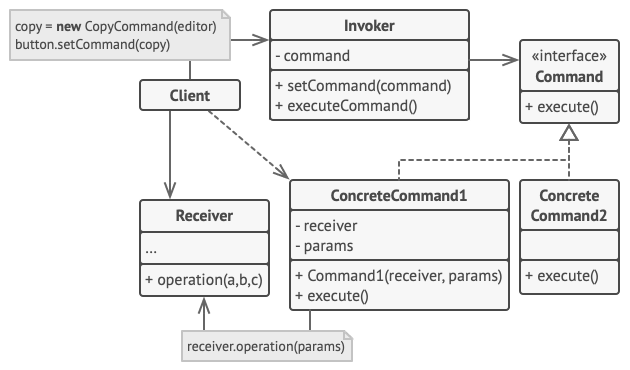
- Command — interface declaring
execute()andundo(). Every action implements this. - Concrete Command — a specific action (
InsertCommand,DeleteCommand). Holds the parameters needed to perform and reverse the action. - Receiver — the object that actually does the work (
TextEditor). Commands delegate to it. - Invoker — triggers commands and maintains history (
CommandHistory). Doesn’t know what the commands do.
Step 1 — Command Interface
Command.java
package command;

/** Command interface: every action is an object */
public interface Command {
    void execute();
    void undo();
    String getDescription();
}
Step 2 — The Receiver (TextEditor)
The receiver knows nothing about commands, history, or undo. It just exposes the low-level text operations that commands will call.
TextEditor.java
package command;

/**
 * Receiver — contains the actual text editing logic.
 * The commands call methods on this object.
 */
public class TextEditor {
    private final StringBuilder text = new StringBuilder();

    public void insertText(String content, int position) {
        text.insert(position, content);
    }

    public void deleteText(int start, int length) {
        text.delete(start, start + length);
    }

    public String getText() { return text.toString(); }

    @Override public String toString() { return "Editor[\"" + text + "\"]"; }
}
Step 3 — Concrete Commands
InsertCommand stores the text and position. Its undo() simply deletes the same text from the same position. DeleteCommand captures the deleted text at execution time so it can be restored on undo — this saved text is the key to making undo work.
InsertCommand.java
package command;

public class InsertCommand implements Command {
    private final TextEditor editor;
    private final String text;
    private final int position;

    public InsertCommand(TextEditor editor, String text, int position) {
        this.editor   = editor;
        this.text     = text;
        this.position = position;
    }

    @Override public void execute() { editor.insertText(text, position); }
    @Override public void undo()    { editor.deleteText(position, text.length()); }
    @Override public String getDescription() { return "Insert \"" + text + "\" at " + position; }
}
DeleteCommand.java
package command;

public class DeleteCommand implements Command {
    private final TextEditor editor;
    private final int start;
    private final int length;
    private String deletedText;  // saved for undo

    public DeleteCommand(TextEditor editor, int start, int length) {
        this.editor = editor;
        this.start  = start;
        this.length = length;
    }

    @Override
    public void execute() {
        deletedText = editor.getText().substring(start, start + length);
        editor.deleteText(start, length);
    }

    @Override public void undo() { editor.insertText(deletedText, start); }
    @Override public String getDescription() { return "Delete " + length + " chars at " + start; }
}
Step 4 — The Invoker (CommandHistory)
The invoker’s job is simple: execute commands and push them onto a stack. On undo, it pops the most recent command and calls undo() on it. It doesn’t know what any command does — that’s the whole point.
CommandHistory.java
package command;

import java.util.ArrayDeque;
import java.util.Deque;

/**
 * Invoker — holds command history and triggers execute/undo.
 * It doesn't know what the commands do; it just calls execute() and undo().
 */
public class CommandHistory {
    private final Deque<Command> history = new ArrayDeque<>();

    public void execute(Command cmd) {
        cmd.execute();
        history.push(cmd);
        System.out.println("  Executed: " + cmd.getDescription());
    }

    public void undo() {
        if (history.isEmpty()) {
            System.out.println("  Nothing to undo.");
            return;
        }
        Command cmd = history.pop();
        cmd.undo();
        System.out.println("  Undone: " + cmd.getDescription());
    }
}
Demo
Main.java
package command;

/**
 * Command Design Pattern — Runnable Demo
 * Run: javac command/*.java -d out/command && java -cp out/command command.Main
 * Article: https://ankurm.com/command-design-pattern-java/
 */
public class Main {
    public static void main(String[] args) {
        System.out.println("=== Command Design Pattern Demo ===\n");

        TextEditor editor = new TextEditor();
        CommandHistory history = new CommandHistory();

        System.out.println("Initial: " + editor);

        history.execute(new InsertCommand(editor, "Hello", 0));
        System.out.println("After:   " + editor);

        history.execute(new InsertCommand(editor, " World", 5));
        System.out.println("After:   " + editor);

        history.execute(new DeleteCommand(editor, 5, 6));
        System.out.println("After:   " + editor);

        System.out.println("\n-- Undo sequence --");
        history.undo();
        System.out.println("After undo: " + editor);

        history.undo();
        System.out.println("After undo: " + editor);

        history.undo();
        System.out.println("After undo: " + editor);

        history.undo();  // nothing left

        System.out.println("\n=== Demo complete ===");
    }
}
Console Output
Initial: Editor[“”]
Executed: Insert “Hello” at 0
After: Editor[“Hello”]
Executed: Insert ” World” at 5
After: Editor[“Hello World”]
Executed: Delete 6 chars at 5
After: Editor[“Hello”]
— Undo sequence —
Undone: Delete 6 chars at 5
After undo: Editor[“Hello World”]
Undone: Insert ” World” at 5
After undo: Editor[“Hello”]
Undone: Insert “Hello” at 0
After undo: Editor[“”]
Nothing to undo.
=== Demo complete ===
Macro Commands: Composing Commands
Because commands are objects, you can compose them. A MacroCommand is a command that holds a list of commands and executes/undoes them all — this is the Composite pattern applied to Command.
public class MacroCommand implements Command {
    private final List<Command> commands;
    public MacroCommand(List<Command> commands) { this.commands = commands; }
    @Override
    public void execute() { commands.forEach(Command::execute); }
    @Override
    public void undo() {
        // Undo in reverse order
        ListIterator<Command> it = commands.listIterator(commands.size());
        while (it.hasPrevious()) it.previous().undo();
    }
    @Override public String getDescription() { return "Macro(" + commands.size() + " commands)"; }
}
Command in the JDK
Runnable and Callable are Command interfaces. Runnable.run() is Command.execute(). ExecutorService is the Invoker — it queues and executes submitted tasks without knowing their implementation.
CompletableFuture chains deferred commands. Each .thenApply() call attaches a command (a function) to be executed when the previous step completes. The completion pipeline is a chain of Command objects scheduled by the ForkJoinPool invoker.
✅ Store Enough State for Undo: The most common mistake with Command is forgetting to capture the state needed for undo(). DeleteCommand must save the deleted text at execute time — before the deletion happens. Trying to reconstruct it afterwards is fragile. Think of each command as a transaction: capture everything you’d need to roll it back before committing any changes.
When to Use Command
Reach for Command when: you need undoable/redoable operations. You want to queue, schedule, or log operations. You need to support macro recording (sequences of user actions replayed later). You want to parameterise a button or menu item with an action without coupling the UI to the business logic. You’re building a transaction system where operations may need to be rolled back.
Avoid it when: the overhead of an extra class per action is not justified by the benefits — for simple fire-and-forget actions that never need to be undone or queued, a direct method call is cleaner. The number of command classes grows very large and they’re all nearly identical — consider whether a functional approach (lambdas and function composition) gives you the same decoupling with less boilerplate.
⚠️ Redo Stack: Once you have an undo stack, users expect redo too. When a user undoes and then types new content, the redo stack should be cleared — you can’t redo into an alternate history. A complete undo/redo implementation maintains two stacks: on execute, push to undo stack and clear redo. On undo, pop from undo stack, execute the undo, push to redo stack. On redo, pop from redo stack, execute, push to undo stack.
Runnable Code on GitHub
Full source at ankurm.com/git.app/asmhatre/design-patterns under 03-behavioral/command/.
javac 03-behavioral/command/*.java -d out/command
java -cp out/command command.Main
See Also
- Memento Design Pattern in Java — saves and restores state; Command uses this idea to capture pre-execution state for undo
- Chain of Responsibility in Java — also routes requests; CoR lets multiple handlers claim a request, Command delivers to exactly one receiver
- Strategy Design Pattern in Java — swaps algorithms; Command encapsulates individual actions; both use the “encapsulate what varies” principle
Further Reading
- Command — Refactoring.Guru
- Design Patterns: Elements of Reusable Object-Oriented Software — Gamma et al., Chapter 5
No Comments yet!