
The Midpoint Circle Algorithm (MPC) is an efficient way to draw a circle using raster graphics. It is an improved version of Bresenham’s circle drawing algorithm and avoids using floating-point calculations, making it faster for computer graphics. This blog post explains a C++ program that implements the Midpoint Circle Algorithm using the graphics.h library.
// Midpoint Circle Algorithm Implementation
#include<graphics.h>  // Graphics library for drawing functions
#include<stdlib.h>
#include<stdio.h>
#include<conio.h>
#include<dos.h>
#include<iostream.h>

void main()
{
    int gdriver = DETECT, gmode, errorcode;
    initgraph(&gdriver, &gmode, "c:\\tc\\bgi"); // Initialize graphics mode

    int xm = getmaxx() / 2; // Get center of the screen (X-coordinate)
    int ym = getmaxy() / 2; // Get center of the screen (Y-coordinate)

    cout << "\n Enter radius:";
    int r;
    cin >> r; // User input for circle radius

    int x = 0;
    int y = r;
    float d = 1.25 - r; // Decision parameter initialization

    while (x <= y)
    {
        // Plot the 8 symmetric points of the circle
        putpixel(xm + x, ym - y, 15); // Top-right
        putpixel(xm + y, ym - x, 15); // Top-right diagonal
        putpixel(xm + y, ym + x, 15); // Bottom-right diagonal
        putpixel(xm + x, ym + y, 15); // Bottom-right
        putpixel(xm - x, ym + y, 15); // Bottom-left
        putpixel(xm - y, ym + x, 15); // Bottom-left diagonal
        putpixel(xm - y, ym - x, 15); // Top-left diagonal
        putpixel(xm - x, ym - y, 15); // Top-left

        // Update decision parameter
        if (d < 0)
        {
            d += (2 * x) + 3; // Choose next pixel in the same row
        }
        else
        {
            d = d + (2 * (x - y)) + 5; // Move diagonally
            y = y - 1;
        }
        x = x + 1;
    }

    getch(); // Wait for user input before closing the graphics window
    closegraph(); // Close graphics mode
}
Overall Process
- Initialize the graphics mode: The program sets up the graphics driver and mode to enable graphical rendering.
- Determine the center of the screen: The midpoint of the screen is calculated to place the circle at the center.
- Take user input for radius: The user enters the desired radius for the circle.
- Apply the Midpoint Circle Algorithm: Using incremental calculations, the program plots pixels for one-eighth of the circle and mirrors them to complete the full circle.
- Update the decision parameter: The algorithm decides whether the next pixel should move horizontally or diagonally to ensure a smooth circular shape.
- Display the final circle: Once all pixels are plotted, the circle appears on the screen.
- Wait for user input and close the graphics mode: The program waits for user interaction before closing the graphical window.
Step-by-step Explanation
- Initializing Graphics Mode:
- The
initgraph()function initializes the graphics mode. - The
DETECTmacro automatically detects the graphics driver.
- The
- Setting Up the Circle’s Center:
getmaxx()andgetmaxy()are used to get the maximum screen width and height.- The center of the screen is determined by dividing these values by 2.
- Taking User Input:
- The program asks the user to input the radius of the circle.
- Midpoint Circle Algorithm Logic:
- The initial values for
xandyare set (x = 0,y = r). - The decision parameter
dis initialized. - The loop continues until
xis greater thany. putpixel()is used to plot the eight symmetrical points of the circle.- The decision parameter is updated:
- If
d < 0, the next point is chosen within the same row. - Otherwise, the next point moves diagonally.
- If
- The values of
xandyare updated accordingly.
- The initial values for
- Displaying the Circle:
- The
getch()function waits for a key press before closing the graphics mode. closegraph()closes the graphics mode.
- The
Output
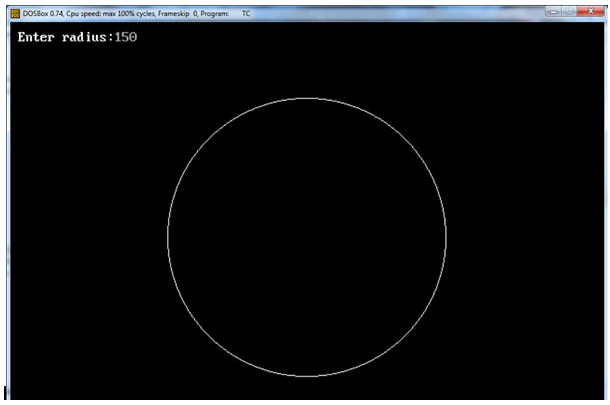
The above screenshot shows sample output for radius = 150.
The Midpoint Circle Algorithm is an efficient way to draw a circle with minimal calculations. This C++ program successfully implements the algorithm using the graphics.h library. Understanding this algorithm is fundamental in computer graphics, especially for raster-based drawing operations. If you wish to experiment, try modifying the radius value or changing the color of the circle by modifying the color code in putpixel().
No Comments yet!