
Socket programming is the foundation of network communication in Java. A socket is one endpoint of a two-way communication channel between two programs running on a network. Java provides the java.net package with high-level abstractions — ServerSocket for the server side and Socket for the client side — that handle the underlying TCP/IP details so you can focus on reading and writing data streams.
This example implements a simple interactive TCP chat between a server and a client. Both sides can send and receive messages. Either side can type Q or q to close the connection gracefully. The server listens on port 5000; the client connects to localhost:5000.
TCPServer.java
import java.io.*;
import java.net.*;

/**
 * TCPServer - waits for a client connection on port 5000,
 * then exchanges messages interactively until either side quits.
 */
public class TCPServer
{
    public static void main(String[] args) throws Exception
    {
        // Create a server socket that listens on port 5000
        ServerSocket serverSocket = new ServerSocket(5000);
        System.out.println("TCPServer waiting for client on port 5000");

        // Accept incoming connections in a loop (handles one client at a time)
        while (true)
        {
            Socket clientSocket = serverSocket.accept();
            System.out.println("Client connected: "
                    + clientSocket.getInetAddress()
                    + ":" + clientSocket.getPort());

            // Stream to read messages typed by the server operator
            BufferedReader consoleReader =
                    new BufferedReader(new InputStreamReader(System.in));

            // Stream to read messages sent by the client
            BufferedReader clientReader =
                    new BufferedReader(new InputStreamReader(clientSocket.getInputStream()));

            // Stream to send messages to the client
            PrintWriter clientWriter =
                    new PrintWriter(clientSocket.getOutputStream(), true);

            // Exchange messages until one side sends Q/q
            while (true)
            {
                System.out.println("SEND (type Q or q to quit): ");
                String messageToClient = consoleReader.readLine();

                if (messageToClient.equalsIgnoreCase("q"))
                {
                    clientWriter.println(messageToClient);  // Notify client before closing
                    clientSocket.close();
                    break;
                }
                else
                {
                    clientWriter.println(messageToClient);
                }

                String messageFromClient = clientReader.readLine();

                if (messageFromClient.equalsIgnoreCase("q"))
                {
                    clientSocket.close();
                    break;
                }
                else
                {
                    System.out.println("RECEIVED: " + messageFromClient);
                }
            }
        }
    }
}
TCPClient.java
import java.io.*;
import java.net.*;

/**
 * TCPClient - connects to TCPServer at localhost:5000
 * and exchanges messages interactively.
 */
public class TCPClient
{
    public static void main(String[] args) throws Exception
    {
        // Connect to the server
        Socket clientSocket = new Socket("localhost", 5000);

        // Stream to read messages typed by the client operator
        BufferedReader consoleReader =
                new BufferedReader(new InputStreamReader(System.in));

        // Stream to send messages to the server
        PrintWriter serverWriter =
                new PrintWriter(clientSocket.getOutputStream(), true);

        // Stream to read messages sent by the server
        BufferedReader serverReader =
                new BufferedReader(new InputStreamReader(clientSocket.getInputStream()));

        // Exchange messages until one side sends Q/q
        while (true)
        {
            String messageFromServer = serverReader.readLine();

            if (messageFromServer.equalsIgnoreCase("q"))
            {
                clientSocket.close();
                break;
            }
            else
            {
                System.out.println("RECEIVED: " + messageFromServer);
                System.out.println("SEND (type Q or q to quit): ");

                String messageToServer = consoleReader.readLine();

                if (messageToServer.equalsIgnoreCase("q"))
                {
                    serverWriter.println(messageToServer);  // Notify server before closing
                    clientSocket.close();
                    break;
                }
                else
                {
                    serverWriter.println(messageToServer);
                }
            }
        }
    }
}
How the Code Works
Step 1 — Server Setup: ServerSocket(5000) binds to port 5000 and starts listening. serverSocket.accept() blocks until a client connects, then returns a Socket representing that specific connection.
Step 2 — Client Setup: new Socket("localhost", 5000) initiates a TCP connection to the server. Once the constructor returns, the three-way handshake is complete and the connection is ready.
Step 3 — Streams: Both sides wrap the socket’s input stream in a BufferedReader (for reading lines of text) and wrap the output stream in a PrintWriter with auto-flush enabled (so each println() is sent immediately without needing an explicit flush() call).
Step 4 — Message Exchange: The server sends first. It reads a line from the console and writes it to the client. The client reads it, displays it, then reads a response from its own console and sends it back. This ping-pong pattern continues indefinitely.
Step 5 — Graceful Shutdown: When either side types Q or q, it sends the quit signal to the other side and calls socket.close(), which triggers a TCP FIN and cleanly terminates the connection.
Sample Output
Run the server first in one terminal, then start the client in a second terminal.
--- Server Terminal ---
TCPServer waiting for client on port 5000
Client connected: /127.0.0.1:52341
SEND (type Q or q to quit):
Hello from server
RECEIVED: Hello from client
SEND (type Q or q to quit):
How are you?
RECEIVED: I am fine!
SEND (type Q or q to quit):
q
--- Client Terminal ---
RECEIVED: Hello from server
SEND (type Q or q to quit):
Hello from client
RECEIVED: How are you?
SEND (type Q or q to quit):
I am fine!
(connection closed by server)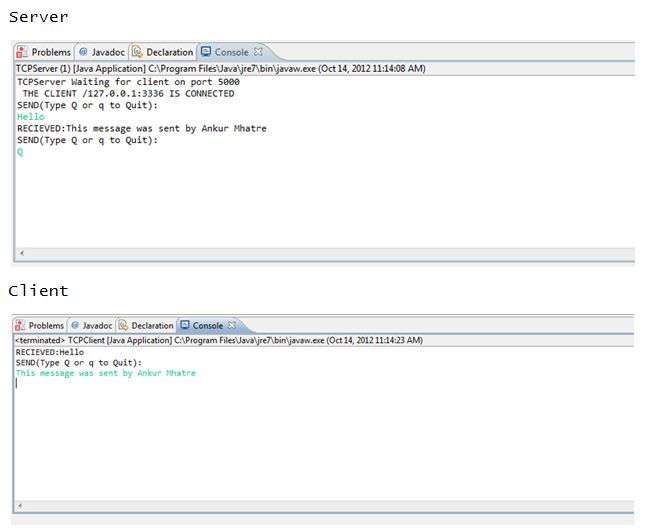
Output Explanation
The server starts and blocks at accept() until the client connects. Once connected, the server sends Hello from server; the client receives it, displays it, then sends back Hello from client. The conversation continues until the server types q, which sends the quit signal to the client. The client detects this, closes its socket, and exits. The server similarly closes the client socket and loops back to accept() waiting for the next connection.
See Also
- Implementation of Hamming Code in C++ — error correction in transmitted frames
- Implementation of CRC Algorithm in C++ — error detection using polynomial division
- Implementation of Dijkstra Algorithm in C++ — shortest path routing
- Implementation of Distance Vector Routing (DVR) Algorithm in C++ — distributed routing protocol
- Illustrating Working of Bit-Map Protocol in C++ — MAC layer channel access control
Conclusion
This TCP chat program demonstrates the core concepts of socket programming in Java: binding a server to a port, accepting connections, wrapping raw byte streams in convenient text readers and writers, and managing the connection lifecycle. These same building blocks underpin HTTP servers, database drivers, message brokers, and virtually every networked Java application. Once comfortable with blocking I/O sockets, the natural next step is to explore Java NIO (java.nio.channels) for non-blocking, high-throughput servers that can handle thousands of concurrent connections.
No Comments yet!