Allow All Types Of Files In WordPress Media Upload
Want your WordPress installation to accept more types of files on upload? By default WordPress limits upload functionality to certain types of file but allows you to customize this functionality according to your needs. Here is how you can customize this functionality.
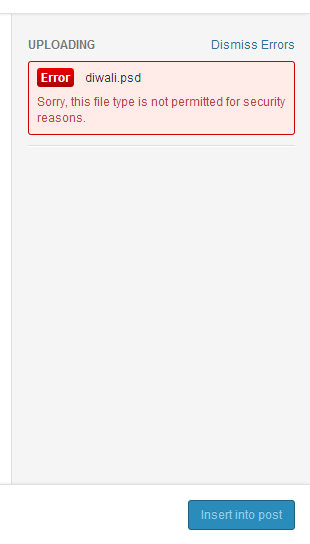
WordPress by default limits the number of file types, that you can upload on WordPress site for a good reason. You can try this yourself. Just create a new post. Then select “Add Media”. Then try to upload an “EXE” file or a “PHP” file. WordPress will reject that file with a nice security reason.
Upload Not Allowed: WordPress
WordPress allows to customize the allowed file types with WordPress hooks. You just have to update your theme’s function.php with a few lines of code and you will able to upload those types of files. For some people, this way is OK but for others, who are constantly uploading different types of files on their blog, this is not a good solution.
Disabling The Filtering
This process of disallowing certain types of files in WordPress is known as filtering. You can simply disable this filtering by using following code. You have to add it in your wp-config.php.
define( 'ALLOW_UNFILTERED_UPLOADS', true );
Security note: Broadly allowing all file types via ALLOW_UNFILTERED_UPLOADS or an unrestricted upload_mimes filter (especially executables like .exe, .php, .js) is a serious security risk — any uploaded file that isn’t managed properly can be executed on the server. Instead, allow only the specific file types your site actually needs. For example, to add SVG and WebP support:
Note: Now you have allowed upload for all types of file on your blog. This may lead to serious security issues. Take care that any file uploaded on the server can be executed if it is not managed properly.
Thanks for that; I didn’t know of that possibility.
Since your post is the top hit on Google for this subject, though, it might be worth mentioning the alternative of extending WordPress’s whitelist with the upload_mimes filter – probably safer than disabling the filter if you just want to add a single MIME type.


thanks ^_^
Thanks for that; I didn’t know of that possibility.
Since your post is the top hit on Google for this subject, though, it might be worth mentioning the alternative of extending WordPress’s whitelist with the
upload_mimesfilter – probably safer than disabling the filter if you just want to add a single MIME type.Ref: https://codex.wordpress.org/Plugin_API/Filter_Reference/upload_mimes
Thank you very much for sharing this tip – it came in handy today!
Thanks Its really help for me …