
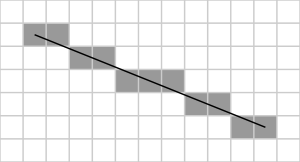
Bresenham’s Line Algorithm is one of the most fundamental algorithms in computer graphics. It determines the set of pixels that most closely approximate a straight line between two given endpoints on a raster display. The key advantage of Bresenham’s algorithm over simpler approaches is that it uses only integer arithmetic — no floating-point multiplication or division — making it extremely fast for hardware and software rendering alike.
How the Algorithm Works
For a line with slope between 0 and 1 (more horizontal than vertical), the algorithm maintains a decision variable errorAccumulator. At each step it increments x by 1 and decides whether to also increment y based on whether the accumulated error exceeds a threshold. This avoids floating-point comparisons entirely.
#include <graphics.h>   // Turbo C++ graphics library
#include <stdlib.h>     // Standard library utilities
#include <stdio.h>      // Standard I/O
#include <conio.h>      // Console input-output (getch)
#include <iostream.h>   // Standard input-output stream

int main(void)
{
    // Graphics setup
    int graphicsDriver = DETECT, graphicsMode;
    initgraph(&graphicsDriver, &graphicsMode, "C:\\tc\\bgi"); // Initialise BGI graphics

    // Read the start and end coordinates from the user
    cout << "\n Enter start point (x1 y1) and end point (x2 y2): ";
    int startX, startY, endX, endY;
    cin >> startX >> startY >> endX >> endY;

    // Calculate horizontal and vertical spans
    int deltaX = endX - startX; // Total change in x
    int deltaY = endY - startY; // Total change in y

    // Starting pixel position (current drawing position)
    int currentX = startX;
    int currentY = startY;

    // Initial error accumulator: 2*deltaY - deltaX
    int errorAccumulator = (2 * deltaY) - deltaX;

    // Plot pixels from startX to endX
    for (int step = 0; step <= deltaX; step++)
    {
        putpixel(currentX, currentY, 15); // Plot current pixel in white

        // Adjust y when the error accumulator signals we are too far below
        while (errorAccumulator >= 0)
        {
            currentY = currentY + 1;              // Move one pixel up/down
            errorAccumulator = errorAccumulator - (2 * deltaX); // Correct the error
        }

        currentX = currentX + 1;                  // Always advance x by 1
        errorAccumulator = errorAccumulator + (2 * deltaY); // Accumulate slope error
    }

    getch();       // Wait for a key press
    closegraph();  // Close the graphics window
    return 0;
}
How the Code Works
- Graphics initialisation –
initgraph()starts the BGI graphics mode. TheDETECTconstant lets Turbo C++ choose the appropriate driver automatically. - Reading coordinates – The user enters the start point
(startX, startY)and end point(endX, endY). The algorithm assumes the line moves from left to right (positivedeltaX). - Computing deltas –
deltaXanddeltaYare the total horizontal and vertical spans. They determine how many pixels are plotted (deltaX + 1) and how the error accumulator is updated at each step. - Error accumulator – The initial value
2*deltaY - deltaXencodes the fractional starting error scaled to integers. Each iteration adds2*deltaY(the slope numerator) to the accumulator. When it reaches or exceeds zero, it means the ideal line has crossed the next pixel row, socurrentYis incremented and2*deltaXis subtracted to bring the error back below zero. - Pixel plotting –
putpixel(currentX, currentY, 15)draws a white pixel at each computed position. The loop runsdeltaX + 1times, covering every x position from start to end.
Sample Output
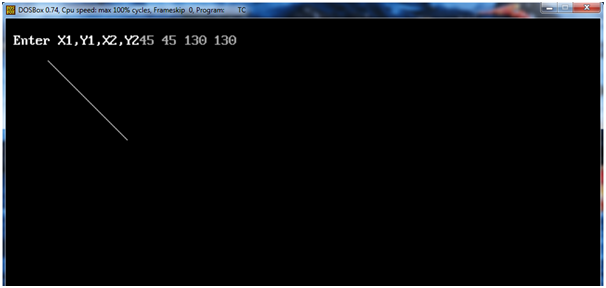
Output Explanation
The graphics window shows a straight diagonal line drawn using only integer operations. The line passes through exactly the pixels that best approximate the true mathematical line between the two entered endpoints. Because no floating-point rounding occurs, the result is pixel-perfect and computationally very efficient.
See Also
- C++ Program to Implement DDA Line Drawing Algorithm
- Implementing Bresenham’s Circle Drawing Algorithm in C++
- C++ Program to Implement Cohen-Sutherland Algorithm
- Implementing 2-D Transformation in C++
Conclusion
Bresenham’s Line Algorithm is a landmark in computer graphics history — its use of pure integer arithmetic revolutionised rasterisation on early hardware. The same decision-variable principle was later extended to circles (Bresenham’s Circle Algorithm) and other curves. Understanding this algorithm gives you a solid foundation for hardware-accelerated rendering, scan conversion, and any pixel-level graphics programming task.
No Comments yet!