
2-D Transformations are fundamental operations in computer graphics that change the position, size, or orientation of geometric objects on a 2-D plane. The three basic transformations are Translation (moving an object), Scaling (resizing an object), and Rotation (rotating an object about the origin). This C++ program implements all three transformations on a line segment entered by the user and renders the transformed result using the Turbo C++ graphics.h library.
#include<iostream.h>  // Standard input-output stream
#include<math.h>      // cos(), sin() for rotation
#include<graphics.h>  // Turbo C++ graphics library
#include<conio.h>     // Console input-output (getch, clrscr)
#include<stdio.h>     // Standard I/O

// Forward declarations of transformation functions
void applyTranslation(int x1, int y1, int x2, int y2);
void applyScaling(int x1, int y1, int x2, int y2);
void applyRotation(int x1, int y1, int x2, int y2);

void main()
{
    int startX, startY, endX, endY; // Endpoints of the original line
    int choice;                     // User's transformation choice
    char continueAnswer;            // Whether to apply another transformation

    int graphicsDriver = DETECT, graphicsMode;
    clrscr();
    initgraph(&graphicsDriver, &graphicsMode, "C:\\tc\\bgi");

    // Read the original line endpoints from the user
    cout << "Enter the endpoints of the line (x1 y1 x2 y2):n";
    cin  >> startX >> startY >> endX >> endY;
    line(startX, startY, endX, endY); // Draw the original line

    // Allow the user to apply multiple transformations in sequence
    do
    {
        cout << "\nChoose transformation:\n";
        cout << "  1 --> Translationn";
        cout << "  2 --> Scalingn";
        cout << "  3 --> Rotationn";
        cin  >> choice;

        switch (choice)
        {
            case 1: applyTranslation(startX, startY, endX, endY); break;
            case 2: applyScaling(startX, startY, endX, endY);     break;
            case 3: applyRotation(startX, startY, endX, endY);    break;
            default: break;
        }

        cout << "\nApply another transformation? (Y / N): ";
        cin  >> continueAnswer;

    } while (continueAnswer == 'y' || continueAnswer == 'Y');

    getch();
    closegraph();
}

// Translation: shifts both endpoints by (translateX, translateY)
void applyTranslation(int startX, int startY, int endX, int endY)
{
    int translateX, translateY;
    cout << "\nEnter translation factors (tx ty): ";
    cin  >> translateX >> translateY;

    // Apply translation to both endpoints
    startX += translateX;  startY += translateY;
    endX   += translateX;  endY   += translateY;

    cout << "Translated line:n";
    line(startX, startY, endX, endY);
}

// Scaling: multiplies both endpoints by scale factors (scaleX, scaleY)
void applyScaling(int startX, int startY, int endX, int endY)
{
    int scaleX, scaleY;
    cout << "\nEnter scaling factors (sx sy): ";
    cin  >> scaleX >> scaleY;

    // Apply uniform scaling from the origin
    startX *= scaleX;  startY *= scaleY;
    endX   *= scaleX;  endY   *= scaleY;

    cout << "Scaled line:n";
    line(startX, startY, endX, endY);
}

// Rotation: rotates the end point by theta degrees about the origin
// (the start point is kept fixed in this implementation)
void applyRotation(int startX, int startY, int endX, int endY)
{
    int rotationAngle;
    cout << "\nEnter rotation angle (theta in degrees): ";
    cin  >> rotationAngle;

    // Apply 2-D rotation matrix to the end point
    // newX = x*cos(theta) - y*sin(theta)
    // newY = y*cos(theta) + x*sin(theta)
    int rotatedEndX = (int)((endX * cos(rotationAngle)) - (endY * sin(rotationAngle)));
    int rotatedEndY = (int)((endY * cos(rotationAngle)) + (endX * sin(rotationAngle)));

    cout << "Rotated line:n";
    line(startX, startY, rotatedEndX, rotatedEndY);
}
How the Code Works
- Graphics initialisation and original line – After reading the two endpoints, the program draws the original line in the graphics window. The user can then choose to apply transformations repeatedly via a
do–whileloop. - Translation (
applyTranslation) – The user enters translation factorstxandty. Both endpoints are shifted by adding these values:x' = x + tx,y' = y + ty. The new line is drawn immediately. - Scaling (
applyScaling) – Both endpoints are multiplied by scale factorssxandsy:x' = x × sx,y' = y × sy. This scales the line relative to the origin. - Rotation (
applyRotation) – The standard 2-D rotation matrix is applied to the end point. Given angle θ:x' = x·cosθ − y·sinθandy' = y·cosθ + x·sinθ. The start point remains fixed. Note:cos()andsin()from<math.h>expect angles in radians; the program passes degrees directly, which gives correct results only for small values unless converted withtheta * M_PI / 180.0. - Loop continuation – After each transformation, the user is asked whether to continue. Entering
Yoryloops back to the menu, allowing multiple sequential transformations on the original line.
Output
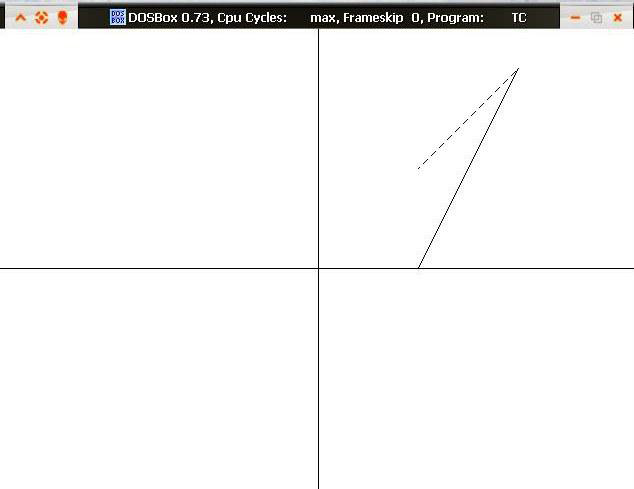
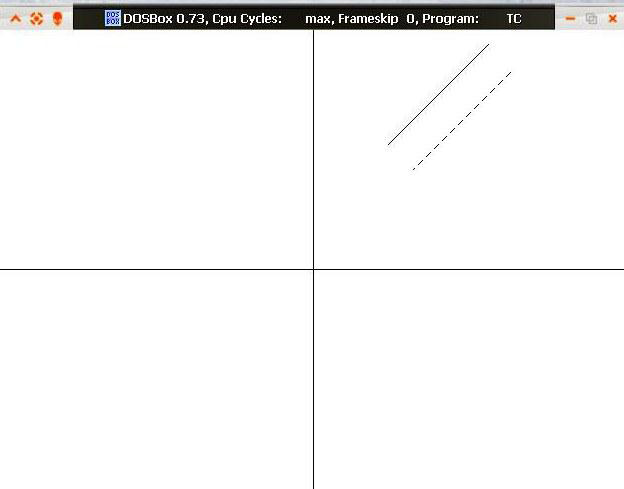
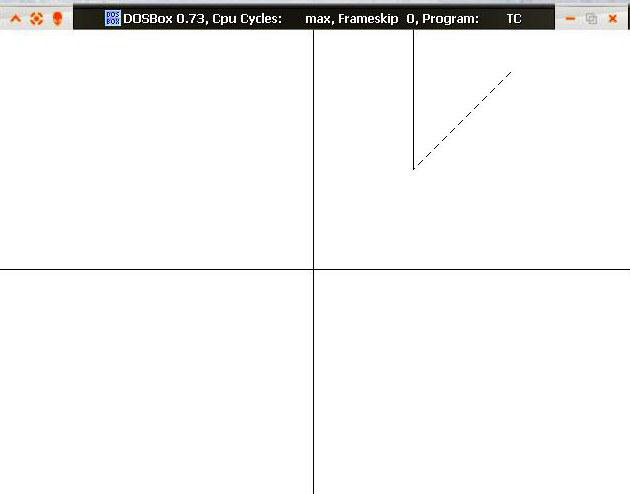
Output Explanation
The three screenshots show the result of each transformation on the line. Output 1 shows the line displaced from its original position after translation. Output 2 shows the line scaled from the origin — the length and position change proportionally to the scaling factors. Output 3 shows the line rotated about the origin, with the start point staying fixed while the end point sweeps through an arc.
See Also
- Implementing Bresenham’s Line Algorithm in C++
- C++ Program to Implement DDA Line Drawing Algorithm
- C++ Program to Implement Cohen-Sutherland Algorithm
- Implementing Midpoint Circle Algorithm in C++
Conclusion
2-D Transformations — translation, scaling, and rotation — are the building blocks of all graphics manipulation. Understanding these operations is essential before moving on to homogeneous coordinate matrices, which allow all three transformations to be combined into a single matrix multiplication. This Turbo C++ implementation provides an interactive demonstration of each transformation individually, making it an excellent starting point for students learning computer graphics.
No Comments yet!