
Character Generation by the Bitmap Method is a fundamental technique in computer graphics for rendering text or custom symbols on a raster display. A character is represented as a two-dimensional binary (or integer) grid — called a bitmap — where each cell in the grid corresponds to one pixel. A 1 (or any non-zero value) means the pixel should be drawn; a 0 means it should be left blank. This method is used in early video games, embedded displays, and any system that needs custom pixel-perfect fonts.
#include<graphics.h>   // Turbo C++ graphics library
#include<conio.h>      // Console input-output (getch, clrscr)
#include<iostream.h>   // Standard input-output stream

void main()
{
    int graphicsDriver = DETECT, graphicsMode; // Auto-detect graphics driver
    initgraph(&graphicsDriver, &graphicsMode, "C:\\tc\\bgi"); // Initialise graphics mode

    // bitmapGrid[row][col]: 7 rows x 5 columns defines the character shape
    // Value 0 = blank pixel, non-zero = filled pixel
    int bitmapGrid[7][5];
    int row, col;

    clrscr(); // Clear the console screen before input

    cout << "Enter the bitmap array (7 rows x 5 columns, 0 for blank, 1 for filled):";

    // Read the 7x5 bitmap values from the user
    for (row = 0; row < 7; row++)
    {
        for (col = 0; col < 5; col++)
        {
            cin >> bitmapGrid[row][col];
        }
    }

    cout << endl << endl;
    cout << "The rendered character is:" << endl;

    // Render the character by printing each cell
    for (row = 0; row < 7; row++)
    {
        for (col = 0; col < 5; col++)
        {
            if (bitmapGrid[row][col] == 0)
                cout << " ";  // Blank cell: print a space
            else
                cout << bitmapGrid[row][col] << " "; // Filled cell: print the value
        }
        cout << endl; // Move to the next row
    }

    getch(); // Wait for a key press before closing
}
How the Code Works
- Graphics initialisation –
initgraph()starts the BGI graphics mode. For this program the actual drawing happens in text mode on the console, but initialising graphics is included to match the Turbo C++ environment setup. - Bitmap grid declaration –
bitmapGrid[7][5]is a 7-row by 5-column integer array. Seven rows represent the height of the character; five columns represent its width. This is a standard character cell size for simple pixel fonts. - User input – The nested
forloops read all 35 values (7×5) into the bitmap grid. The outer loop iterates over rows and the inner loop over columns. - Rendering – A second pair of nested loops prints the character. For each cell, if the value is
0a space is printed (blank pixel); otherwise, the numeric value followed by a space is printed (lit pixel). Each completed row ends withendlto move to the next line. - Output format – The result is an ASCII-art representation of the character. For example, encoding a letter “H” as a 7×5 bitmap would produce a recognisable H-shape made of 1s and spaces.
Sample Input
The following 7×5 bitmap encodes a simple letter shape (e.g., the letter “A”):
0 0 1 0 0
0 1 0 1 0
1 0 0 0 1
1 1 1 1 1
1 0 0 0 1
1 0 0 0 1
1 0 0 0 1
Output
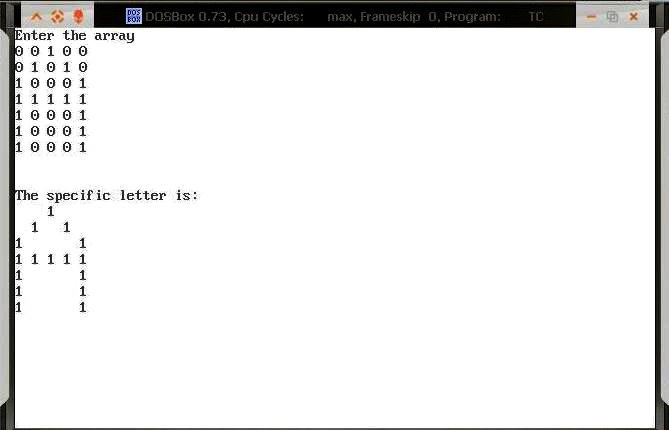
Output Explanation
The screenshot shows the console after the user has entered a 7×5 bitmap. The program prints a grid where non-zero values appear as their digit (e.g., 1) followed by a space, and zero values appear as blank spaces. Together they form the visual shape of the intended character — demonstrating how pixel fonts are constructed from binary grids.
See Also
- Implementing Boundary Fill Algorithm in C++
- Implementing Flood Fill Algorithm in C++
- C++ Program to Implement DDA Line Drawing Algorithm
- Implementing Bresenham’s Circle Drawing Algorithm in C++
Conclusion
The Bitmap Method of character generation illustrates the fundamental relationship between a 2D integer grid and pixel-based rendering. By treating each cell as either lit or unlit, you can design any character or symbol for display on a raster screen. This principle underpins TrueType fonts, sprite sheets in game development, and LED matrix displays — making it a concept worth understanding thoroughly.
write a program to implement bitmap character