
The Boundary Fill Algorithm is a region-filling technique used in computer graphics to fill a connected area with a new colour. Starting from a seed pixel inside the shape, the algorithm recursively colours every neighbouring pixel as long as it does not match the defined boundary colour and has not already been coloured with the new fill colour. It supports 8-connected filling, meaning it spreads to all eight surrounding pixels — including diagonals.
#include<iostream.h>  // Standard input-output stream
#include<conio.h>      // Console input-output (getch)
#include<graphics.h>   // Turbo C++ graphics library
#include<dos.h>        // DOS-specific functions

// Recursively fills a region bounded by boundaryColour with newFillColour
// Uses 8-connected filling: checks all 8 neighbours of each pixel
void boundaryFill(int pixelX, int pixelY, int boundaryColour, int newFillColour)
{
    int currentColour = getpixel(pixelX, pixelY); // Read colour of current pixel

    // Fill only if current pixel is NOT the boundary and NOT already filled
    if (currentColour != boundaryColour && currentColour != newFillColour)
    {
        putpixel(pixelX, pixelY, newFillColour); // Colour this pixel

        // Recursively fill 8 neighbouring pixels
        boundaryFill(pixelX + 1, pixelY,     boundaryColour, newFillColour); // Right
        boundaryFill(pixelX,     pixelY + 1, boundaryColour, newFillColour); // Down
        boundaryFill(pixelX,     pixelY - 1, boundaryColour, newFillColour); // Up
        boundaryFill(pixelX - 1, pixelY,     boundaryColour, newFillColour); // Left
        boundaryFill(pixelX + 1, pixelY + 1, boundaryColour, newFillColour); // Down-Right
        boundaryFill(pixelX - 1, pixelY - 1, boundaryColour, newFillColour); // Up-Left
        boundaryFill(pixelX - 1, pixelY + 1, boundaryColour, newFillColour); // Down-Left
        boundaryFill(pixelX + 1, pixelY - 1, boundaryColour, newFillColour); // Up-Right
    }
}

void main()
{
    int graphicsDriver = DETECT, graphicsMode; // Auto-detect graphics driver
    initgraph(&graphicsDriver, &graphicsMode, "C:\\tc\\bgi"); // Initialise graphics mode

    // Draw a rectangle from (50,50) to (100,100) using the default foreground colour (white = 15)
    rectangle(50, 50, 100, 100);

    // Seed point (55,55) is inside the rectangle
    // boundaryColour = 0 (black, the rectangle border drawn by rectangle())
    // newFillColour  = 3 (cyan)
    boundaryFill(55, 55, 0, 3);

    getch();       // Wait for a key press
    closegraph();  // Close the graphics window
}
How the Code Works
- Graphics initialisation –
initgraph()starts the Borland Graphics Interface (BGI). TheDETECTconstant auto-selects the best available driver. - Drawing the boundary shape –
rectangle(50, 50, 100, 100)draws a 50×50 pixel square. The border pixels are coloured with the default foreground (white, colour index 15), but the function draws using colour 0 (black) in most BGI environments — the boundary colour is whichever colour the border was drawn with. In this program the border is colour 0 (default background matches black boundary). - Seed point selection – The seed
(55, 55)is a pixel strictly inside the rectangle. The algorithm starts here and spreads outward. - Boundary check –
getpixel(pixelX, pixelY)reads the current pixel’s colour. If it equalsboundaryColour(the rectangle edge) ornewFillColour(already filled), the recursion stops for that path. - Pixel colouring – When neither stop-condition is met,
putpixel()paints the pixel withnewFillColour(3 = cyan), then recursively callsboundaryFill()for all 8 neighbours. - Termination – The recursion naturally terminates when every interior pixel has been filled or when a boundary pixel is encountered, leaving the rectangle’s edges intact.
Output
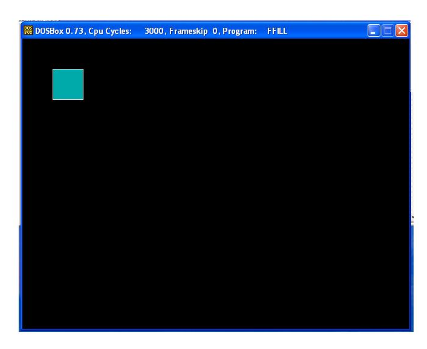
Output Explanation
The screenshot shows a filled rectangle on the graphics screen. The outer border of the rectangle remains in its original boundary colour while the interior region is completely filled with cyan (colour index 3). The 8-connected approach ensures there are no unfilled diagonal gaps inside the shape.
See Also
- Implementing Flood Fill Algorithm in C++
- Implementing Bresenham’s Line Algorithm in C++
- C++ Program to Implement DDA Line Drawing Algorithm
- Implementing Bresenham’s Circle Drawing Algorithm in C++
Conclusion
The Boundary Fill Algorithm is an intuitive, recursive approach to region filling in raster graphics. Its 8-connected variant ensures complete coverage of any irregularly shaped region bounded by a single colour. While this Turbo C++ implementation demonstrates the core concept clearly, production graphics engines typically use iterative, stack-based versions of the algorithm to avoid stack-overflow issues caused by deep recursion on large regions.
No Comments yet!