
Let’s dive into a fascinating corner of Java’s Collections Framework: the LinkedHashMap. You might already be familiar with HashMap for its speedy key-value pair storage and LinkedHashSet for maintaining insertion order in a set. Well, LinkedHashMap is the best of both worlds, offering the familiar map interface with the added benefit of predictable iteration order.
Let’s break down what makes LinkedHashMap so special and when you should consider using it.
What is LinkedHashMap?
In simple terms, LinkedHashMap is a hash table and a linked list implementation of the Map interface. It inherits all the goodness from HashMap (fast lookups, insertions, and deletions) but adds an internal doubly-linked list that runs through all of its entries. This linked list defines the iteration order, which can either be:
- Insertion Order: The default behavior, where elements are iterated in the order they were first inserted into the map.
- Access Order: Elements are iterated in the order they were last accessed (read or written). This is particularly useful for implementing LRU (Least Recently Used) caches.
Like HashMap, LinkedHashMap allows one null key and multiple null values.
Interface Hierarchy
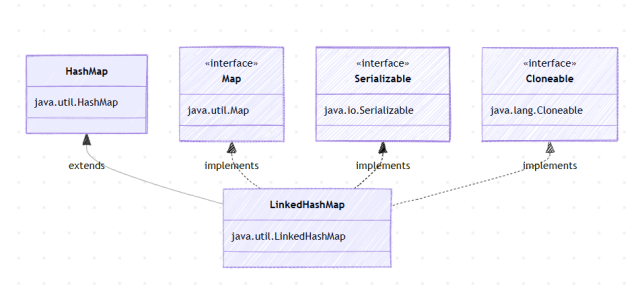
LinkedHashMap implements the following interfaces and extends the following class:
java.io.Serializablejava.util.Mapjava.lang.Cloneable
And it extends java.util.HashMap.
Key Features of LinkedHashMap
- Predictable Iteration Order: This is its most significant advantage over
HashMap. When you iterate over aLinkedHashMap, you’re guaranteed to get elements in a specific order (either insertion or access). - Performance: Similar to
HashMap, it provides constant-time performance (O(1)) for basic operations likeget(),put(), andremove(), assuming a good hash function distributes elements uniformly. In the worst-case scenario (many hash collisions), performance can degrade to O(n). - Doubly-Linked List: The internal linked list is what enables the ordered iteration. Each entry in the map maintains pointers to its predecessor and successor.
- Memory Overhead: Due to the extra pointers required for the linked list,
LinkedHashMapuses slightly more memory than a plainHashMap.
Constructors of LinkedHashMap
LinkedHashMap provides several constructors to initialize the map:
1. LinkedHashMap(): Creates an empty LinkedHashMap with a default initial capacity (16) and load factor (0.75), maintaining insertion order.
LinkedHashMap<String, Integer> insertionOrderMap = new LinkedHashMap<>();
2. LinkedHashMap(int initialCapacity): Creates an empty LinkedHashMap with the specified initial capacity and default load factor, maintaining insertion order.
LinkedHashMap<String, Integer> mapWithCapacity = new LinkedHashMap<>(20);
3. LinkedHashMap(int initialCapacity, float loadFactor): Creates an empty LinkedHashMap with the specified initial capacity and load factor, maintaining insertion order.
LinkedHashMap<String, Integer> customMap = new LinkedHashMap<>(20, 0.9f);
4. LinkedHashMap(int initialCapacity, float loadFactor, boolean accessOrder): This is the most interesting constructor. It allows you to specify whether the iteration order should be based on insertion order (false) or access order (true).
// Insertion order (default behavior)
LinkedHashMap<String, Integer> insertionMap = new LinkedHashMap<>(16, 0.75f, false);

// Access order (for LRU caches)
LinkedHashMap<String, Integer> lruCache = new LinkedHashMap<>(16, 0.75f, true);
5. LinkedHashMap(Map m): Creates a LinkedHashMap with the same mappings as the specified Map. The insertion order will be the order in which the entries’ iterators return their elements.
Map<String, String> anotherMap = new HashMap<>();
anotherMap.put("a", "Apple");
anotherMap.put("b", "Banana");

LinkedHashMap<String, String> linkedMapFromMap = new LinkedHashMap<>(anotherMap);
// Iteration order will likely be "a", "b" if HashMap iterated that way,
// but it's not guaranteed for the source HashMap itself.
// For LinkedHashMap, it will follow the order of entries from the 'm' map's iterator.
Example of LinkedHashMap (Insertion Order)
Let’s see LinkedHashMap in action with its default insertion order behavior:
import java.util.LinkedHashMap;
import java.util.Map;

public class LinkedHashMapInsertionOrderExample {
    public static void main(String[] args) {
        // Create a LinkedHashMap with default insertion order
        LinkedHashMap<String, String> cityPopulation = new LinkedHashMap<>();

        // Add elements
        cityPopulation.put("Mumbai", "20M");
        cityPopulation.put("Delhi", "19M");
        cityPopulation.put("Bangalore", "13M");
        cityPopulation.put("Hyderabad", "10M");

        System.out.println("LinkedHashMap (Insertion Order): " + cityPopulation);

        // Iterate through the map - order is preserved
        System.out.println("Iterating through LinkedHashMap (Insertion Order):");
        for (Map.Entry<String, String> entry : cityPopulation.entrySet()) {
            System.out.println("City: " + entry.getKey() + ", Population: " + entry.getValue());
        }

        // Accessing an element doesn't change insertion order here
        System.out.println("Accessing 'Delhi': " + cityPopulation.get("Delhi"));
        System.out.println("After accessing, map remains: " + cityPopulation);

        // Modifying an element doesn't change insertion order
        cityPopulation.put("Delhi", "21M");
        System.out.println("After modifying 'Delhi': " + cityPopulation);

        // Adding a new element maintains its position at the end
        cityPopulation.put("Chennai", "11M");
        System.out.println("After adding 'Chennai': " + cityPopulation);

        // Removing an element
        cityPopulation.remove("Bangalore");
        System.out.println("After removing 'Bangalore': " + cityPopulation);

        // Iterating again to confirm order after modifications
        System.out.println("Final Iteration:");
        for (Map.Entry<String, String> entry : cityPopulation.entrySet()) {
            System.out.println("City: " + entry.getKey() + ", Population: " + entry.getValue());
        }
    }
}
Output:
LinkedHashMap (Insertion Order): {Mumbai=20M, Delhi=19M, Bangalore=13M, Hyderabad=10M}

Iterating through LinkedHashMap (Insertion Order):
City: Mumbai, Population: 20M
City: Delhi, Population: 19M
City: Bangalore, Population: 13M
City: Hyderabad, Population: 10M

Accessing 'Delhi': 19M
After accessing, map remains: {Mumbai=20M, Delhi=19M, Bangalore=13M, Hyderabad=10M}

After modifying 'Delhi': {Mumbai=20M, Delhi=21M, Bangalore=13M, Hyderabad=10M}

After adding 'Chennai': {Mumbai=20M, Delhi=21M, Hyderabad=10M, Chennai=11M}

After removing 'Bangalore': {Mumbai=20M, Delhi=21M, Hyderabad=10M, Chennai=11M}

Final Iteration:
City: Mumbai, Population: 20M
City: Delhi, Population: 21M
City: Hyderabad, Population: 10M
City: Chennai, Population: 11M
As you can see, the iteration order consistently reflects the order in which elements were initially added.
Example of LinkedHashMap (Access Order) – Building an LRU Cache
The access order mode is incredibly powerful for implementing caches where you want to evict the least recently used entries. Let’s build a simple LRU cache using LinkedHashMap.
To enable access order, we use the constructor LinkedHashMap(int initialCapacity, float loadFactor, boolean accessOrder) with accessOrder set to true.
Additionally, LinkedHashMap provides a protected method removeEldestEntry(Map.Entry eldest), which is designed to be overridden. This method is invoked by put() and putAll() after inserting a new entry into the map. You can use it to specify a condition for removing the “eldest” entry (the least recently inserted or accessed, depending on the map’s ordering mode).
import java.util.LinkedHashMap;
import java.util.Map;

public class LRUCacheExample {

    private static final int MAX_CACHE_SIZE = 3; // Maximum number of items in the cache

    public static void main(String[] args) {

        // Create an LRU Cache using LinkedHashMap
        LinkedHashMap<String, String> lruCache = new LinkedHashMap<>(
                MAX_CACHE_SIZE + 1, // Initial capacity (slightly more than max to avoid immediate rehash)
                0.75f,              // Load factor
                true                // true for access order
        ) {
            @Override
            protected boolean removeEldestEntry(Map.Entry<String, String> eldest) {
                // Return true to remove the eldest entry when the cache exceeds MAX_CACHE_SIZE
                return size() > MAX_CACHE_SIZE;
            }
        };

        System.out.println("Adding elements to LRU Cache:");
        lruCache.put("A", "Apple"); // A oldest
        lruCache.put("B", "Banana");
        lruCache.put("C", "Cherry"); // C newest
        printCache(lruCache, "Initial state"); // Order: A, B, C

        System.out.println("Accessing 'A'");
        lruCache.get("A"); // 'A' becomes most recently accessed
        printCache(lruCache, "After accessing 'A'"); // Order: B, C, A

        System.out.println("Adding 'D'");
        lruCache.put("D", "Date"); // 'B' should be removed as it's now the eldest (least recently accessed)
        printCache(lruCache, "After adding 'D'"); // Order: C, A, D (B is removed)

        System.out.println("Accessing 'C'");
        lruCache.get("C"); // 'C' becomes most recently accessed
        printCache(lruCache, "After accessing 'C'"); // Order: A, D, C

        System.out.println("Adding 'E'");
        lruCache.put("E", "Elderberry"); // 'A' should be removed
        printCache(lruCache, "After adding 'E'"); // Order: D, C, E (A is removed)

        // Iterate through the cache - order is based on access
        System.out.println("Iterating through LRU Cache (Access Order):");
        for (Map.Entry<String, String> entry : lruCache.entrySet()) {
            System.out.println("Key: " + entry.getKey() + ", Value: " + entry.getValue());
        }
    }

    private static void printCache(LinkedHashMap<String, String> cache, String message) {
        System.out.println(message + ": " + cache);
    }
}
Output:
Adding elements to LRU Cache:
Initial state: {A=Apple, B=Banana, C=Cherry}
Accessing 'A'
After accessing 'A': {B=Banana, C=Cherry, A=Apple}
Adding 'D'
After adding 'D': {C=Cherry, A=Apple, D=Date}
Accessing 'C'
After accessing 'C': {A=Apple, D=Date, C=Cherry}
Adding 'E'
After adding 'E': {D=Date, C=Cherry, E=Elderberry}

Iterating through LRU Cache (Access Order):
Key: D, Value: Date
Key: C, Value: Cherry
Key: E, Value: Elderberry
This example beautifully demonstrates how removeEldestEntry combined with access order mode makes LinkedHashMap an excellent foundation for building a simple LRU cache.
When to use LinkedHashMap?
You should opt for LinkedHashMap when:
- You need a
Mapwhere the iteration order is crucial and predictable. - You want to remember the insertion order of elements.
- You’re implementing a Least Recently Used (LRU) cache or a similar caching mechanism where elements need to be evicted based on their access frequency.
- You need the general performance benefits of a hash table but with ordered iteration.
When to use HashMap over LinkedHashMap?
If you don’t care about the iteration order and absolutely need to maximize performance and minimize memory consumption, a plain HashMap might be a slightly better choice. The overhead of maintaining the doubly-linked list in LinkedHashMap, though small, does exist.
Conclusion
LinkedHashMap is a versatile and powerful addition to the Java Collections Framework. By combining the efficiency of a hash table with the ordered iteration of a linked list, it fills a specific and important niche. Whether you need to maintain insertion order or create a smart LRU cache, LinkedHashMap is often the perfect tool for the job.
Keep coding, and stay tuned for more Java insights!
No Comments yet!