
Tested against: Spring Boot 4.1.2 (latest GA), JDK 25.0.5, OpenPDF 3.0.5 (latest GA on Maven Central; packageorg.openpdf.text), iText Core 9.8.0 (latest GA; AGPL 3 or commercial), Flying Saucerflying-saucer-pdf10.7.0 (latest GA, built against OpenPDF 3.0.5; the oldflying-saucer-pdf-openpdfartifact stopped at 9.4.0 and its POM is a relocation toflying-saucer-pdf), Thymeleaf 3.1.5.RELEASE, Apache PDFBox 3.0.8 (tests), Apache FOP 2.11 (one experiment), Noto Sans Devanagari under the SIL Open Font License 1.1. Poppler’spdftoppmandpdftotextdid the rendering and extraction. Timings come from a shared 2-vCPU sandbox, one run per line: indicative only.
A PDF library does two jobs, and two of the three share one engine
A PDF is a page description: “draw these glyph numbers from this embedded font at these coordinates”. A library has to lay out your content (where does the table go, where does the line wrap) and then write the file (fonts, content streams, cross-reference table). OpenPDF and iText expose both through Java objects: you build aDocument, add a table, add paragraphs. Flying Saucer takes a different route: you give it HTML and CSS, it does the layout with its own CSS engine, and it hands the drawing to OpenPDF.
One data record feeds all three, so the comparison is about the libraries. It is Invoice.java, with sample data in SampleInvoices.java: a Mumbai seller, a Pune buyer named in Marathi, four lines mixing Marathi, Hindi and English, 18% GST split as CGST and SGST. Every writer implements the same one-method interface, InvoiceWriter.java.
The smallest version: OpenPDF
OpenPDF is the maintained fork of the old iText 4 code (LGPL 2.1 and MPL 2.0, declared in its parent POM). In 3.0.5 the package isorg.openpdf.text; older tutorials and Stack Overflow answers use com.lowagie.text and fail at the import line. The font is embedded with IDENTITY_H, which means the PDF stores glyph ids and only the glyphs actually used are embedded — a subset.
From src/main/java/com/ankurm/pdfinvoice/OpenPdfInvoiceWriter.java:
// IDENTITY_H + EMBEDDED: glyph ids are written, and only the glyphs used are embedded (a subset).
// The FOP engine re-reads the font by file name, so in FOP mode the font must be a real file.
BaseFont regular = shaping == Shaping.FOP
        ? BaseFont.createFont(FontBytes.tempFile(FontBytes.REGULAR).toString(), BaseFont.IDENTITY_H, BaseFont.EMBEDDED)
        : BaseFont.createFont("NotoSansDevanagari-Regular.ttf", BaseFont.IDENTITY_H,
                BaseFont.EMBEDDED, true, FontBytes.load(FontBytes.REGULAR), null);
BaseFont bold = shaping == Shaping.FOP
        ? BaseFont.createFont(FontBytes.tempFile(FontBytes.BOLD).toString(), BaseFont.IDENTITY_H, BaseFont.EMBEDDED)
        : BaseFont.createFont("NotoSansDevanagari-Bold.ttf", BaseFont.IDENTITY_H,
                BaseFont.EMBEDDED, true, FontBytes.load(FontBytes.BOLD), null);
body = new Font(regular, 10);
strong = new Font(bold, 10);
title = new Font(bold, 20);
The line-item table is a PdfPTable with weighted column widths; the cell helpers are in the same file. The rendered page is output/png/invoice-openpdf.png, and the PDF itself is output/pdf/openpdf.pdf (20,039 bytes).

Going deeper: what the writer does not close
The writer calls writer.setCloseStream(false) because it is handed a servlet output stream it does not own. Fonts are re-created on every call, which is simple and measurably cheap for a demo but is the first thing to cache in a service that renders thousands of invoices; the timings below include that cost. The Marathi labels (“कर चलन”, “ग्राहक”) sit next to English ones in the same Phrase because the single Noto font carries Latin glyphs as well, so no per-run font switching is needed.
The same invoice in iText Core 9, and the licence you have to read first
iText Core’s API is the better-designed of the two programmatic ones: aPdfWriter feeds a PdfDocument, a Document lays out Paragraph and Table elements, and the font is a PdfFont you set once on the document. The code is longer only because the invoice has a header table and a totals table.
From src/main/java/com/ankurm/pdfinvoice/ITextInvoiceWriter.java:
PdfFont regular = PdfFontFactory.createFont(FontBytes.load(FontBytes.REGULAR),
        PdfEncodings.IDENTITY_H, EmbeddingStrategy.FORCE_EMBEDDED);
PdfFont bold = PdfFontFactory.createFont(FontBytes.load(FontBytes.BOLD),
        PdfEncodings.IDENTITY_H, EmbeddingStrategy.FORCE_EMBEDDED);

regular.setSubset(subset);
bold.setSubset(subset);

PdfWriter writer = new PdfWriter(out);
writer.setCloseStream(false);
PdfDocument pdf = new PdfDocument(writer);
pdf.getDocumentInfo().setTitle("Invoice " + inv.number());
Document doc = new Document(pdf, PageSize.A4);
doc.setMargins(40, 40, 40, 40);
doc.setFont(regular).setFontSize(10);
The result is output/png/invoice-itext.png; the PDF is 23,344 bytes against OpenPDF’s 20,039; both are one page of about 20 KB.

Now the licence, because it is the real difference between these libraries. The facts below are read from the sources by scripts/licences.sh and saved in output/00-versions-and-licences.txt.
openpdf 3.0.5 (declared in openpdf-parent):     GNU Lesser General Public License (LGPL), Version 2.1;Mozilla Public License Version 2.0;
itext kernel/layout 9.8.0 (root pom):            GNU Affero General Public License v3;
flying-saucer-pdf 10.7.0 (flying-saucer-parent): GNU Lesser General Public License (LGPL), version 2.1 or later;
typography (pdfCalligraph) 5.1.1:           Proprietary License;
The iText Core POM declares the GNU Affero General Public License v3. On its AGPL page iText states that all versions from 5 on are “dual-licensed, and available under open source (AGPLv3) or commercial license agreements”, and spells out what the AGPL route asks of you in these words, copied from the page text saved in output/00-versions-and-licences.txt:
- If you cannot comply with the AGPLv3 terms, we offer commercial licensing options. Purchasing a commercial license will release you from the AGPLv3 copyleft restrictions, allowing you to keep your applications closed-source to your users.

- You may not deploy it on a network without disclosing the full source code of your own applications under the AGPL license. You must distribute all source code, including your own product and web-based applications.

- When using iText Core/Community under AGPL, you must prominently mention iText and include the iText copyright and AGPL license in output file metadata, and also retain the producer line in every PDF that is created or manipulated using iText.
The AGPL trap, stated as facts and not as advice. I am not a lawyer and this is not legal advice. The iText page says that using iText Core under the AGPL means you “may not deploy it on a network without disclosing the full source code of your own applications”, and that the commercial licence is how you “keep your applications closed-source to your users”. A Spring Boot service that renders invoices and is reachable over a network is exactly the shape of deployment that sentence is about. The same page says you must keep the producer line in every PDF; the file really does carry one (see below). The dependency is one line in a pom.xml and arrives without a prompt, which is why it gets pulled in by accident. Whether your project is affected, and what the AGPL requires of it, is a question for your own counsel.
Title:           Invoice INV-2026-0042
Producer:        iText® Core 9.8.0 (AGPL version) ©2000-2026 Apryse Group NV
That is the Producer line iText 9.8.0 wrote into output/pdf/itext.pdf, copied from output/03-pdffonts-and-producer.txt; OpenPDF writes OpenPDF 3.0.5 and Flying Saucer Flying Saucer 10.7.0 with OpenPDF 3.0.5 in the same field.
Going deeper: the Devanagari add-on is proprietary
iText sells the shaping engine as a separate add-on, pdfCalligraph; its product page lists Hindi and Marathi among the supported languages. The POM of the typography artifact (5.1.1 on iText’s own repository, not on Maven Central) declares Proprietary License and depends on iText’s licensing library. I did not run it: it needs a licence key, and testing a paid add-on without one would not tell you what it does. So for iText the honest result in this post is “iText Core on its own does not shape Devanagari”, nothing more.
Flying Saucer: write the invoice as HTML and CSS
If your invoice already exists as an HTML email or a web page, or a designer owns it, laying it out in CSS is far more pleasant than computing coordinates in Java. Flying Saucer renders a strict subset: the input must be well-formed XHTML, the CSS I used was plain CSS 2.1 plus@page; I would not expect flexbox or grid to work and did not try them. Thymeleaf produces the XHTML string; Flying Saucer parses it as XML.
The template is src/main/resources/templates/invoice.html; the part that matters is the font declaration and one table row:
body { font-family: 'Noto Sans Devanagari'; font-size: 10pt; color: #000; }
...
<tr th:each="l : ${inv.lines}">
  <td th:text="${l.description}">item</td>
  <td class="r" th:text="${l.quantity}">1</td>
  <td class="r" th:text="${money.inr(l.unitPrice)}">1</td>
  <td class="r" th:text="${money.inr(l.amount)}">1</td>
</tr>
And the writer, from src/main/java/com/ankurm/pdfinvoice/FlyingSaucerInvoiceWriter.java. Flying Saucer takes fonts as a file path, so the module copies the two Noto files from the classpath to a temp directory at start-up:
private void render(Invoice inv, OutputStream out) throws Exception {
    ITextRenderer renderer = new ITextRenderer();
    renderer.getFontResolver().addFont(fontDir.resolve("NotoSansDevanagari-Regular.ttf").toString(),
            "Noto Sans Devanagari", BaseFont.IDENTITY_H, BaseFont.EMBEDDED, null);
    renderer.getFontResolver().addFont(fontDir.resolve("NotoSansDevanagari-Bold.ttf").toString(),
            "Noto Sans Devanagari", BaseFont.IDENTITY_H, BaseFont.EMBEDDED, null);
    if (!subset || shaped) {
        for (FontFamily family : renderer.getFontResolver().getFonts().values()) {
            if (!"Noto Sans Devanagari".equalsIgnoreCase(family.getName())) {
                continue;   // the built-in Helvetica/Serif families are in the same map
            }
            for (FontDescription d : family.getFontDescriptions()) {
                d.getFont().setSubset(subset);
                if (!shaped) {
                    continue;
                }
                String file = d.getWeight() >= 700 ? "NotoSansDevanagari-Bold.ttf" : "NotoSansDevanagari-Regular.ttf";
                LayoutProcessor.loadFont(d.getFont(), fontDir.resolve(file).toString());
            }
        }
    }
    renderer.setDocumentFromString(html(inv));
    renderer.layout();
    renderer.createPDF(out, false);   // false: do not close the servlet output stream
    renderer.finishPDF();
}
Thymeleaf 3.1 refuses to call methods onjava.*objects. My first template passed aDecimalFormatand called${inr.format(l.unitPrice)}. The page failed with Calling method ‘format’ is forbidden for type ‘class java.text.DecimalFormat’ in this expression context. The fix is a small class of your own, Money.java, exposed to the template as${money.inr(x)}, and it is also what keeps the three writers formatting rupees identically.
Going deeper: which Flying Saucer artifact, and why
Most tutorials still show flying-saucer-pdf-openpdf. Maven Central’s metadata for it ends at 9.4.0 (last updated 2023-12-30) and the 9.4.0 POM contains a <relocation> to org.xhtmlrenderer:flying-saucer-pdf. That artifact, at 10.7.0 (metadata updated 2026-10-24), declares OpenPDF 3.0.5 as its dependency and is compiled with java.version 21 in its parent POM; the PDF it wrote here says “Flying Saucer 10.7.0 with OpenPDF 3.0.5”. There is also flying-saucer-pdf-itext5 (last 9.7.2), which targets iText 5; I did not test it. The class you use is still org.xhtmlrenderer.pdf.ITextRenderer.
The rendered page is output/png/invoice-flyingsaucer.png.

Marathi and Hindi: the PDF looks nearly right, and is wrong
Devanagari is not written one code point at a time. ज्ञ is stored as three code points — ज, the virama (halant) ्, and ञ — and must be drawn as one conjunct glyph. The short-i vowel sign ि is stored after its consonant but drawn before it. A reph (the र् in कर्म) is stored first and drawn as a mark above the following consonant. The font contains all the needed glyphs and the substitution rules (the OpenTypeGSUB table); something has to apply them. That something is a shaper, and a PDF library that writes “one glyph per code point” does not have one.
?probe=true) whose only content is क्षत्रिय ज्ञान श्री द्वार कर्म कि प्रिय, and a second reference line drawn by a different shaper: Pillow with libraqm (HarfBuzz), using the same font file, from scripts/compare.py. I rendered every PDF to PNG with pdftoppm and looked at the images.
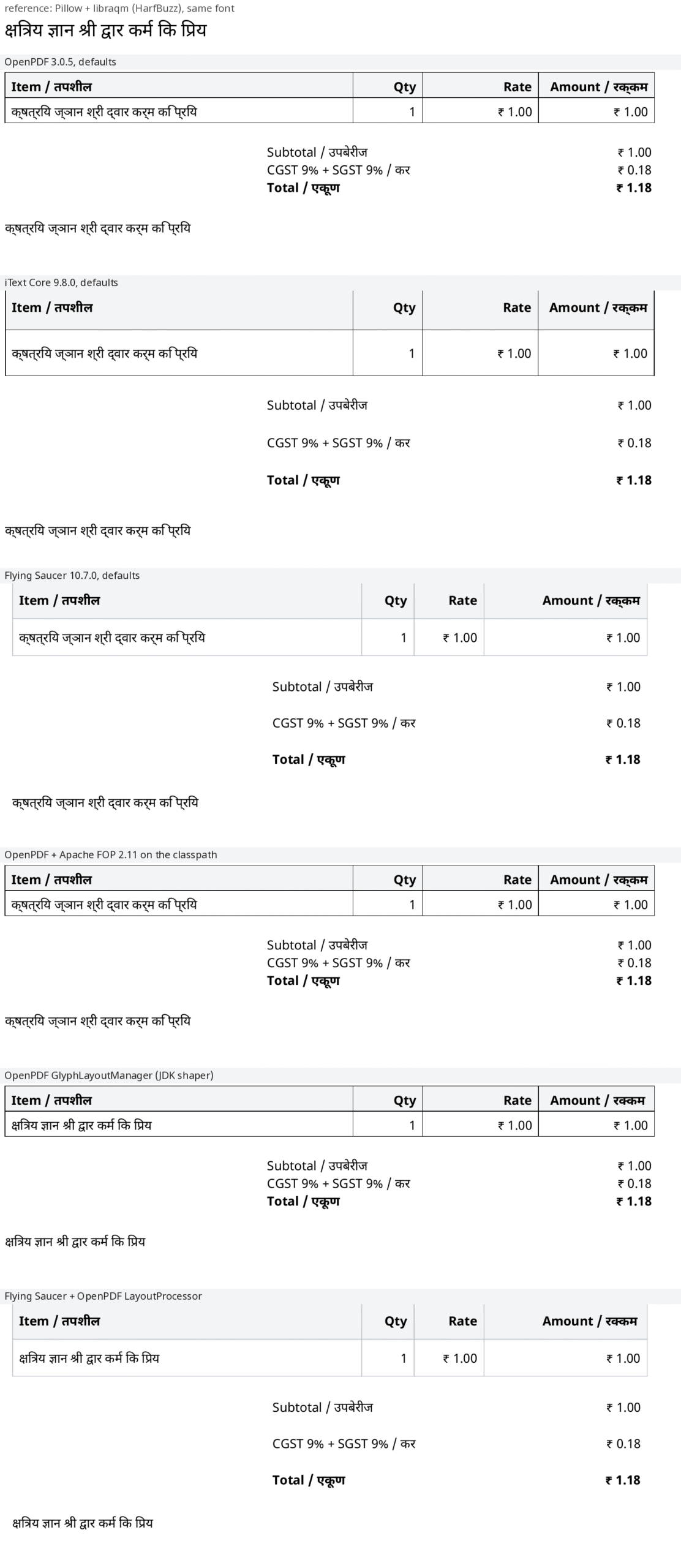
The picture is output/png/shaping-comparison.png. Top to bottom: the reference, OpenPDF, iText, Flying Saucer (all defaults), OpenPDF with Apache FOP on the classpath, OpenPDF with its GlyphLayoutManager, and Flying Saucer with OpenPDF’s LayoutProcessor switched on. What I saw: in the three default renderings क्ष and ज्ञ come out as a consonant, a visible halant and a second consonant, the ि of कि lands after its consonant, and the reph of कर्म sits beside the र instead of above. The two shaped renderings match the reference line.

GlyphCountTest (all fonts are Identity-H, two bytes per glyph):
openpdf                  glyph codes: 427
itext                    glyph codes: 423
flyingsaucer             glyph codes: 421
openpdf-jdk              glyph codes: 387
openpdf-jdk-actualtext   glyph codes: 387
flyingsaucer-shaped      glyph codes: 381
From output/04-glyph-counts.txt. The defaults write 427, 423 and 421; the shaped variants 387 and 381. The absolute numbers include spaces and differ by layout details, so read the gap between the groups, not the digits.
Result, per library, with defaults: OpenPDF 3.0.5 — broken conjuncts. iText Core 9.8.0 — broken conjuncts. Flying Saucer 10.7.0 — broken conjuncts (it writes through OpenPDF). Nothing in the documentation path I followed warns you, because the text is all there: a spell-checker, a copy-paste and a unit test that extracts the text will all pass. Only your eyes, or a customer, see it.
Making OpenPDF shape Devanagari: three switches, one that works
OpenPDF 3.0.5 ships three mechanisms in its jar. I tried all three on the same invoice.1. GlyphLayoutManager (works). OpenPDF can hand a string to java.awt.Font, whose text layout in the JDK uses a bundled HarfBuzz, and write the resulting glyph ids to the PDF. You load the font through the manager instead of BaseFont.createFont. From src/main/java/com/ankurm/pdfinvoice/OpenPdfInvoiceWriter.java:
if (shaping == Shaping.JDK || shaping == Shaping.JDK_ACTUAL_TEXT) {
    GlyphLayoutManager glm = new GlyphLayoutManager().setWriteActualText(shaping == Shaping.JDK_ACTUAL_TEXT);
    writer.setGlyphLayoutManager(glm);
    body = glm.loadFont("NotoSansDevanagari-Regular.ttf", new ByteArrayInputStream(FontBytes.load(FontBytes.REGULAR)), 10);
    strong = glm.loadFont("NotoSansDevanagari-Bold.ttf", new ByteArrayInputStream(FontBytes.load(FontBytes.BOLD)), 10);
    title = glm.loadFont("NotoSansDevanagari-Bold.ttf", new ByteArrayInputStream(FontBytes.load(FontBytes.BOLD)), 20);
}
The rendering matches the reference (the fifth row of the picture), and the glyph count drops as shown above. This needs the java.desktop module, which a normal JDK has; it ran here in a headless sandbox, because only font layout is used, not a display.
The price: the text layer breaks. A shaped glyph has no one-to-one path back to the code points that made it, so copy-paste, search and screen readers get the wrong text.PdfContentTestprinted what PDFBox extracts from the shaped invoice, written to output/01-text-extraction.txt:
The shaped page without ActualText extracts From / ववकेता and गाहक where the page shows विक्रेता and ग्राहक. Switching onsetWriteActualText(true)makes OpenPDF wrap each shaped run in PDF/ActualTextmarked content and fixes extraction: that is theopenpdf-jdk-actualtextengine, and its extraction matched all eight Devanagari strings the test asserts.
openpdf-jdk:            From / ववकेता Bill to / गाहक
                        Item / तपशील Qty Rate Amount / रककम
openpdf-jdk-actualtext: From / विक्रेता  Bill to / ग्राहक
                        Item / तपशील Qty Rate Amount / रक्कम
2. Apache FOP on the classpath (did not help). OpenPDF has an optional dependency on org.apache.xmlgraphics:fop; with it present, TextRenderingOptions switches on a GSUB-based path. I added FOP 2.11 through the fop Maven profile of the module (the resolved classpath grew to 121 jars, Batik among them), asked for glyph substitution, and rendered both the invoice and a plain paragraph. In the invoice’s table cells the output was visually the same as with no FOP (the fourth row of the picture); in a plain paragraph in a scratch test the viramas disappeared from the text altogether. That scratch test is not in the module, so treat the second half as a warning rather than a result: the FOP route did not give me correct Devanagari in the invoice, and I would not ship it.
3. The static LayoutProcessor (works, with a global-state trap). This older mechanism is what makes Flying Saucer shape: you cannot give Flying Saucer a GlyphLayoutManager, but you can register the fonts Flying Saucer created with OpenPDF’s static LayoutProcessor. The sixth row of the picture is the result. It is JVM-wide and deprecated. Run while it is enabled, every other OpenPDF writer in the process fails, which the module records:
openpdf: RuntimeException: Font creation failed for NotoSansDevanagari-Regular.ttf. | root cause IOException: NotoSansDevanagari-Regular.ttf not found as file or resource.
openpdf-jdk: IllegalStateException: LayoutProcessor is enabled. Don't use the deprecated LayoutProcessor! | root cause IllegalStateException: LayoutProcessor is enabled. Don't use the deprecated LayoutProcessor!
after LayoutProcessor.disable(): openpdf-jdk rendered normally
That is output/05-layoutprocessor-trap.txt, written by LayoutProcessorTrapTest. The shaped Flying Saucer writer therefore takes a global lock and calls LayoutProcessor.disable() in a finally; that makes it safe against itself, not against another thread rendering with plain OpenPDF at the same moment. Also, Flying Saucer still measures text without shaping, so column widths and right alignment are computed from unshaped widths while the drawn text is shaped. On this invoice nothing visibly collided; a table with tight, centred Devanagari cells might.
Going deeper: other routes I did not run
These are things people suggest; none was run for this post, so treat them as leads only. OpenHTMLtoPDF is a Flying Saucer fork that draws with PDFBox and has an optional HarfBuzz-based text shaper. Rendering the same HTML in headless Chromium (print to PDF) or LibreOffice uses HarfBuzz and would shape correctly; neither was available as a Java library in this sandbox, and both put a process boundary into your service. Pre-rendering the Devanagari text as an image or SVG outline avoids fonts altogether and costs you selectable text. And you can avoid the problem entirely by using the Latin transliteration on an invoice, which is a business decision, not an engineering one.
The font: free, embedded, and subset
Noto Sans Devanagari is licensed under the SIL Open Font License 1.1 (the licence file travels with the font in the module). GitHub raw downloads were blocked in the sandbox, so the variable font came from the jsDelivr mirror of thegoogle/fonts repository; scripts/make_fonts.py cuts static Regular and Bold instances from it, because OpenPDF and iText read only the default master of a variable font. Each file is about 218 KB. A PDF that embeds the whole font would be about that much bigger; all three libraries embed a subset instead, which pdffonts confirms:
name                                 type              encoding         emb sub uni object ID
------------------------------------ ----------------- ---------------- --- --- --- ---------
QVECCU+NotoSansDevanagari-Bold       CID TrueType      Identity-H       yes yes yes      1  0
LWDRDP+NotoSansDevanagari-Regular    CID TrueType      Identity-H       yes yes yes      2  0
From output/03-pdffonts-and-producer.txt: emb yes, sub yes, a six-letter subset tag before the name. Re-rendering with subsetting turned off gives this (one render each, from output/06-bench.txt):
openpdf                    subset=20025 bytes, whole font=186300 bytes
itext                      subset=23330 bytes, whole font=200149 bytes
flyingsaucer               subset=19996 bytes, whole font=186308 bytes
openpdf-jdk-actualtext     subset=22268 bytes, whole font=187399 bytes
flyingsaucer-shaped        subset=21525 bytes, whole font=186691 bytes
Serving it: streaming a PDF, and what a failure looks like
A controller can return the PDF two ways.StreamingResponseBody hands you the servlet output stream and the library writes straight into it, with no whole-file buffer. The alternative is to render into a byte[] first. The difference is not memory; it is what happens when rendering fails half-way.
Content-Length and costs heap proportional to the file. For an invoice of about 20 KB that cost is nothing; for a 500-page statement it is the reason to stream and to validate your data before the first byte.
From src/main/java/com/ankurm/pdfinvoice/InvoiceController.java:
ContentDisposition cd = ("inline".equals(disposition) ? ContentDisposition.inline() : ContentDisposition.attachment())
        .filename("बिल-" + number + ".pdf", StandardCharsets.UTF_8)
        .build();

if ("buffered".equals(mode)) {
    ByteArrayOutputStream buf = new ByteArrayOutputStream(64 * 1024);
    writer.write(invoice, buf);               // an exception here is still a clean 500
    if (failAtEnd) {
        throw new IllegalStateException("simulated failure after rendering");
    }
    byte[] bytes = buf.toByteArray();
    return ResponseEntity.ok()
            .header(HttpHeaders.CONTENT_DISPOSITION, cd.toString())
            .contentType(MediaType.APPLICATION_PDF)
            .contentLength(bytes.length)
            .body(out -> out.write(bytes));
}
return ResponseEntity.ok()
        .header(HttpHeaders.CONTENT_DISPOSITION, cd.toString())
        .contentType(MediaType.APPLICATION_PDF)
        .body(out -> {
    ...
What the server answered, from output/02-endpoints.txt (the failure is simulated with ?failAtEnd=true, thrown after the PDF has been written):
--- GET /invoices/openpdf.pdf
HTTP/1.1 200
Content-Disposition: attachment; filename="__-INV-2026-0042.pdf"; filename*=UTF-8''%E0%A4%AC%E0%A4%BF%E0%A4%B2-INV-2026-0042.pdf
Content-Type: application/pdf
Transfer-Encoding: chunked
--- GET /invoices/openpdf.pdf?mode=buffered
HTTP/1.1 200
Content-Length: 20039
--- GET /invoices/openpdf.pdf?failAtEnd=true   (streamed: headers are already gone when the failure happens)
HTTP/1.1 200
Transfer-Encoding: chunked
curl exit=18 bytes_received=20039
--- GET /invoices/openpdf.pdf?failAtEnd=true&mode=buffered   (rendered into memory first)
HTTP/1.1 500
curl exit=0 bytes_received=116HTTP/1.1 200, chunked, and curl exits with code 18 (partial file) after receiving 20039 bytes — here the whole PDF had already arrived, so the browser would probably show a file that looks fine, but with a real mid-render failure it would be a truncated PDF behind a success status. The buffered failure is a plain 500. The Marathi file name goes out as an RFC 6266 filename*=UTF-8'' parameter, which Spring’s ContentDisposition builds for you, next to an ASCII fallback with underscores.
Do not callwriter.close()on the servlet stream, and do not render twice. All three writers are told not to close the stream they were given (setCloseStream(false)in OpenPDF and iText,createPDF(out, false)in Flying Saucer), because Spring owns that stream. Also,mode=bufferedin this module renders once and sends those bytes; a common mistake is to render once to get the length and once more to stream.
The streaming and cross-linking sibling posts cover related ground: File Upload and Download in Spring Boot 4 for Range and large downloads, and Export Excel and CSV from Spring Boot, which is the same streaming-versus-memory argument for spreadsheets. Marathi and Hindi text in Spring itself is covered in Internationalization (i18n) in Spring Boot 4.
How big and how fast
Bench renders N invoices per engine in one JVM after a warm-up pass and prints the first (cold) invoice separately. This is a shared 2-vCPU sandbox, one run per line, other jobs were running on the same machine, and the font is re-read for every invoice: take the ratios between rows, not the milliseconds.
# n=500 invoices per engine after 100 warm-up, one JVM, engines run one after another
# OpenJDK 64-Bit Server VM 25.0.5 | 2 vCPU
engine                       first_ms    mean_ms     p95_ms    total_s  pdf_bytes
openpdf                         377.0       7.93      18.89       3.96      20034
itext                           330.9      15.88      36.38       7.94      23338
flyingsaucer                   1163.4      28.05      57.66      14.02      20008
openpdf-jdk-actualtext          423.5      42.89     107.47      21.45      22281
flyingsaucer-shaped             107.5      49.99      93.45      24.99      21537
From output/06-bench.txt. Read it as an ordering, not as milliseconds: OpenPDF is the cheapest per invoice (20,034 bytes, 7.9 ms mean in this run), iText next (23,338 bytes, 15.9 ms), Flying Saucer after that (20,008 bytes, 28.1 ms) because it parses XML, resolves CSS and lays out boxes for every invoice, and the two shaped variants are the slowest (22,281 bytes and 42.9 ms for OpenPDF with the JDK shaper and ActualText, 21,537 bytes and 50.0 ms for shaped Flying Saucer). The benchmark was run more than once while other jobs shared the machine and the ratios between rows moved, and only this run is committed, so the ordering is the finding. The first-invoice column is dominated by class loading and by which engine ran first in that JVM, so it is not a fair cold-start comparison. File sizes are 20 to 23 KB for every engine.
Shared state hid a bug in my own benchmark. My first subset measurement said the shaped OpenPDF engine always embeds the whole font. It did not: OpenPDF cachesBaseFontinstances by name for the whole JVM, and an earlier engine had switched subsetting off on the shared instance, so the shaped engine inherited it. The writer now sets the flag on every render. If you togglesetSubset(false)anywhere, you toggle it for every writer in the process that uses the same cached font.
Going deeper: what I did not measure
No heap or allocation figures were taken, only wall-clock time on one shared 2-vCPU machine, with no concurrent requests. All engines read the same two font files on every invoice, which a real service would cache; with caching the gap between OpenPDF and the others would be different. Large documents (hundreds of pages) were not tested, so the claim that streaming “pays off” for statements is a design argument, not a measurement here.
Testing a PDF: assert on the text, then do not trust it
The cheap, reliable test is to read the PDF back with Apache PDFBox and assert on the extracted text: the invoice number, the line items, the totals. It catches a missing font, a wrong total and a dropped section.PdfContentTest does this for every engine; it also asserts that each font is embedded and carries a subset tag, and that the file stays under 60 KB.
From src/test/java/com/ankurm/pdfinvoice/PdfContentTest.java:
void thePdfCarriesTheInvoiceNumbersAndTheCorrectTotals(String engine) throws Exception {
    byte[] pdf = render(engine);
    assertThat(new String(pdf, 0, 5, StandardCharsets.US_ASCII)).isEqualTo("%PDF-");
    String t = text(pdf);
    assertThat(t).contains("INV-2026-0042", "Spring Boot 4 Handbook", "₹ 3,474.50", "₹ 625.41", "₹ 4,099.91");
    try (PDDocument doc = Loader.loadPDF(pdf)) {
        assertThat(doc.getNumberOfPages()).isEqualTo(1);
    }
    log(engine, pdf.length, t);
}
A passing text-extraction test says nothing about shaping. The unshaped engines draw broken conjuncts and extract perfectly, because they write one glyph per code point and the PDF maps each glyph straight back. The shaped engine draws correctly and extracts wrongly unless ActualText is on. The test class pins both directions, inunshapedTextExtractsPerfectlyandshapedWithoutActualTextDrawsRightButExtractsWrong. For the look of the page there is no substitute for rendering it (pdftoppm -png) and viewing it;GlyphCountTestgives a number that moves when shaping happens, but it is a proxy.
Which one should you pick?
| If you’re… | Use | Because |
|---|---|---|
| building a Latin-script invoice from Java, closed source | OpenPDF | LGPL/MPL; fastest per invoice in this run |
| needing Marathi or Hindi that renders correctly, from Java | OpenPDF with GlyphLayoutManager and ActualText | the only route here that shaped correctly with a sound text layer; slower |
| with a designer-owned HTML/CSS template | Flying Saucer | CSS layout; Devanagari needs the global LayoutProcessor workaround |
| able to open-source your service under AGPL, or buy a licence | iText Core | the nicest API; shaping needs the proprietary add-on (not run) |
Should you even generate the PDF yourself? If the invoice has to be legally archivable (PDF/A), signed, or e-invoicing compliant, none of this post is enough: that is a conformance problem and a commercial-licence conversation, and a hosted or desktop document service may be cheaper than the engineering. If the customer only needs the numbers, send an HTML email or CSV. And if Marathi or Hindi text matters to your customers, view your output before every release: the failure is silent, and the code that produces it passes every test that only reads text.
What I did not test
- iText’s pdfCalligraph add-on (proprietary licence, needs a key).
- Any viewer other than poppler’s renderer: Adobe Acrobat, Chrome’s PDF viewer and mobile viewers may differ in how they treat the shaped glyph streams.
- PDF/A, PDF/UA, signatures, multi-page invoices, headers and footers.
- Concurrent rendering and heap use; the benchmark is sequential and in one JVM.
- OpenHTMLtoPDF, headless Chromium and LibreOffice as alternatives.
- Other Indic scripts (Tamil, Bengali) and right-to-left scripts.
- The FOP route beyond the invoice itself; the scratch test that showed vanishing viramas is not in the repository.
Further reading
- The companion module, with the README indexing every captured output
- File Upload and Download in Spring Boot 4
- Export Excel and CSV from Spring Boot
- Spring Boot 4 + Thymeleaf + htmx
- Internationalization (i18n) in Spring Boot 4
- OpenPDF
- iText AGPLv3 licence page
- Flying Saucer
- SIL Open Font License 1.1
- RFC 6266: Content-Disposition in HTTP
No Comments yet!