
In this post, we implement the Discrete Cosine Transform (DCT) and its inverse (IDCT) on a grayscale image in MATLAB. The DCT is the mathematical backbone of JPEG image compression: it converts spatial pixel data into frequency coefficients, allowing low-energy (high-frequency) components to be discarded with minimal perceptual loss. The IDCT reconstructs the image from those coefficients.
MATLAB Code
% Implementing DCT and IDCT on an Image in MATLAB
% Shows the original image, its DCT coefficient map, and the IDCT reconstruction.

clc;        % Clear the command window
clear all;  % Clear all workspace variables

% --- Load and prepare image ---
% Place your image in the MATLAB working directory.
originalImage = imread('sample.jpg');       % Read the colour image
grayImage     = rgb2gray(originalImage);    % Convert to grayscale

[numRows, numCols] = size(grayImage);       % Get image dimensions

% --- Forward DCT (2D) ---
% dct2() computes the 2-D Discrete Cosine Transform.
% The output Y contains DCT coefficients (frequency domain).
dctCoefficients = dct2(double(grayImage));  % Cast to double for precision

% --- Inverse DCT ---
% idct2() reconstructs the image from the DCT coefficients.
% Ideally the reconstruction should match the original exactly.
reconstructedImage = idct2(dctCoefficients);

% --- Display results ---
subplot(2, 3, 1);
imshow(originalImage);
title('Original Colour Image');

subplot(2, 3, 2);
imshow(grayImage);
title('Grayscale Image');

subplot(2, 3, 3);
imshow(dctCoefficients, [0, 255]);
title('DCT Coefficients');

subplot(2, 3, 4);
imshow(reconstructedImage, [0, 255]);
title('IDCT (Reconstructed)');
How the Code Works
- Image preparation — The colour image is loaded with
imread()and converted to grayscale withrgb2gray().double()casts the uint8 pixel values to floating-point so thatdct2()can work with full precision. - dct2() — Applies the 2-D Discrete Cosine Transform to the entire image matrix. The top-left corner of the output contains low-frequency (DC) coefficients that carry most of the image energy; the bottom-right contains high-frequency detail.
- idct2() — Applies the inverse transform to convert the frequency-domain coefficients back to the spatial domain. With no compression applied, the reconstruction should be numerically identical to the original.
- Display scaling — The DCT coefficient matrix contains a very wide range of values. Passing
[0, 255]toimshow()scales the display so that the coefficient map is visible as an image. - subplot(2, 3, k) — Organises up to six subplots in a 2-row, 3-column grid. The unused positions remain blank.
Sample Output
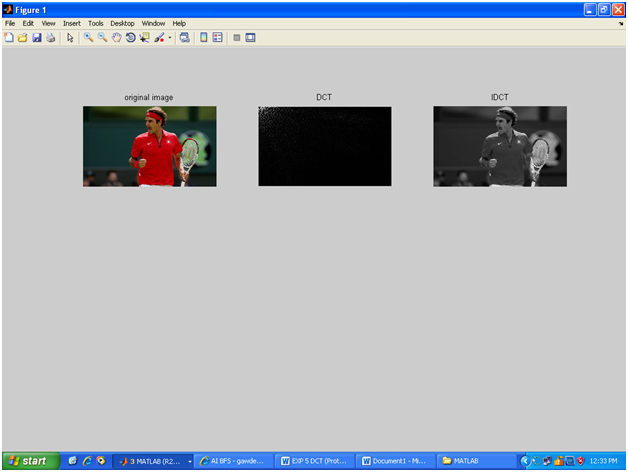
Running the program with any colour JPEG opens a figure window showing the original colour image, the grayscale version, the DCT coefficient map, and the IDCT-reconstructed image. No text is printed to the command window.
Output Explanation
- Original Colour Image — The full RGB image as loaded.
- Grayscale Image — The input to the DCT. Only intensity information is retained.
- DCT Coefficients — The transformed image looks mostly black with a bright spot in the top-left corner. This bright region represents the low-frequency DC component that dominates image energy. The rest of the image (high frequencies) has near-zero energy and appears dark.
- IDCT Reconstruction — Visually identical to the grayscale original, confirming that the DCT is lossless when all coefficients are retained. In JPEG compression, some high-frequency coefficients are zeroed before the IDCT step to reduce file size.
See Also
- Implementing DFT in MATLAB
- Implementation of Histogram Processing in MATLAB
- Implementing Digital Negative and Grayscale of Image in MATLAB
- Plotting Linear and Circular Convolution with MATLAB
Conclusion
The DCT is one of the most important transforms in image and video compression. This MATLAB program demonstrates the full forward-and-inverse cycle on a real image, showing that the reconstruction is lossless when all coefficients are preserved. Understanding the DCT at this level is essential before exploring how JPEG selectively discards high-frequency coefficients to achieve compression while maintaining visual quality.
No Comments yet!