
You are building a data access layer that must work with both MySQL and PostgreSQL. You have MySQLConnection, MySQLStatement, MySQLResultSet and matching PostgreSQL classes. The risk: a MySQLConnection used together with a PostgreSQLStatement is a runtime error waiting to happen. The objects in a family must be used together consistently. The Abstract Factory pattern enforces that consistency.
This guide builds the pattern from the ground up using a realistic UI theme scenario — dark and light themes — so the “family” concept is immediately tangible. Once the structure is clear, you will see exactly how JDBC in the Java standard library uses the same idea.
Tested with Java 25. All examples compile and run with no external dependencies.
The Problem: Mixing Products From Different Families
Imagine a UI library with two visual themes: Light and Dark. Each theme has matching components: a button, a text field, and a checkbox. Each component has distinct colors, fonts, and borders tuned for its theme. You need to ensure that an application running in Dark mode does not accidentally render a single Light-themed button in the middle of the screen.
With separate new LightButton() and new DarkButton() calls scattered across the codebase, the compiler cannot stop you from mixing them. Any developer can instantiate a Light button when they meant Dark. Abstract Factory prevents this by providing a single interface that creates an entire consistent family — you can only ever get a matched set.
What Is the Abstract Factory Pattern?
The Abstract Factory is a creational design pattern. It provides an interface for creating families of related or dependent objects without specifying their concrete classes.
“Provide an interface for creating families of related or dependent objects without specifying their concrete classes.” — Design Patterns, Gamma et al.
The key phrase is families of related objects. This is what distinguishes Abstract Factory from Factory Method. Factory Method creates one type of object via one overridable method. Abstract Factory creates several related types via a group of factory methods on a single interface — and ensures you always get a matched set from one family at a time.
The Five Building Blocks — Mapped to Our Example
Before looking at code, here are the five roles the pattern uses, mapped to our UI theme example so nothing feels abstract.
| GoF Term | In Our Example | What It Does |
|---|---|---|
| Abstract Factory | UIFactory interface | Declares factory methods for each product type in the family. Client code only knows this interface. |
| Concrete Factory | LightThemeFactory, DarkThemeFactory | Implements all factory methods to return a consistent family — all Light or all Dark products. |
| Abstract Product | Button, TextField interfaces | The contract each product type must fulfill. Client code talks to these interfaces, never to concrete classes. |
| Concrete Product | LightButton, DarkButton, LightTextField, DarkTextField | The actual implementations. Each belongs to exactly one family. |
| Client | Application | Uses only the Abstract Factory and Abstract Product interfaces. Never references a concrete class — which is what makes it portable across families. |
💡 The Core Idea: You pass a factory object to the client, not a product. The factory decides the entire family. The client asks the factory for what it needs and gets consistent objects every time, without knowing which family it is running in.
How the UML Diagram Maps to Our Code
Now that you know the five roles by name, the structure diagram is straightforward:
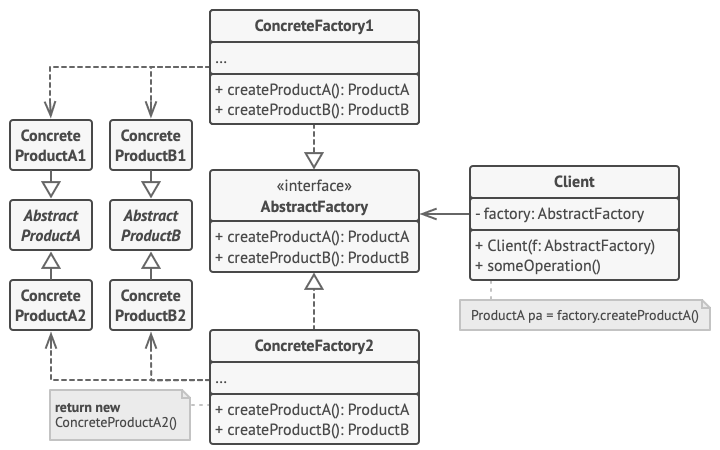
UIFactory. “ConcreteFactory1” = our LightThemeFactory. “ConcreteFactory2” = our DarkThemeFactory. “AbstractProductA” = our Button. “AbstractProductB” = our TextField. Diagram credit: Refactoring.GuruNotice the two concrete factories on the left, each implementing all the factory methods. The products on the right belong to their family column. The Client (not shown) only holds a reference to UIFactory (top center) and calls its methods to get products. It never reaches down to the concrete rows.
Building the Pattern Step by Step
Part 1 — The Abstract Products: Button and TextField
We start by defining what each product type must be able to do, independently of any theme. These interfaces are the Abstract Products — all that the Client code will ever reference.
Button.java
// Every button, regardless of theme, must be able to render and handle clicks
public interface Button {
    void render();   // draw on screen
    void onClick();  // respond to a click event
}
Next, the matching text field contract:
TextField.java
// Every text field must be able to render and return its value
public interface TextField {
    void render();
    String getValue();
}
These two interfaces are the only types the Application client will work with. The client will never declare a variable of type LightButton — only Button. This keeps the client isolated from the family choice.
Part 2 — The Concrete Products: Four Implementations, Two Families
Now we implement the four Concrete Products — two buttons (one per theme) and two text fields (one per theme). Each concrete class knows only about its own theme’s visual style.
Here is the Light theme family, starting with the button:
LightButton.java
public class LightButton implements Button {
    @Override
    public void render() {
        System.out.println("[Light Button] White background, dark text, 1px gray border");
    }
    @Override
    public void onClick() {
        System.out.println("[Light Button] Subtle gray ripple effect");
    }
}
Its text field counterpart, same family:
LightTextField.java
public class LightTextField implements TextField {
    private String value = "";
    @Override
    public void render() {
        System.out.println("[Light TextField] White background, dark placeholder text");
    }
    @Override
    public String getValue() { return value; }
}
Now the Dark theme family — same shape as Light, different styling, and it never references any Light class:
DarkButton.java
public class DarkButton implements Button {
    @Override
    public void render() {
        System.out.println("[Dark Button] Charcoal background, white text, no border");
    }
    @Override
    public void onClick() {
        System.out.println("[Dark Button] Bright highlight ripple effect");
    }
}
And its text field:
DarkTextField.java
public class DarkTextField implements TextField {
    private String value = "";
    @Override
    public void render() {
        System.out.println("[Dark TextField] Dark gray background, light placeholder text");
    }
    @Override
    public String getValue() { return value; }
}
Note that LightButton and DarkButton have no knowledge of each other. They are independent implementations of the same interface. The family relationship exists only in the factory, which we define next.
Part 3 — The Abstract Factory: UIFactory Interface
This is the central interface of the pattern. UIFactory declares one factory method for each product type. Notice that every return type is an Abstract Product interface, never a concrete class. This is the contract that all theme factories must implement.
UIFactory.java
public interface UIFactory {

    // Factory method for buttons — returns the abstract type, not LightButton or DarkButton
    Button createButton();

    // Factory method for text fields — same principle
    TextField createTextField();

    // Adding a new product type (e.g., Checkbox) means adding a method here
    // AND implementing it in every Concrete Factory. This is the one cost of the pattern.
}
Every concrete factory must implement all of these methods. This constraint is what guarantees consistency: a factory that implements UIFactory must provide a complete, matched set of products for its family.
Part 4 — The Concrete Factories: LightThemeFactory and DarkThemeFactory
Each Concrete Factory implements UIFactory and returns only products from its own family. The Light factory only creates Light products; the Dark factory only creates Dark products. The compiler enforces this through the interface.
LightThemeFactory.java
public class LightThemeFactory implements UIFactory {

    @Override
    public Button createButton() {
        return new LightButton();       // Only Light products come from this factory
    }

    @Override
    public TextField createTextField() {
        return new LightTextField();
    }
}
And the Dark theme factory — identical shape, different products:
DarkThemeFactory.java
public class DarkThemeFactory implements UIFactory {

    @Override
    public Button createButton() {
        return new DarkButton();        // Only Dark products come from this factory
    }

    @Override
    public TextField createTextField() {
        return new DarkTextField();
    }
}
The factories are small by design. Their only purpose is to centralize the family-specific creation decision. Everything else lives in the products themselves.
Part 5 — The Client: Application
The Client is the application code that uses the UI components. It receives a UIFactory at construction time — it never knows or cares which theme is active. It just asks the factory for what it needs and uses the resulting Button and TextField objects through their interfaces.
Application.java
public class Application {

    // The client holds references to the Abstract Factory and Abstract Products.
    // It never imports LightButton, DarkButton, or any concrete class.
    private final UIFactory factory;
    private Button submitButton;
    private TextField usernameField;

    public Application(UIFactory factory) {
        this.factory = factory;  // theme is injected; client doesn't decide
    }

    public void buildUI() {
        // Ask the factory — get consistent products from the same family
        submitButton = factory.createButton();
        usernameField = factory.createTextField();
    }

    public void render() {
        System.out.println("Rendering login screen:");
        usernameField.render();
        submitButton.render();
    }

    public void simulateSubmit() {
        submitButton.onClick();
    }
}
The entry point wires everything together. It is the only file that ever names a concrete factory class:
Main.java
// Entry point: the ONLY place that knows the theme
public class Main {
    public static void main(String[] args) {

        // Production: read theme from config or OS preference
        String theme = System.getProperty("app.theme", "light");
        UIFactory factory = "dark".equals(theme) ? new DarkThemeFactory() : new LightThemeFactory();

        Application app = new Application(factory);
        app.buildUI();
        app.render();
        app.simulateSubmit();
    }
}
Running this (compiled and executed locally on Java 25) with the default theme prints:
Rendering login screen:
[Light TextField] White background, dark placeholder text
[Light Button] White background, dark text, 1px gray border
[Light Button] Subtle gray ripple effect
Pass -Dapp.theme=dark on the command line and every line of output switches to the Dark family instead — same client code, same workflow, only the injected factory changes.
The main method is the only location that references a concrete factory class. Every other file — Application, any controller, any renderer — works exclusively with UIFactory, Button, and TextField. Switching from light to dark theme is a one-line change in one place, and nothing else in the codebase changes.
Adding a New Theme: What Changes?
Adding a High-Contrast theme requires creating exactly three new files: HighContrastButton, HighContrastTextField, and HighContrastFactory. No existing files change — not UIFactory, not Application, not the existing theme classes. This is the pattern’s primary benefit.
Adding a new product type (say, Checkbox) is the harder case. You must add createCheckbox() to UIFactory and implement it in every existing factory. This is the pattern’s primary cost. If you have many factories and expect frequent new product types, this overhead grows. Factor this in when deciding whether to use Abstract Factory.
⚠️ Watch Out: If your “family” currently has only one product type, you probably need Factory Method, not Abstract Factory. Add Abstract Factory when a second (or third) related product type appears and they must stay consistent with the first.
Abstract Factory in the Java Standard Library: JDBC
JDBC is one of the clearest examples of Abstract Factory in the JDK. The JDBC interfaces are the Abstract Products, and each database vendor’s driver is a Concrete Factory that creates a consistent family of driver-specific implementations.
| Abstract Factory Role | JDBC Equivalent | MySQL Concrete | PostgreSQL Concrete |
|---|---|---|---|
| Abstract Factory | Connection (produces Statements) | JDBC4Connection | PgConnection |
| Factory Method 1 | connection.createStatement() | StatementImpl | PgStatement |
| Factory Method 2 | connection.prepareStatement(sql) | PreparedStatementImpl | PgPreparedStatement |
| Abstract Product A | Statement | MySQL’s Statement | PostgreSQL’s Statement |
| Abstract Product B | PreparedStatement | MySQL’s PreparedStatement | PostgreSQL’s PreparedStatement |
// Your application code works with the JDBC interfaces (Abstract Products).
// The concrete factory (Connection) is determined by the JDBC URL at startup.

Connection conn = DriverManager.getConnection("jdbc:mysql://localhost/mydb", user, pass);
// DriverManager returns a MySQLConnection (Concrete Factory)

// conn.createStatement() is a factory method — returns MySQL's concrete Statement
Statement stmt = conn.createStatement();

// conn.prepareStatement() is another factory method — also MySQL-specific
PreparedStatement ps = conn.prepareStatement("SELECT * FROM users WHERE id = ?");

// Your code uses Statement and PreparedStatement (Abstract Products).
// Swap the JDBC URL to postgres:// and you get PostgreSQL implementations —
// the application code is unchanged.
This is why you can write database-agnostic JDBC code. Your code talks to Connection, Statement, and PreparedStatement — the abstract products. The vendor driver provides the concrete factory and concrete products transparently.
Abstract Factory vs. Factory Method
| Factory Method | Abstract Factory | |
|---|---|---|
| Creates | One product type | A family of related product types |
| How | One abstract method subclasses override | An interface with multiple factory methods |
| Polymorphism axis | Subclassing the creator class | Switching the factory object (composition) |
| Use when | You have one thing to create, extensible by type | You have multiple things that must stay consistent |
| JDK example | Collection.iterator() | JDBC Connection |
Abstract Factory is often implemented using Factory Methods internally — each method on UIFactory is itself a factory method. The distinction is at the level of intent: one product vs. a family of products.
When to Use Abstract Factory — and When to Skip It
Reach for Abstract Factory when: Your system must work with multiple families of products (multiple databases, multiple themes, multiple platform backends). Products within a family must be used together and mixing families is a correctness error, not just an aesthetic issue. You want to enforce consistency at compile time rather than relying on developer discipline.
Skip it when: You only have one product type — use Factory Method instead. Your product families are unlikely to grow beyond one — a plain factory class or even a static factory method is simpler. You are in a Spring application where the DI container can select and inject the right implementation automatically via @ConditionalOnProperty or profiles.
✅ Best Practice: Inject the Abstract Factory through the constructor (as shown with Application). Never let the client discover the factory via a static call or a global singleton — that defeats the testability advantage of the pattern.
Frequently Asked Questions
Does Abstract Factory have to use interfaces, or can it use abstract classes?
Either works. Interfaces are preferred in modern Java because they allow concrete factories to extend another class if needed. Use an abstract class for the factory only when the factory methods share common implementation logic worth inheriting.
How does this work with Spring?
In Spring, you can define each concrete factory as a @Bean method inside a @Configuration class, and use @ConditionalOnProperty or @Profile to select which factory gets injected. Spring’s context then injects the chosen factory wherever UIFactory is declared as a dependency — the application code is oblivious to the selection.
What if I need to mix products from two families in one edge case?
Abstract Factory deliberately makes this hard — that is part of its value. If you genuinely need a mixed case, the “families” are not as strict as you thought, and a simpler design (individual Factory Methods or direct construction) may be more appropriate. Forcing a cross-family mix through an Abstract Factory usually means the abstraction boundary is wrong.
5 AI Prompts for Abstract Factory
- “I have two implementations of [ServiceA] and [ServiceB] that must always be used together — implementation 1 of A must pair with implementation 1 of B. Refactor this into an Abstract Factory. Show the factory interface, two concrete factories, and how the client uses only the interface.”
- “Explain how JDBC implements the Abstract Factory pattern. Map Connection, Statement, PreparedStatement, and ResultSet to the GoF roles (AbstractFactory, AbstractProduct, ConcreteFactory, ConcreteProduct).”
- “I’m using Spring Boot 3. Show me how to select an Abstract Factory implementation at runtime using @ConditionalOnProperty so that ‘feature.theme=dark’ in application.properties injects DarkThemeFactory wherever UIFactory is wired.”
- “Write JUnit 5 parameterized tests for an application that accepts a UIFactory. Show how to pass both LightThemeFactory and DarkThemeFactory as parameters and assert that render() produces the expected output for each.”
- “When should I prefer Abstract Factory over Strategy pattern? Give me two concrete examples where Abstract Factory is the right choice and two where Strategy fits better.”
Conclusion
Abstract Factory solves a precise problem: enforcing that a set of related objects always comes from the same consistent family. The factory interface groups all the creation decisions for a family into one place; each concrete factory implements that interface for one family. The client works entirely through the abstract interfaces and never touches a concrete class — which is what makes swapping families a one-line change.
You have been using Abstract Factory every time you wrote JDBC code — the database driver is the concrete factory, and your Statement and PreparedStatement objects are the products from that family. Recognizing that structure in existing APIs and in your own design problems is the first step to applying it deliberately.
See Also
- Factory Method Design Pattern in Java — creating one product type via subclassing, the simpler sibling pattern
- Builder Design Pattern in Java — for constructing a single complex object with many optional parts
- Singleton Design Pattern in Java — ensuring only one instance of your factory exists
Further Reading
- Abstract Factory — Refactoring.Guru
- Abstract Factory Pattern in Java — Baeldung
- Design Patterns: Elements of Reusable Object-Oriented Software — Gamma, Helm, Johnson, Vlissides, Chapter 3
- Effective Java, 3rd Edition — Joshua Bloch, Item 1 (static factories as an alternative for simple cases)
No Comments yet!