
You need to create a HttpRequest object. It has a URL, a method, headers, a body, a timeout, authentication credentials, proxy settings, and retry configuration. Most of these are optional. How do you construct it? A constructor with 8 parameters is unreadable — which argument is the timeout and which is the retry count? A setter-based approach leaves the object in an inconsistent half-configured state until the last setter is called. The Builder pattern gives you a third option: a fluent, readable, safe construction API.
This guide builds the Builder pattern from the problem it solves to a full implementation, covers Lombok’s @Builder shortcut, and explains the Director role that many tutorials skip.
Tested with Java 25. All examples compile and run with no external dependencies. Lombok examples require Lombok on the classpath.
The Problem: Telescoping Constructors
The classic symptom is telescoping constructors — a chain of overloads where each one calls the next with a default for the new optional parameter:
public class HttpRequest {
    public HttpRequest(String url) {
        this(url, "GET");
    }
    public HttpRequest(String url, String method) {
        this(url, method, null);
    }
    public HttpRequest(String url, String method, String body) {
        this(url, method, body, 30_000);
    }
    public HttpRequest(String url, String method, String body, int timeoutMs) {
        this(url, method, body, timeoutMs, null);
    }
    // ... five more overloads ...
}

// At the call site, which argument is the timeout? Which is the retry count?
new HttpRequest("https://api.example.com", "POST", body, 5000, null, 3, false);
The last line is unreadable without looking up the constructor signature. Add two more parameters next month and every call site breaks. Swap the order of two int parameters and the compiler will not warn you — but your request will have the wrong timeout. This is what Builder is designed to prevent.
What Is the Builder Pattern?
The Builder is a creational design pattern. It separates the construction of a complex object from its representation, letting you produce different configurations using the same construction process.
“Separate the construction of a complex object from its representation so that the same construction process can create different representations.” — Design Patterns, Gamma et al.
In practice: instead of passing all parameters to one constructor, you call setter-like methods on a builder object — one per field, each with a descriptive name — and call build() at the end to get the fully-configured, immutable product. The product is never in a half-configured state.
The Four Building Blocks — Mapped to Our Example
| GoF Term | In Our Example | What It Does |
|---|---|---|
| Product | HttpRequest | The complex object being built. Immutable — all fields set in constructor, no setters. |
| Builder | HttpRequest.Builder (static inner class) | Accumulates configuration via fluent methods. Creates the Product in build(). |
| Director | HttpClientConfig | Optional. Encodes a specific, named configuration sequence. Useful for common presets. |
| Client | Code that calls the builder | Creates a builder, sets the fields it cares about (skipping the rest), calls build(). |
💡 The Core Idea: The Builder separates what you are building (the Product’s final structure) from how you configure it (the individual builder method calls). The Product is immutable; the Builder is the mutable scratch pad used to construct it.
How the UML Diagram Maps to Our Code
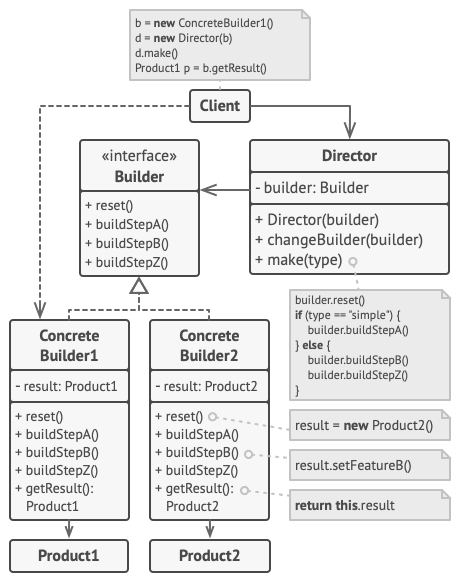
HttpClientConfig. “Builder” = our HttpRequest.Builder. “Product” = our HttpRequest. Diagram credit: Refactoring.GuruThe Director (top left) holds a Builder reference and calls its methods in a specific order to produce a preset configuration. The Client can use the Director for common presets, or talk to the Builder directly for custom configurations. The Builder creates the Product internally and returns it through getResult() (or in our case, build()).
Building the Pattern Step by Step
Part 1 — The Product: HttpRequest (Immutable)
The Product is the object you are trying to create — HttpRequest. Two design decisions matter here: all fields are final (the object cannot change after creation), and the constructor is private (the only way to create an HttpRequest is through the Builder). The Builder class is a static inner class so it has access to the private constructor.
HttpRequest.java
import java.util.Collections;
import java.util.HashMap;
import java.util.Map;
import java.util.Objects;

public final class HttpRequest {

    // All fields are final: the object is immutable after build() returns.
    private final String url;
    private final String method;
    private final String body;
    private final Map<String, String> headers;
    private final int timeoutMs;
    private final int maxRetries;

    // Private: the only path to an HttpRequest is through Builder.build()
    private HttpRequest(Builder builder) {
        this.url        = Objects.requireNonNull(builder.url, "URL is required");
        this.method     = builder.method;
        this.body       = builder.body;
        this.headers    = Collections.unmodifiableMap(new HashMap<>(builder.headers));
        this.timeoutMs  = builder.timeoutMs;
        this.maxRetries = builder.maxRetries;
    }

    // Getters only — no setters, enforcing immutability
    public String getUrl()          { return url; }
    public String getMethod()       { return method; }
    public String getBody()         { return body; }
    public Map<String, String> getHeaders() { return headers; }
    public int getTimeoutMs()       { return timeoutMs; }
    public int getMaxRetries()      { return maxRetries; }

    @Override
    public String toString() {
        return String.format("%s %s (timeout=%dms, retries=%d, headers=%s, body=%s)",
            method, url, timeoutMs, maxRetries, headers, body);
    }

    // -----------------------------------------------------------------------
    // THE BUILDER — static inner class so it can call the private constructor
    // -----------------------------------------------------------------------
    public static class Builder {

        // Required field — no default, must be set
        private String url;

        // Optional fields with sensible defaults
        private String method     = "GET";
        private String body       = null;
        private Map<String, String> headers = new HashMap<>();
        private int timeoutMs     = 30_000;  // 30 seconds
        private int maxRetries    = 0;

        // Fluent methods: each returns 'this' so calls can be chained
        public Builder url(String url)              { this.url = url; return this; }
        public Builder method(String method)        { this.method = method; return this; }
        public Builder body(String body)            { this.body = body; return this; }
        public Builder header(String key, String v) { headers.put(key, v); return this; }
        public Builder timeoutMs(int ms)            { this.timeoutMs = ms; return this; }
        public Builder maxRetries(int n)            { this.maxRetries = n; return this; }

        // Terminal method: validates and creates the immutable HttpRequest
        public HttpRequest build() {
            if (url == null || url.isBlank()) {
                throw new IllegalStateException("url() is required before calling build()");
            }
            if (maxRetries < 0) {
                throw new IllegalStateException("maxRetries must be >= 0");
            }
            return new HttpRequest(this);  // calls the private constructor
        }
    }
}
Read the Builder’s field declarations: required fields have no default (url = null); optional fields have a sensible default (method = "GET", timeoutMs = 30_000). The build() method validates the required fields before creating the Product, so an invalid object can never be returned. Every fluent method returns this, enabling chaining.
Part 2 — The Director: Encapsulating Common Configurations
The Director is the part most tutorials skip. It is a class that knows how to configure the Builder for a specific, named use case. You are not required to use a Director — clients can call the Builder directly — but a Director is useful when you have 2–3 standard configurations that are used in many places and you want to name them instead of copy-pasting the builder chain.
HttpClientConfig.java
public class HttpClientConfig {

    // Director method 1: a health check probe — short timeout, no retries
    public HttpRequest buildHealthCheck(String baseUrl) {
        return new HttpRequest.Builder()
            .url(baseUrl + "/health")
            .method("GET")
            .timeoutMs(2_000)     // fast fail for health checks
            .maxRetries(0)
            .build();
    }

    // Director method 2: a resilient POST with standard JSON headers and retries
    public HttpRequest buildResilientPost(String url, String jsonBody) {
        return new HttpRequest.Builder()
            .url(url)
            .method("POST")
            .body(jsonBody)
            .header("Content-Type", "application/json")
            .header("Accept", "application/json")
            .timeoutMs(15_000)
            .maxRetries(3)
            .build();
    }
}
The Director method names (buildHealthCheck, buildResilientPost) document the intent clearly. If the health check timeout changes from 2 seconds to 1 second, you change it in one place. The Director is not about hiding the Builder — clients can still use the Builder directly for custom configurations. The Director is about naming and centralizing the preset cases.
Part 3 — Using the Builder: Client Code
Here is the client code that creates requests, both directly through the Builder and through the Director presets defined above. Compare the readability to the telescoping constructor shown at the start — every field is named at the call site, optional fields are simply omitted, and there is no way to accidentally put a timeout value in the retry count position.
Main.java
public class Main {

    public static void main(String[] args) {

        // Simple GET — only the required field
        HttpRequest ping = new HttpRequest.Builder()
            .url("https://api.example.com/health")
            .build();

        System.out.println("Simple GET: " + ping);

        // Full POST with authentication and retry
        HttpRequest post = new HttpRequest.Builder()
            .url("https://api.example.com/orders")
            .method("POST")
            .body("{"item":"book","qty":1}")
            .header("Content-Type", "application/json")
            .header("Authorization", "Bearer eyJ...")
            .timeoutMs(10_000)   // 10 seconds — name is self-documenting
            .maxRetries(3)
            .build();

        System.out.println("POST: " + post);

        // build() throws if url is missing — validation at construction time
        try {
            HttpRequest bad = new HttpRequest.Builder().build(); // no URL!
        } catch (IllegalStateException e) {
            System.out.println("Caught: " + e.getMessage()); // url() is required
        }

        // Using the Director for the two standard presets defined above
        HttpClientConfig config = new HttpClientConfig();
        HttpRequest healthCheck = config.buildHealthCheck("https://api.example.com");
        System.out.println("Health check: " + healthCheck);

        HttpRequest order = config.buildResilientPost("https://api.example.com/orders", "{"qty":1}");
        System.out.println("Order: " + order);
    }
}
Running this (compiled and executed locally on Java 25) prints:
Simple GET: GET https://api.example.com/health (timeout=30000ms, retries=0, headers={}, body=null)
POST: POST https://api.example.com/orders (timeout=10000ms, retries=3, headers={Authorization=Bearer eyJ..., Content-Type=application/json}, body={"item":"book","qty":1})
Caught: url() is required before calling build()
Health check: GET https://api.example.com/health (timeout=2000ms, retries=0, headers={}, body=null)
Order: POST https://api.example.com/orders (timeout=15000ms, retries=3, headers={Accept=application/json, Content-Type=application/json}, body={"qty":1})
The POST request is entirely self-documenting: you can read it top to bottom and know exactly what each line configures. The failure case shows validation working at the right time — build() throws before you can use an invalid object. The final two lines show the Director presets in action — buildHealthCheck() and buildResilientPost() — producing the same kind of immutable, validated HttpRequest without repeating the builder chain at every call site.
Builder with Lombok: The Shortcut
Lombok’s @Builder annotation generates the entire Builder class at compile time. For straightforward cases without custom validation logic, it eliminates the boilerplate while producing the same result:
import lombok.Builder;
import lombok.Getter;
import lombok.ToString;

@Builder        // generates HttpRequest.builder() and HttpRequest.HttpRequestBuilder class
@Getter         // generates all getters
@ToString       // generates toString()
public final class HttpRequest {

    // @NonNull causes @Builder's build() to throw NullPointerException if url is null
    @lombok.NonNull
    private final String url;

    @Builder.Default private final String method     = "GET";
    @Builder.Default private final int    timeoutMs  = 30_000;
    @Builder.Default private final int    maxRetries = 0;
    private final String body;
}

// Usage: identical API, zero boilerplate
HttpRequest request = HttpRequest.builder()
    .url("https://api.example.com/orders")
    .method("POST")
    .body("{"qty":1}")
    .timeoutMs(10_000)
    .maxRetries(3)
    .build();

System.out.println(request);
@Builder.Default is required for any field that should have a non-null default value — without it, Lombok’s generated builder initializes all fields to null/0. The trade-off vs. the manual version: Lombok does not support custom validation inside build() natively. You can work around this with a custom build() method, but at that point the manual Builder may be simpler.
✅ Best Practice: Use Lombok’s @Builder when the object has no cross-field validation logic. Write the Builder manually when you need validation in build() or when the construction logic is complex enough to need testing in isolation.
Builder in the Java Standard Library
The JDK uses Builder extensively for objects that combine many optional settings:
// java.net.http.HttpRequest.Builder — the real-world version of our example
java.net.http.HttpRequest request = java.net.http.HttpRequest.newBuilder()
    .uri(URI.create("https://api.example.com/users"))
    .header("Accept", "application/json")
    .timeout(Duration.ofSeconds(10))
    .GET()
    .build();

// StringBuilder — the classic Builder for string construction
String csv = new StringBuilder()
    .append("name").append(",")
    .append("age").append(",")
    .append("email")
    .toString();

// ProcessBuilder — building operating system process configurations
ProcessBuilder pb = new ProcessBuilder("java", "-version")
    .directory(new File("/tmp"))
    .redirectErrorStream(true);
Process process = pb.start();
When to Use Builder — and When to Skip It
Reach for Builder when: A class has 4 or more parameters, especially with several optional ones. Immutability is required and a multi-parameter constructor would be unreadable. You need validation at construction time before the object enters circulation. You want to reuse the same builder configuration to produce multiple related objects.
Skip it when: The object has 2–3 parameters that are all required — a plain constructor is fine. The object needs to be mutable after creation — a setter-based JavaBean is simpler. You are using a DI framework (Spring) that already handles optional configuration through property injection.
⚠️ Watch Out: A Builder does not make your object thread-safe. The Builder itself is a mutable scratch pad and should not be shared between threads. Build the object on one thread, then share the immutable result.
Frequently Asked Questions
Should the Builder be a static inner class or a separate top-level class?
Static inner class is strongly preferred. It keeps the Builder and the Product coupled in one file, it makes the API intuitive (new HttpRequest.Builder()), and it allows the Builder to call the Product’s private constructor. A separate top-level Builder class only makes sense when the Builder itself is complex enough to warrant its own test file — a rare situation.
Does calling build() twice produce two separate objects?
Yes — each build() call creates a new Product instance from the current state of the Builder. You can set additional fields between calls to produce variations. This is sometimes called a “builder template” pattern and is useful for creating many similar objects with slight differences.
What is the difference between Builder and the Factory patterns?
Builder focuses on constructing one complex object step by step, with an emphasis on optional configuration and immutability. Factory Method and Abstract Factory focus on deciding which class to instantiate, with all parameters known upfront. You often use them together: a Factory Method selects which Builder to use; the Builder then configures the product.
5 AI Prompts for Builder
- “I have a class with 7 constructor parameters, 4 of which are optional. Refactor it to use the Builder pattern. The required fields should throw IllegalStateException from build() if not set. Show before and after.”
- “Explain the difference between Lombok’s @Builder and a hand-written Builder. When would you choose one over the other? Show a case where hand-written is necessary.”
- “Show me how to write a JUnit 5 test that verifies the Builder’s validation: that build() throws when a required field is missing, and succeeds when all required fields are set.”
- “I’m using Spring Boot. Can Builder and @ConfigurationProperties work together? Show how to populate a Builder from application.properties values.”
- “Explain how java.net.http.HttpRequest.Builder in the JDK follows the GoF Builder pattern. Map each JDK method to the GoF terms: Builder, ConcreteBuilder, Product, Director.”
Conclusion
The Builder pattern replaces a large, unreadable constructor with a fluent API where every field is named at the call site, optional fields are simply omitted, and validation happens in one place before the object is handed out. The product is immutable; the Builder is the temporary scratch pad used to assemble it.
You have been using Builder every time you called StringBuilder, ProcessBuilder, or java.net.http.HttpRequest.Builder. For your own classes, reach for it as soon as you find yourself writing a constructor with four or more parameters, especially optional ones.
See Also
- Factory Method Design Pattern in Java — deciding which type to create when the type varies
- Abstract Factory Design Pattern in Java — creating consistent families of related objects
- Prototype Design Pattern in Java — cloning existing objects as an alternative to construction from scratch
Further Reading
- Builder — Refactoring.Guru
- Builder Design Pattern in Java — Baeldung
- Effective Java, 3rd Edition — Joshua Bloch, Item 2 (Consider a builder when faced with many constructor parameters)
- Design Patterns: Elements of Reusable Object-Oriented Software — Gamma, Helm, Johnson, Vlissides, Chapter 3
No Comments yet!