
You write a notification service. First it sends email. A month later you add SMS. Then push notifications. Then Slack. Each time, you open the same class and add another else if branch. The class that was tested and working now needs to change again — and again — every time a new channel appears. This is the problem Factory Method solves.
This guide builds the pattern from the ground up. You will see exactly why each piece exists before you see the code for it. By the end, you will understand how the pattern works, how to spot it in the Java standard library, and when to use (and skip) it.
Tested with Java 25. All examples compile and run with no external dependencies.
The Problem: Object Creation Leaks Into Business Logic
Here is the typical starting point — a class that decides which notification to create and also runs the sending workflow:
NotificationService.java (anti-pattern — included in the repository for reference, not used by Main)
public class NotificationService {

    public void send(String type, String recipient, String message) {

        // Creation logic mixed with business logic
        Notification notification;
        if ("EMAIL".equals(type)) {
            notification = new EmailNotification();
        } else if ("SMS".equals(type)) {
            notification = new SmsNotification();
        } else if ("PUSH".equals(type)) {
            notification = new PushNotification();
        } else {
            throw new IllegalArgumentException("Unknown type: " + type);
        }

        // Business logic that should never change
        System.out.println("Sending " + type + " to " + recipient);
        notification.send(recipient, message);
        System.out.println("Delivered.");
    }
}
This works — until you need to add Slack. Now you edit NotificationService. Next month you add webhooks. You edit it again. The class keeps growing, and every edit risks introducing bugs in the parts that were already working. Worse, if another class also needs to create notifications, the same if/else gets copy-pasted there too.
The Factory Method pattern fixes this by moving the creation decision out of the workflow class entirely — into subclasses that each know exactly one thing: which object to create.
What Is the Factory Method Pattern?
The Factory Method is a creational design pattern. It defines an interface for creating an object, but lets subclasses decide which class to instantiate.
“Define an interface for creating an object, but let subclasses decide which class to instantiate. Factory Method lets a class defer instantiation to subclasses.” — Design Patterns, Gamma et al.
The key word is defer. The parent class says “I need a Notification — someone give me one.” Each subclass answers differently: “I’ll give you an EmailNotification,” or “I’ll give you an SmsNotification.” The parent class never changes; only the subclasses differ.
The Four Building Blocks — In Plain English
Before looking at code or diagrams, here are the four roles the pattern uses. We will use our notification example names throughout so nothing feels abstract.
| GoF Term | In Our Example | What It Does |
|---|---|---|
| Product | Notification interface | The common contract all created objects share. The Creator only ever talks to this interface. |
| Concrete Product | EmailNotification, SmsNotification, PushNotification | The actual objects being created. Each knows how to deliver one specific channel. |
| Creator | NotificationSender abstract class | Contains the shared workflow (logging, retries, sequencing). Declares the factory method as abstract, which subclasses must implement. |
| Concrete Creator | EmailSender, SmsSender, PushSender | Each subclass overrides the factory method to return one specific Concrete Product. That is their only job. |
💡 The Core Idea: The Creator runs the workflow (how to send a notification). The Concrete Creator decides the object (which kind of notification). Separating these two responsibilities is the entire point of the pattern.
How the UML Diagram Maps to Our Code
Now that you know our four players by name, the structure diagram makes immediate sense:
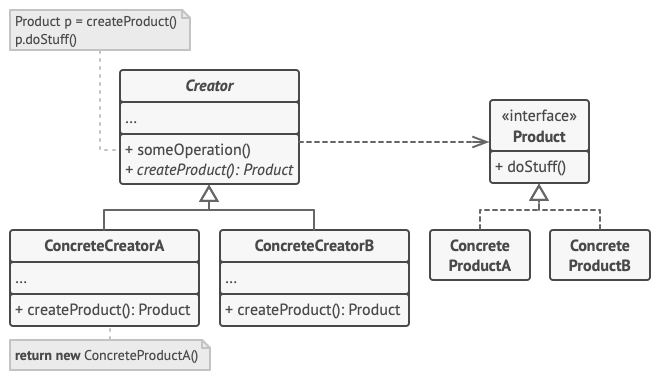
NotificationSender. “Product” = our Notification interface. “ConcreteCreator” = our EmailSender. “ConcreteProduct” = our EmailNotification. Diagram credit: Refactoring.GuruNotice that the Creator (NotificationSender) has an arrow to the Product interface (Notification), not to any concrete class. This is the rule: the Creator never imports or references a Concrete Product. It only calls the factory method and receives a Notification. The subclass handles the concrete decision in isolation.
Now let us build each piece.
Building the Pattern Step by Step
Part 1 — The Notification Interface (the “Product”)
We start with the interface that all notification types will implement. This is the Product — the type the Creator works with. The Creator will only ever hold a reference to Notification, never to EmailNotification or SmsNotification directly.
Notification.java
public interface Notification {

    // Every notification must know how to deliver itself
    void send(String recipient, String message);

    // Used by the Creator for logging — it needs to know the type
    // without knowing the concrete class
    String getType();
}
Two methods: send() is how a notification delivers itself (email, SMS, HTTP POST, etc.), and getType() lets the logging code in the Creator identify the channel without breaking encapsulation. This interface is all the Creator will ever need to know about notifications.
Part 2 — The Concrete Notification Classes (the “Concrete Products”)
Now we write the three notification types — the Concrete Products. Each implements Notification and knows only about its own delivery channel. They are completely independent of each other, so each gets its own file:
EmailNotification.java
public class EmailNotification implements Notification {

    @Override
    public void send(String recipient, String message) {
        // In production: use JavaMail or Spring Mail
        System.out.printf("  [EMAIL] To: %s | Body: %s%n", recipient, message);
    }

    @Override
    public String getType() { return "EMAIL"; }
}
Next, the SMS variant — same shape, different channel:
SmsNotification.java
public class SmsNotification implements Notification {

    @Override
    public void send(String recipient, String message) {
        // In production: use Twilio SDK
        System.out.printf("  [SMS]   To: %s | Text: %s%n", recipient, message);
    }

    @Override
    public String getType() { return "SMS"; }
}
And the push notification variant:
PushNotification.java
public class PushNotification implements Notification {

    @Override
    public void send(String recipient, String message) {
        // In production: use Firebase FCM
        System.out.printf("  [PUSH]  To: %s | Alert: %s%n", recipient, message);
    }

    @Override
    public String getType() { return "PUSH"; }
}
Each class is self-contained and small. EmailNotification knows about email; SmsNotification knows about SMS. They do not know about each other, and they do not depend on any part of the sending workflow. This separation means you can change how email is delivered without touching SMS at all.
Part 3 — The NotificationSender Class (the “Creator”)
This is the heart of the pattern. The Creator — our NotificationSender abstract class — owns the sending workflow: logging, calling send(), confirming delivery, and handling retries. What it does not know is which type of notification to create. That single decision is delegated to createNotification(), which is declared abstract and left for subclasses to implement.
NotificationSender.java
public abstract class NotificationSender {

    // THE factory method — this is the one thing subclasses override.
    // It returns a Notification (the Product interface), never a concrete class.
    protected abstract Notification createNotification();

    // The shared workflow — marked final so subclasses cannot change it.
    // It calls createNotification() to get the right notification,
    // then runs the same steps every time regardless of which channel was created.
    public final void notify(String recipient, String message) {
        Notification notification = createNotification();     // delegate creation
        System.out.println("Sending " + notification.getType() + " notification...");
        notification.send(recipient, message);                // use the Product interface
        System.out.println("Delivered.");
    }

    // Shared retry logic — works for all channels without change
    public void notifyWithRetry(String recipient, String message, int maxRetries) {
        for (int attempt = 1; attempt <= maxRetries; attempt++) {
            try {
                notify(recipient, message);
                return; // success — exit
            } catch (Exception e) {
                System.err.printf("Attempt %d failed: %s%n", attempt, e.getMessage());
            }
        }
        throw new RuntimeException("All " + maxRetries + " attempts failed");
    }
}
Read notify() carefully: it calls createNotification() and receives a Notification. It does not care what type came back — email, SMS, push — because it only calls send(), which every Notification has. The workflow is complete and closed. The final modifier prevents subclasses from accidentally overriding the workflow; they may only override the factory method.
⚠️ Common Mistake: Making createNotification() public. It is a hook for subclasses, not part of the public API. Keep it protected so callers cannot call it directly and bypass the workflow in notify().
Part 4 — The Concrete Sender Subclasses (the “Concrete Creators”)
Now the Concrete Creators — one subclass per channel. Each overrides createNotification() to return its specific product. That is their entire responsibility. They do not contain any workflow logic; that all lives in the parent class. Each class exists solely to answer: “which notification should I create?”
EmailSender.java
public class EmailSender extends NotificationSender {
    @Override
    protected Notification createNotification() {
        return new EmailNotification();
    }
}
The SMS creator is identical in shape:
SmsSender.java
public class SmsSender extends NotificationSender {
    @Override
    protected Notification createNotification() {
        return new SmsNotification();
    }
}
And the push creator:
PushSender.java
public class PushSender extends NotificationSender {
    @Override
    protected Notification createNotification() {
        return new PushNotification();
    }
}
Each class is three lines of real logic. They delegate everything else — logging, sending, retrying — to NotificationSender. This is also where the Open/Closed Principle becomes concrete: to add Slack, you write two new classes (SlackNotification and SlackSender) and nothing else changes.
Part 5 — Running It: Client Code and Output
The client works exclusively with NotificationSender — the abstract Creator. It never imports EmailNotification or PushNotification. This means the client code is immune to future channel additions.
Main.java
public class Main {

    public static void main(String[] args) {

        // The client only knows about NotificationSender (the Creator)
        NotificationSender sender;

        sender = new EmailSender();
        sender.notify("[email protected]", "Your order has shipped!");

        sender = new SmsSender();
        sender.notify("+1-555-0100", "OTP: 482910");

        sender = new PushSender();
        sender.notify("device-token-xyz", "New message from Bob");

        // Adding Slack: just swap the creator. Client code doesn't change.
        sender = new SlackSender();  // new class, nothing else touched
        sender.notify("#alerts", "CPU usage above 90%");
    }
}
Running this (compiled and executed locally on Java 25) prints:
Sending EMAIL notification...
  [EMAIL] To: [email protected] | Body: Your order has shipped!
Delivered.
Sending SMS notification...
  [SMS]   To: +1-555-0100 | Text: OTP: 482910
Delivered.
Sending PUSH notification...
  [PUSH]  To: device-token-xyz | Alert: New message from Bob
Delivered.
Sending SLACK notification...
  [SLACK] Channel: #alerts | Message: CPU usage above 90%
Delivered.
The output shows the full workflow for each channel — the same logging, the same structure — even though the notification type changed each time. That workflow is defined once in NotificationSender.notify() and works for every channel, past and future.
Adding a New Channel: What “Open/Closed” Looks Like in Practice
Adding Slack support requires exactly two new files:
SlackNotification.java
// New Concrete Product — knows how to send to Slack
public class SlackNotification implements Notification {
    @Override
    public void send(String recipient, String message) {
        System.out.printf("  [SLACK] Channel: %s | Message: %s%n", recipient, message);
    }
    @Override
    public String getType() { return "SLACK"; }
}
And the matching concrete creator:
SlackSender.java
// New Concrete Creator — knows to create a SlackNotification
public class SlackSender extends NotificationSender {
    @Override
    protected Notification createNotification() {
        return new SlackNotification();
    }
}
Every other file — NotificationSender, EmailSender, EmailNotification, the client — is untouched. Your existing tests still pass. The pattern delivered on its promise: open for extension, closed for modification.
Factory Method in the Java Standard Library
Once you recognize the pattern, you see it throughout the JDK. In each case, the creator declares a method, and a subclass or implementation decides what gets returned:
| Factory Method | Creator | What the Concrete Creator returns |
|---|---|---|
Calendar.getInstance() | Calendar | GregorianCalendar or BuddhistCalendar depending on locale |
Collection.iterator() | Any Collection | ArrayList returns its own iterator; LinkedList returns its own |
LoggerFactory.getLogger() | SLF4J LoggerFactory | Logback, Log4j2, or JUL logger — whichever is on the classpath |
DocumentBuilderFactory.newDocumentBuilder() | DocumentBuilderFactory | The parser-specific builder for whichever XML implementation is configured |
// iterator() is a factory method — ArrayList decides the concrete type
List<String> list = new ArrayList<>(List.of("a", "b", "c"));
Iterator<String> it = list.iterator(); // ArrayList's factory method returns ArrayListIterator

// Calendar.getInstance() returns different subclasses based on locale
Calendar thai = Calendar.getInstance(Locale.of("th", "TH")); // returns BuddhistCalendar!

// SLF4J: your code calls getLogger() — the implementation on the classpath decides what you get
Logger log = LoggerFactory.getLogger(Main.class); // Logback, Log4j2, or JUL
When to Use Factory Method — and When to Skip It
Reach for Factory Method when: You have a class with a stable workflow but the type of object it works with varies. You expect new types to be added over time. You are writing a framework or library where users need to extend object creation without editing your source code.
Skip it when: You only ever have one or two types and that is unlikely to change — a plain constructor is cleaner. The objects you create are simple value holders with no polymorphic behavior. You need to create families of related objects — that calls for Abstract Factory instead.
✅ Best Practice: Name your factory method createXxx(). This signals its intent to every reader. Avoid generic names like make() or get() which could mean anything.
Two Mistakes to Avoid
Mistake 1 — Returning a Concrete Type Instead of the Product Interface
// Wrong: returning the concrete class couples the Creator to the implementation
protected EmailNotification createNotification() {  // breaks polymorphism
    return new EmailNotification();
}

// Correct: always return the Product interface
protected Notification createNotification() {       // Creator stays decoupled
    return new EmailNotification();
}
When the factory method returns EmailNotification instead of Notification, the Creator now knows the concrete type — which defeats the purpose. The compiler will catch this if your factory method is declared on the abstract class with the interface return type.
Mistake 2 — Confusing This with Java’s Static Factory Methods
Java developers often hear “factory method” and think of Integer.valueOf(), List.of(), or LocalDate.of(). These are static factory methods — a different concept from Effective Java Item 1. They are static convenience methods that return an instance. The GoF Factory Method is an instance method on an abstract class that subclasses override. Same name, different pattern. Both are useful; do not conflate them.
Frequently Asked Questions
Does the Creator class have to be abstract?
No. The Creator can be a concrete class that provides a default implementation of the factory method. Subclasses may optionally override it to return a different type. This is useful when you want the pattern to work out of the box while still being extensible.
What is the difference between Factory Method and Abstract Factory?
Factory Method creates one product via one overridable method. Abstract Factory creates a family of related products through multiple factory methods grouped in a single interface. Abstract Factory is typically implemented using Factory Methods internally. If you only have one type of thing to create, Factory Method is sufficient; if you have several types that must stay consistent with each other, reach for Abstract Factory.
Can I use lambdas or Supplier<T> instead of subclasses?
Yes, for simple cases. A Map<String, Supplier<Notification>> registry is a functional alternative — register EmailNotification::new under “EMAIL” and call it by key. This works well when the Concrete Creator has no additional state or behavior. The class-based approach is better when each creator needs its own fields, configuration, or when the Creator has multiple overridable hook methods beyond just the factory method.
Is this pattern used in Spring?
Extensively. BeanFactory and ApplicationContext are themselves factory hierarchies. HandlerMapping, ViewResolver, and MessageConverter all follow the pattern. When you annotate a @Configuration class with @ConditionalOnProperty and return different bean types per condition, you are applying the same idea through Spring’s DI container.
5 AI Prompts for Factory Method
- “I have an
if/elseblock that creates different implementations of [interface] based on a string parameter. Refactor it to use the Factory Method pattern. Show the abstract Creator, at least two Concrete Creators, and the updated client code.” - “Review this Creator class and tell me: is the factory method correctly declared? Is the return type the Product interface or a concrete class? Is it protected or public? [paste class]”
- “Generate a complete Factory Method implementation in Java for a payment processing system that needs to support CreditCard, PayPal, and BankTransfer. Include javadoc on the factory method explaining what subclasses must return.”
- “Show me how to combine the Factory Method pattern with Spring Boot’s
@ConditionalOnPropertyso that the correct Concrete Creator is injected at startup based on a property in application.properties.” - “Write a JUnit 5 test for a class that uses the Factory Method pattern. Show how to subclass the Creator in the test to inject a controllable test double, without using Mockito.”
Conclusion
The Factory Method pattern is not about hiding a constructor. It is about giving subclasses the authority to decide what gets created, while the superclass retains control of what happens with the created object. The result is a clean separation: the workflow never changes, the product type is the only variable, and adding a new type costs you nothing in the existing codebase.
You have been using this pattern every time you called list.iterator() or Calendar.getInstance(). Recognizing it in the JDK — and in your own if/else chains — is the first step to applying it deliberately.
See Also
- Abstract Factory Design Pattern in Java — when you need consistent families of objects, not just one
- Builder Design Pattern in Java — for objects with many optional configuration fields
- Singleton Design Pattern in Java — ensuring only one instance of the creator exists
Further Reading
- Factory Method — Refactoring.Guru
- Factory Design Pattern in Java — DigitalOcean
- Effective Java, 3rd Edition — Joshua Bloch, Item 1 (static factory methods) and Item 17 (design for inheritance)
- Design Patterns: Elements of Reusable Object-Oriented Software — Gamma, Helm, Johnson, Vlissides, Chapter 3
No Comments yet!