
In this post, we implement three popular edge detection algorithms in MATLAB: Canny, Prewitt, and Sobel. Edge detection is a critical step in image processing and computer vision — it identifies points where image brightness changes sharply, which typically corresponds to object boundaries. We apply all three detectors to the same input image and display the results side by side for comparison.
MATLAB Code
% Edge Detection in MATLAB: Canny, Prewitt, and Sobel
% Applies three edge detectors to the same grayscale image
% and displays all results in a 2x2 subplot grid.

clc;          % Clear the command window
clear all;    % Clear all workspace variables
close all;    % Close all open figure windows

% --- Load image ---
% 'cameraman.tif' is a standard MATLAB sample image.
% Replace with any grayscale image in your working directory.
originalImage = imread('cameraman.tif');

% --- Apply edge detectors ---
% edge(I, 'method') returns a binary image:
%   1 = edge pixel  |  0 = non-edge pixel

% Canny: optimal detector - good noise suppression, thin edges
canny  = edge(originalImage, 'canny');

% Prewitt: gradient-based, uses 3x3 horizontal/vertical kernels
prewitt = edge(originalImage, 'prewitt');

% Sobel: similar to Prewitt but weights the central row/column more
sobel  = edge(originalImage, 'sobel');

% --- Display results ---
figure;

subplot(2, 2, 1);
imshow(originalImage);
title('Original Image');

subplot(2, 2, 2);
imshow(canny);
title('Canny Edge Detection');

subplot(2, 2, 3);
imshow(prewitt);
title('Prewitt Edge Detection');

subplot(2, 2, 4);
imshow(sobel);
title('Sobel Edge Detection');
How the Code Works
- Initialisation —
clc,clear all, andclose allare used (note: these are two-word commands in MATLAB;clearallorcloseallas one word would cause an error). - imread() — Reads the image.
'cameraman.tif'is a standard grayscale test image bundled with MATLAB’s Image Processing Toolbox. Any grayscale image can be substituted. - edge(I, ‘canny’) — The Canny detector applies Gaussian smoothing to reduce noise, computes the gradient magnitude and direction, applies non-maximum suppression to thin edges, and uses double thresholding to detect strong and weak edges.
- edge(I, ‘prewitt’) — The Prewitt detector convolves the image with two 3×3 kernels (one for horizontal, one for vertical gradients) and thresholds the resulting gradient magnitude.
- edge(I, ‘sobel’) — The Sobel detector is similar to Prewitt but uses kernels that give more weight to the pixels directly adjacent to the centre, making it slightly less sensitive to noise.
- subplot(2, 2, k) — Displays the original image in subplot 1 and the three edge maps in subplots 2, 3, and 4 for a direct side-by-side comparison.
Sample Output
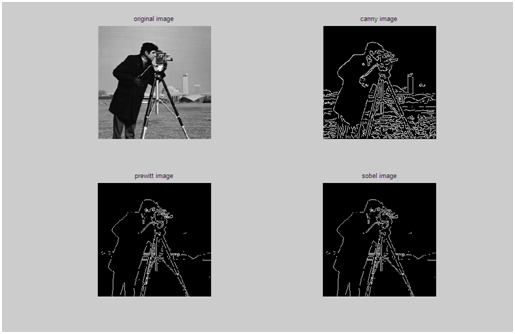
No text is printed to the command window. MATLAB opens a figure with four subplots: the original cameraman image and three binary edge maps.
Output Explanation
- Original Image — The classic 256×256 cameraman image. It contains a person, a tripod, and a background scene with varied edges.
- Canny — Produces the cleanest, thinnest edges with the least noise. Object boundaries are well-defined and continuous. This is generally the most accurate detector.
- Prewitt — Edges are slightly thicker and noisier than Canny but correctly outline major boundaries. Small textures tend to produce spurious edges.
- Sobel — Very similar to Prewitt in appearance. May preserve slightly smoother edges along horizontal and vertical directions due to its weighted kernel.
See Also
- Implementing HPF in MATLAB
- MATLAB Program to Implement LPF
- Program for Threshold in MATLAB
- Implementation of Histogram Processing in MATLAB
Conclusion
Edge detection is one of the most widely used preprocessing steps in computer vision. This program demonstrates three of MATLAB’s built-in edge detectors: Canny, Prewitt, and Sobel. Canny is generally preferred for its accuracy, while Prewitt and Sobel are simpler gradient-based methods suited for real-time applications. Choosing the right detector depends on the trade-off between accuracy, noise tolerance, and computational cost in your specific application.
No Comments yet!