
When Windows 8 dropped, it brought us a completely new, flat UI called “Metro”. Inspired by that fresh design, developers built MetroTwit—a slick Twitter client right for your desktop.
It’s a tiny download (just around 3.44 MB), but it packs an elegant, clean user interface that’s genuinely beautiful to look at and a real pleasure to read. It manages to be simple while still feeling incredibly powerful.
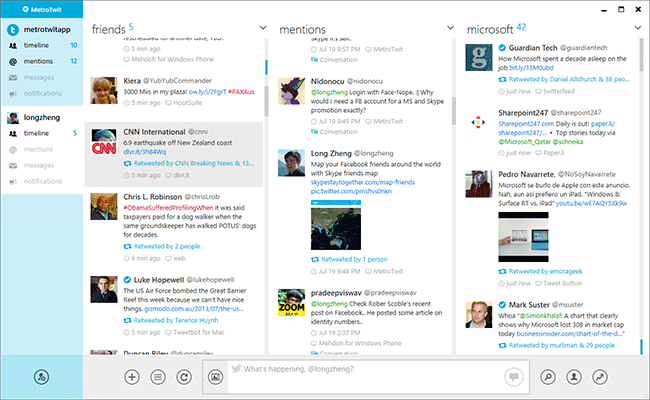
Here are just a few of the features that make it stand out:
- Infinite scrolling: As you scroll down, it pulls in older tweets instantly.
- URL Shortening: Built right in to save your character count.
- Auto-complete: Makes typing usernames and hashtags a breeze.
- Windows 7 Taskbar integration: Plays nicely with your OS.
- Media Previews: See images and videos inline.
And there’s a lot more under the hood. You can check out the full feature list over at metrotwit.com.
One of my favorite touches is how MetroTwit handles notifications. It displays live updates from your timeline straight into your system tray, so you never miss a beat.

If you’re a heavy Twitter user, I highly recommend giving this app a spin. You can download it directly from www.metrotwit.com.
(Screenshot courtesy of metrotwit.com)
No Comments yet!