
Eureka is the survivor of the Spring Cloud Netflix stack. While Hystrix, Zuul, and Ribbon were removed from Spring Cloud years ago, Eureka server and client are still actively maintained and ship in every current release train. This post — a complete rewrite of my 2020 Eureka series — builds a working setup on Spring Boot 3.x: a Eureka server, a registered student service, and a second service that discovers and calls it through Spring Cloud LoadBalancer, with none of the deprecated pieces.
Spring Cloud: Consuming Eureka client application With another eureka client and Rest Template (Part 3)
⚠️ This tutorial covers an old Spring Cloud version. It uses RestTemplate with Ribbon on Spring Boot 1.x/2.x — Ribbon was removed from Spring Cloud, and RestTemplate is replaced by RestClient. See the updated Eureka guide, the RestTemplate to RestClient migration guide, and the Spring Cloud Netflix migration guide.
This is a quick tutorial for consuming services exposed by one Eureka client application in another Eureka client application. This tutorial has the prerequisite of a running Eureka server and a Eureka client application as well. In case if you do not have Eureka server or a Eureka client application, check out my previous posts in this series which explains how to setup eureka server and how to develop a eureka client application.
The eureka client which we will be developing in this tutorial will be registered in eureka server and will consume service exposed by another client application.
TL;DR You can download whole project by clicking following link.
To give you a brief idea about what we are developing… We will be creating a Eureka client in this tutorial. The client will be a spring boot application and will expose one rest endpoint. The client will also internally consume service exposed by another eureka client application.
Continue reading Spring Cloud: Consuming Eureka client application With another eureka client and Rest Template (Part 3)Spring Cloud: Creating first client application With eureka client (Part 2)
⚠️ This tutorial covers an old Spring Cloud version. Eureka itself is still actively maintained, but this setup targets Spring Boot 1.x/2.x. For Spring Boot 3.x, see the updated Service Discovery with Eureka guide and the Spring Cloud Netflix migration guide.
This is a quick tutorial for creating a eureka client application. This tutorial has the prerequisite of a running eureka server. In case if you do not have running eureka server or a newbie, check out my previous post in this series which explains how to setup eureka server yourself. The eureka client which we will be developing in this tutorial will be registered in the eureka server.
TL;DR You can download whole project by clicking following link.
We will be creating a Eureka client in this tutorial. The client will be a spring boot application and will expose one rest endpoint. That endpoint will accept one value (or String, as said in Java world) as path parameter and will prefix it with ‘Hello’. The endpoint will return its result as String again.
Continue reading Spring Cloud: Creating first client application With eureka client (Part 2)Setting Up Eureka Server Using Spring Cloud (Version: 1.5.18.RELEASE/ Edgware.SR5)
⚠️ This post covers Spring Cloud Edgware (2018) and is kept for reference only. For Spring Boot 3.x, see the updated Service Discovery with Eureka guide and the Spring Cloud Netflix migration guide.
This post contains pom.xml file and sample eureka server project built using Spring cloud version 1.5.18.RELEASE/ Edgware.SR5. Please refer Setting Up Eureka Server Using Spring Cloud post for detailed instructions.
Continue reading Setting Up Eureka Server Using Spring Cloud (Version: 1.5.18.RELEASE/ Edgware.SR5)Setting Up Eureka Server Using Spring Cloud (Part 1)
⚠️ This tutorial covers an old Spring Cloud version. Eureka itself is still actively maintained, but this setup targets Spring Boot 1.x/2.x. For Spring Boot 3.x, see the updated Service Discovery with Eureka guide and the Spring Cloud Netflix migration guide.
This is a quick example for setting up Eureka server using Spring Cloud.
You can download the whole project by using following link.
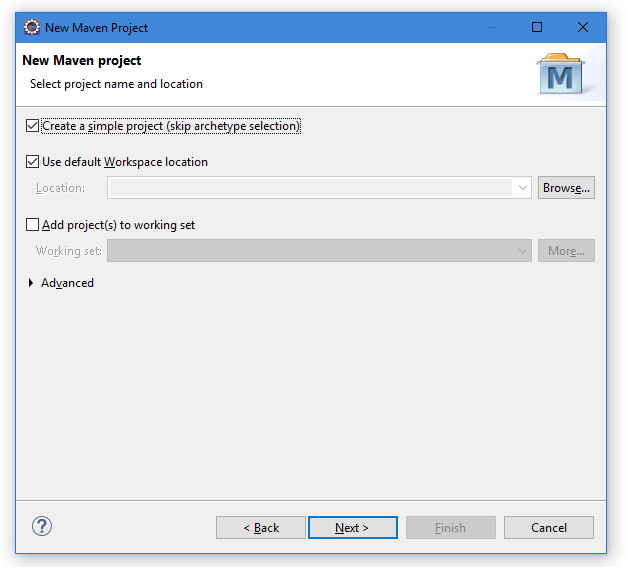
For this tutorial, we will be creating a New Maven Project. To keep thing more simple we will be creating a simple maven project i.e. we will be skipping archetype selection.
Struts 2 Hello World Example (XML Version)
Security Warning: The dependency versions in this tutorial (
struts2-core-2.2.1, ognl-3.0, javassist-3.7.ga, freemarker-2.3.16, commons-io-1.3.2, xwork-core-2.2.1) are from 2010–2011 and contain known critical vulnerabilities including remote code execution (RCE) exploits. Do not use these JARs in any production application. For current Struts 2, use the latest release from struts.apache.org and manage dependencies via Maven. This post is preserved for historical reference only.
In this tutorial, we will be creating a simple “Hello world” program using Struts 2. For this tutorial we will be using Eclipse, Struts 2. Struts 2 allows you to define configuration either by using traditional Struts 1 like XML way or by using annotations. In this tutorial we will be following traditional XML way. Let’s move ahead!
Continue reading Struts 2 Hello World Example (XML Version)
Implementing JPEG Algorithm in Java
The JPEG (Joint Photographic Experts Group) compression standard is the most widely used format for digital photographs on the web. Unlike lossless codecs, JPEG achieves very high compression ratios by discarding perceptually insignificant information from the image. At its core, the algorithm transforms pixel data into the frequency domain, aggressively quantises the high-frequency components (which the human eye is less sensitive to), and then encodes the result efficiently.
This Java program demonstrates the key computational stages of JPEG compression applied to a single 8×8 pixel block: the Discrete Cosine Transform (DCT), quantisation, zigzag scan, and a simplified entropy encoding step.
This example provides an educational look at the key stages of JPEG compression.
JPEG Compression Pipeline
A real JPEG encoder processes an image in the following sequence. This program implements all four stages for one 8×8 luminance block:
- Input block — An 8×8 grid of pixel intensity values.
- DCT — Converts spatial pixel data into frequency-domain coefficients.
- Quantisation — Divides each DCT coefficient by a value from the standard luminance quantisation table and rounds to the nearest integer, discarding fine detail.
- Zigzag scan — Reorders the 8×8 quantised coefficients into a 1D array, placing the most significant low-frequency coefficients first.
- Entropy encoding — Encodes the 1D array using a simplified run-length + binary scheme similar to the actual JPEG Huffman coding step.