

Facebook is used by you, me, and millions of people around the world to stay connected with friends and family. Most of us use it daily — some of us are probably a little too addicted to it. But here’s a question worth asking: is your Facebook account actually secure? What have you done to protect it?
If you don’t have a good answer, follow these four steps right now.
Step 1: Change Your Password
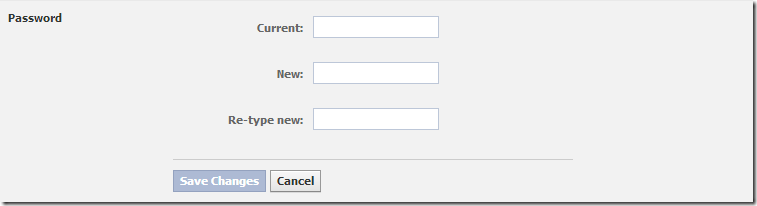
This is the most important step. If you’ve been using the same password for a long time, change it now. Go to Account Settings > General. Make it a habit to update your password every month — it cuts off anyone who may have come across your old one.
Step 2: Enable Secure Browsing

Secure browsing encrypts the data going between your PC and Facebook’s servers. Once enabled, nobody on the same network as you can intercept your session. You’ll find this option under Account Settings > Security.
Step 3: Enable Login Notifications

Login notifications alert you whenever someone signs in to your account — including your own logins from new devices. You can get these as email and/or SMS. Enabling both is a good idea. Head to Account Settings > Security to turn this on.
Step 4: End Active Sessions
You’ve probably logged into Facebook from multiple devices — your laptop, a friend’s PC, your office computer — and maybe closed the browser without logging out. Those sessions could still be active, meaning anyone who picks up that device might have access to your account.
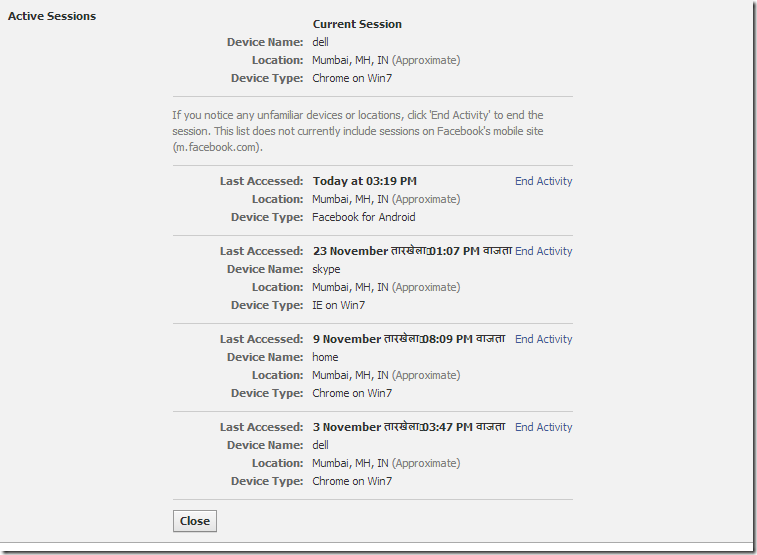
Go to Account Settings > Security and look for the Active Sessions section. It lists every device and location you’re currently logged in from. Click End Activity on anything that looks unfamiliar. It’s a good habit to log out from all locations except your current device.
No Comments yet!