

Are you frustrated with random tags, unwanted posts, or unknown people seeing things on your timeline? Your friends are tagging you in photos you’d rather not have on your profile? You’re not alone — and the good news is Facebook gives you quite a bit of control over all of this. Most people just don’t know where to look.
How to control your Timeline
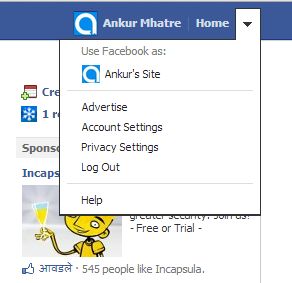
Go to Privacy Settings from the dropdown menu next to your profile link. Scroll down and you’ll find:
- Timeline and Tagging
- Ads, Apps and Websites
- Limit the Audience for Past Posts
Timeline and Tagging
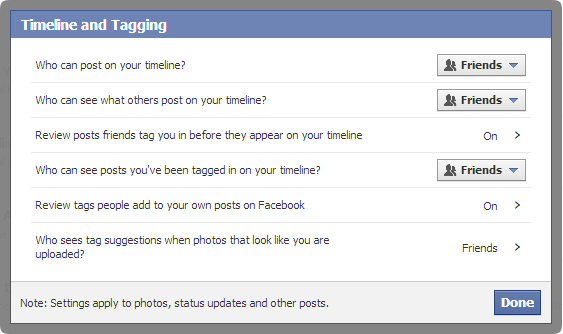
This section lets you control what your friends can post on your timeline and who can see it. There are six options:
- Don’t want friends posting on your timeline at all? Use the first option and change it to No One.
- Want to hide friends’ posts from everyone else? Use the second option, set it to Custom > Only Me.
- Enable post review using options three and five — every post your friends try to put on your timeline will be queued for your approval before it goes live.
- Control who can tag you in posts via option four.
- Option six lets you restrict who can tag you at all — set it to No One if you don’t want random tags from anyone.
Ads, Apps and Websites
Most Facebook users click Allow on app permissions without reading them carefully. Once an app has permission to post to your wall, it doesn’t need to ask again. That’s how you end up with random game updates and app notifications cluttering your timeline.
Click Edit Settings under this section, then Edit Settings again under Apps you use.
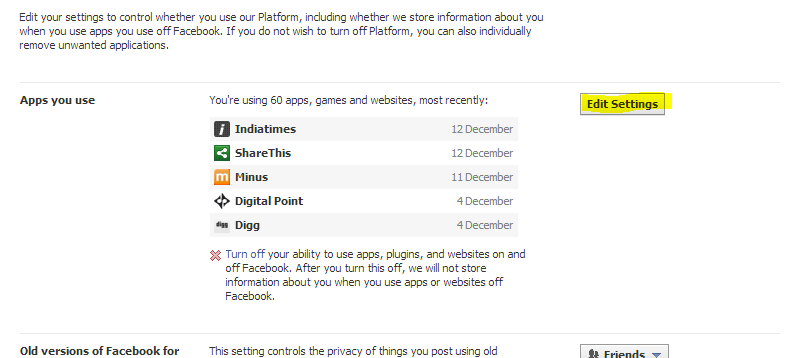
You’ll see a full list of apps with posting permission. Remove the ones you don’t use or recognize. They’ll need to ask for permission again next time they want to post.
Limit the Audience for Past Posts
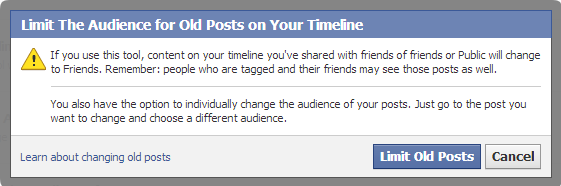
This is a one-click fix that changes the visibility of all your old public posts to Friends only. Just click Limit Old Posts and it’s done.
These are just a few of the available options. There’s a lot more to explore in Facebook’s privacy settings. Take some time to go through all of them — your privacy is worth it.
No Comments yet!