
JUnit 6 Test Naming Conventions for Readable and Maintainable Tests

Good test names are one of the highest-value investments you can make in a test suite. A test named test1() tells you nothing when it fails at 2am. A test named shouldThrowIllegalArgumentExceptionWhenEmailIsNull tells you exactly what broke, why it matters, and where to look. This guide covers every JUnit 6 test naming convention and strategy β€” from method names and @DisplayName to display name generators and custom naming strategies.

Why Test Naming Matters

Test names serve as living documentation. They communicate:

  • What is being tested (the method or feature)
  • When β€” under what conditions
  • What is expected to happen

A well-named test suite is searchable, self-documenting, and produces build reports that any developer β€” or product owner β€” can read and understand without opening the source code.

Strategy 1: The Should-When Pattern

The most widely adopted Java test naming convention. The method name reads as a sentence: "should [expected behaviour] when [condition]."

class PasswordValidatorTest {

    // Pattern: should[ExpectedBehaviour]When[Condition]
    @Test
    void shouldReturnTrueWhenPasswordMeetsAllRequirements() { }

    @Test
    void shouldReturnFalseWhenPasswordIsShorterThanEightCharacters() { }

    @Test
    void shouldThrowIllegalArgumentExceptionWhenPasswordIsNull() { }

    @Test
    void shouldRequireAtLeastOneUppercaseLetter() { }

    @Test
    void shouldRequireAtLeastOneSpecialCharacter() { }
}

Strategy 2: The Given-When-Then Pattern (BDD Style)

Derived from Behaviour-Driven Development (BDD). Works well in teams that also write Gherkin-style specifications:

class ShoppingCartTest {

    // Pattern: given[Context]_when[Action]_then[ExpectedOutcome]
    // Underscores are allowed in test method names β€” JUnit 6 accepts them
    @Test
    void givenEmptyCart_whenAddingFirstItem_thenCartContainsOneItem() { }

    @Test
    void givenCartWithItems_whenApplyingValidCoupon_thenTotalIsReduced() { }

    @Test
    void givenCartWithItems_whenApplyingExpiredCoupon_thenExceptionIsThrown() { }

    @Test
    void givenCartAtMaxCapacity_whenAddingAnotherItem_thenCartFullExceptionIsThrown() { }
}
Continue reading JUnit 6 Test Naming Conventions for Readable and Maintainable Tests

JUnit 6 Assumptions and Conditional Test Execution Guide

Sometimes a test should not run at all β€” not because it is broken, but because the environment or context makes it irrelevant. JUnit 6 Assumptions let you express these conditions explicitly: if an assumption fails, the test is skipped (aborted), not failed. This is a crucial distinction that keeps your test reports clean and meaningful.

This guide covers all assumption methods, conditional test annotations, and real-world scenarios where each approach shines.

Assumptions vs Assertions: The Key Difference

AssertionAssumption
ClassAssertionsAssumptions
On failureTest FAILSTest is SKIPPED/ABORTED
Use whenVerifying correct behaviourPrecondition for test relevance
Report statusRed ❌ FAILEDYellow ⚠️ ABORTED / SKIPPED

Think of assumptions as: β€œThis test only makes sense if this condition is true. If it isn’t, skip it β€” it’s not a code bug, it’s just irrelevant right now.”

The Assumptions Class

Import all assumption methods with a static import:

import static org.junit.jupiter.api.Assumptions.*;

assumeTrue

import org.junit.jupiter.api.Test;
import static org.junit.jupiter.api.Assumptions.*;
import static org.junit.jupiter.api.Assertions.*;

class DatabaseIntegrationTest {

    @Test
    @DisplayName("Fetch user from live database")
    void fetchUserFromDatabase() {
        // assumeTrue: if the condition is FALSE, this test is SKIPPED (not failed)
        // Use when the test is only relevant in certain environments
        assumeTrue(
            System.getenv("CI_ENV") != null,
            "Skipping: this test only runs in the CI environment"
        );

        // If we reach here, CI_ENV is set β€” proceed with the real test
        User user = userRepository.findById(1L);
        assertNotNull(user, "User with ID 1 should exist in the CI database");
    }

    @Test
    @DisplayName("Windows-only file locking test")
    void windowsFileLockingBehaviour() {
        // Only run this test on Windows
        assumeTrue(
            System.getProperty("os.name").toLowerCase().contains("win"),
            "Skipping: Windows-specific file locking test"
        );

        // Windows-specific assertion
        assertTrue(fileLockingService.isFileLocked("test.dat"));
    }
}

assumeFalse

@Test
@DisplayName("Skip test if running under memory profiler")
void performanceTest() {
    // assumeFalse: test is SKIPPED if the condition is TRUE
    boolean isRunningUnderProfiler = ManagementFactory
        .getRuntimeMXBean().getInputArguments().toString()
        .contains("javaagent");

    assumeFalse(isRunningUnderProfiler,
        "Skipping performance test: a profiler agent is attached");

    // If we get here, no profiler β€” timing is reliable
    long startTime = System.nanoTime();
    dataProcessor.processLargeDataset();
    long durationMs = (System.nanoTime() - startTime) / 1_000_000;

    assertTrue(durationMs < 1000,
        "Processing should complete within 1000 ms, took: " + durationMs + " ms");
}
Continue reading JUnit 6 Assumptions and Conditional Test Execution Guide

JUnit 6 Assertions: All Methods Explained with Real Examples

Assertions are the heart of every JUnit 6 test. They are the statements that determine whether a test passes or fails. JUnit 6 provides a rich set of assertion methods in the org.junit.jupiter.api.Assertions class β€” from simple equality checks to grouped assertions, exception verification, and timeout enforcement. This guide covers every assertion method with real examples, console output, and guidance on when to use each one.

All assertion methods are static, so the standard pattern is to use a static import at the top of your test class:

import static org.junit.jupiter.api.Assertions.*;

1. assertEquals and assertNotEquals

The most commonly used assertions. They compare two values for equality using .equals():

@Test
@DisplayName("assertEquals and assertNotEquals examples")
void equalityAssertions() {
    String greeting = "Hello, JUnit 6";

    // Basic equality check
    assertEquals("Hello, JUnit 6", greeting);

    // With a custom failure message (shown if assertion fails)
    assertEquals("Hello, JUnit 6", greeting, "Greeting string should match exactly");

    // Lazy message: the Supplier lambda only evaluates if the assertion FAILS
    // Use this when building the message is expensive (e.g. involves I/O)
    assertEquals("Hello, JUnit 6", greeting,
        () -> "Expected greeting to be 'Hello, JUnit 6' but got: " + greeting);

    // assertNotEquals: passes when values are NOT equal
    assertNotEquals("Goodbye", greeting, "Greeting should not be 'Goodbye'");

    // Floating-point comparison with a delta (tolerance)
    // Never compare doubles with == or assertEquals without a delta
    double result = 0.1 + 0.2; // = 0.30000000000000004 due to floating-point
    assertEquals(0.3, result, 0.0001, "0.1 + 0.2 should be approximately 0.3");
}

2. assertTrue and assertFalse

@Test
@DisplayName("assertTrue and assertFalse examples")
void booleanAssertions() {
    List languages = List.of("Java", "Python", "Go");

    // assertTrue: passes when condition is true
    assertTrue(languages.contains("Java"), "List should contain Java");
    assertTrue(languages.size() > 0, "List should not be empty");

    // assertFalse: passes when condition is false
    assertFalse(languages.isEmpty(), "List should not be empty");
    assertFalse(languages.contains("COBOL"), "List should not contain COBOL");

    // Works with Predicate-style lambdas for complex conditions
    assertTrue(languages.stream().anyMatch(lang -> lang.startsWith("J")),
        "At least one language should start with J");
}

3. assertNull and assertNotNull

@Test
@DisplayName("assertNull and assertNotNull examples")
void nullAssertions() {
    String uninitialised = null;
    String initialised = "JUnit 6";

    // assertNull: passes when value IS null
    assertNull(uninitialised, "Uninitialised variable should be null");

    // assertNotNull: passes when value is NOT null
    assertNotNull(initialised, "Initialised variable should not be null");

    // Common real-world usage: verify a factory method returns a non-null object
    Order order = OrderFactory.createDefault();
    assertNotNull(order, "OrderFactory.createDefault() must not return null");
    assertNotNull(order.getId(), "Created order must have an assigned ID");
}
Continue reading JUnit 6 Assertions: All Methods Explained with Real Examples

Writing Your First Clean Test in JUnit 6 (Best Practices)

Writing a test that compiles and passes is easy. Writing a test that is clean, readable, trustworthy, and maintainable takes deliberate practice. This guide walks you through exactly what separates a good JUnit 6 test from a great one β€” structure, naming, assertions, test isolation, and the habits that experienced Java developers rely on every day.

Every example here follows the patterns established in the JUnit 6 Tutorial series, building on the lifecycle and project structure knowledge from earlier chapters.

The Anatomy of a Clean JUnit 6 Test

Every well-written test has three distinct phases, known as the Arrange-Act-Assert (AAA) pattern. Each phase has one job:

  • Arrange β€” Set up the objects, data, and state needed for the test
  • Act β€” Call the method or trigger the behaviour being tested
  • Assert β€” Verify the outcome is what you expected
import org.junit.jupiter.api.*;
import static org.junit.jupiter.api.Assertions.*;

class BankAccountTest {

    // ----------------------------------------------------------------
    // CLEAN TEST β€” follows Arrange-Act-Assert with clear separation
    // ----------------------------------------------------------------
    @Test
    @DisplayName("Depositing funds increases balance by the deposited amount")
    void depositingFundsIncreasesBalance() {

        // Arrange: set up the object under test and the input
        BankAccount account = new BankAccount("ACC001", 100.00);
        double depositAmount = 50.00;

        // Act: call the method being tested
        account.deposit(depositAmount);

        // Assert: verify the outcome
        assertEquals(150.00, account.getBalance(), 0.001,
            "Balance should be initial 100 + deposited 50 = 150");
    }

    // ----------------------------------------------------------------
    // CLEAN TEST β€” exception testing with descriptive assertion message
    // ----------------------------------------------------------------
    @Test
    @DisplayName("Depositing a negative amount throws IllegalArgumentException")
    void depositingNegativeAmountThrowsException() {

        // Arrange
        BankAccount account = new BankAccount("ACC001", 100.00);

        // Act + Assert combined: assertThrows captures the exception
        IllegalArgumentException exception = assertThrows(
            IllegalArgumentException.class,
            () -> account.deposit(-10.00),
            "Negative deposit should throw IllegalArgumentException"
        );

        // Assert the exception message contains meaningful information
        assertTrue(exception.getMessage().contains("negative"),
            "Exception message should mention 'negative'");
    }
}
Continue reading Writing Your First Clean Test in JUnit 6 (Best Practices)

JUnit 6 Test Lifecycle Explained (BeforeEach, AfterAll, and More)

The JUnit 6 test lifecycle defines exactly when each setup and teardown method runs relative to your tests. Misunderstanding the lifecycle is one of the most common sources of subtle, order-dependent test failures. This guide covers every lifecycle annotation in depth β€” @BeforeAll, @BeforeEach, @AfterEach, @AfterAll β€” with complete code examples, execution order diagrams, and the important differences between the PER_METHOD and PER_CLASS instance lifecycles.

The Four Lifecycle Annotations

AnnotationRunsMust be static?JUnit 4 equivalent
@BeforeAllOnce before ALL tests in the classYes (default) / No (PER_CLASS)@BeforeClass
@BeforeEachBefore EACH individual test methodNo@Before
@AfterEachAfter EACH individual test methodNo@After
@AfterAllOnce after ALL tests in the classYes (default) / No (PER_CLASS)@AfterClass

Complete Lifecycle Example

This example demonstrates all four annotations together. Read the comments and then check the output to see exactly what order they run in:

import org.junit.jupiter.api.*;
import static org.junit.jupiter.api.Assertions.*;

@DisplayName("Order Processing Lifecycle Demo")
class OrderProcessorTest {

    // Simulates a shared resource (e.g. DB connection, test server)
    private static int sharedResourceInitCount = 0;

    // Instance field: reset before every test because JUnit creates
    // a new instance of this class for each test method (PER_METHOD, default)
    private OrderProcessor orderProcessor;

    // ----------------------------------------------------------------
    // @BeforeAll: runs ONCE before any test in this class.
    // Must be static in the default PER_METHOD lifecycle.
    // Use for expensive one-time setup: starting servers, loading fixtures.
    // ----------------------------------------------------------------
    @BeforeAll
    static void initialiseSharedResources() {
        sharedResourceInitCount++;
        System.out.println("[BeforeAll] Shared resources initialised. Count: " + sharedResourceInitCount);
    }

    // ----------------------------------------------------------------
    // @BeforeEach: runs before EVERY individual @Test method.
    // Use for creating a fresh object under test to avoid state pollution.
    // ----------------------------------------------------------------
    @BeforeEach
    void createFreshOrderProcessor() {
        orderProcessor = new OrderProcessor();
        System.out.println("[BeforeEach] Fresh OrderProcessor created");
    }

    @Test
    @DisplayName("Creating an order sets status to PENDING")
    void creatingOrderSetsPendingStatus() {
        Order order = orderProcessor.createOrder("[email protected]", 49.99);
        System.out.println("[Test] creatingOrderSetsPendingStatus running");
        assertEquals(OrderStatus.PENDING, order.getStatus());
    }

    @Test
    @DisplayName("Completing an order sets status to COMPLETED")
    void completingOrderSetsCompletedStatus() {
        Order order = orderProcessor.createOrder("[email protected]", 49.99);
        orderProcessor.completeOrder(order);
        System.out.println("[Test] completingOrderSetsCompletedStatus running");
        assertEquals(OrderStatus.COMPLETED, order.getStatus());
    }

    // ----------------------------------------------------------------
    // @AfterEach: runs after EVERY individual @Test method.
    // Use for cleanup: closing files, resetting mocks, clearing caches.
    // ----------------------------------------------------------------
    @AfterEach
    void cleanUpAfterTest() {
        orderProcessor = null; // help GC, signal we are done with this instance
        System.out.println("[AfterEach] Cleaned up");
    }

    // ----------------------------------------------------------------
    // @AfterAll: runs ONCE after ALL tests in this class have finished.
    // Must be static in the default PER_METHOD lifecycle.
    // Use for releasing shared resources: closing DB connections, stopping servers.
    // ----------------------------------------------------------------
    @AfterAll
    static void releaseSharedResources() {
        System.out.println("[AfterAll] Shared resources released");
    }
}

Console Output

[BeforeAll] Shared resources initialised. Count: 1

[BeforeEach] Fresh OrderProcessor created
[Test] creatingOrderSetsPendingStatus running
[AfterEach] Cleaned up

[BeforeEach] Fresh OrderProcessor created
[Test] completingOrderSetsCompletedStatus running
[AfterEach] Cleaned up

[AfterAll] Shared resources released

Tests run: 2, Failures: 0, Errors: 0, Skipped: 0

Notice that @BeforeAll runs exactly once, @BeforeEach and @AfterEach run twice (once per test), and @AfterAll runs exactly once at the end.

Continue reading JUnit 6 Test Lifecycle Explained (BeforeEach, AfterAll, and More)

JUnit 6 Architecture Deep Dive: Platform, Engines, and Launchers

Most developers use JUnit 6 daily without thinking about what happens under the hood when they click β€œRun.” Understanding the JUnit 6 architecture β€” how the Platform discovers tests, how Engines execute them, and how Launchers tie it all together β€” makes you a dramatically more effective tester. You will debug mysterious β€œ0 tests found” issues in seconds, build custom extensions with confidence, and understand why certain configurations behave the way they do.

The Three-Pillar Architecture

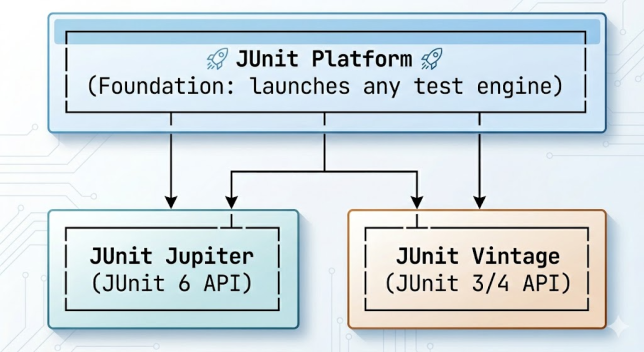
JUnit 6 is not a single monolithic library. It is composed of three distinct modules, each with a clearly defined responsibility:

  • JUnit Platform β€” The foundation. Defines the TestEngine SPI and the Launcher API. Build tools (Maven, Gradle) and IDEs talk to the Platform, not to Jupiter or Vintage directly.
  • JUnit Jupiter β€” The JUnit 6 programming model. Contains all the annotations (@Test, @BeforeEach, etc.), assertion classes, and the JupiterTestEngine that understands them.
  • JUnit Vintage β€” A compatibility shim. Contains the VintageTestEngine which wraps the old JUnit 4 runner so legacy tests can run on the JUnit Platform.
Continue reading JUnit 6 Architecture Deep Dive: Platform, Engines, and Launchers

JUnit 6 vs JUnit 5: Key Differences, Features, and Migration Guide

If you have been using JUnit 5 (also known as JUnit Jupiter) and are evaluating whether to move to JUnit 6, or you just want to understand what changed and why, this guide has every answer. We compare the two frameworks side by side β€” architecture, annotations, APIs, extension model, and migration path β€” with real code examples throughout.

The short answer: JUnit 6 is evolutionary, not revolutionary. If you know JUnit 5, you already know 90% of JUnit 6. The upgrade pays off in cleaner extension APIs, improved parameterized tests, and better alignment with modern Java features like records and sealed classes.

Updated for Spring Boot 4 (2026): With the release of Spring Boot 4.0 on 20 November 2025, this migration is no longer optional for many teams. Spring Boot 4 builds on Spring Framework 7 and makes JUnit 6 the default testing baseline β€” JUnit 4 support is deprecated and the Vintage engine now serves only as a temporary bridge. If you are planning a Spring Boot 4 upgrade, JUnit 6 comes with it. For the wider picture, see our Spring Boot 3 to 4 Migration Guide and Spring Framework 6 to 7 Migration Guide.

TL;DR: JUnit 5 vs JUnit 6 at a Glance

If you only need the headline differences before deciding, this table sums up the move from JUnit 5 to JUnit 6:

AspectJUnit 5 (Jupiter)JUnit 6 (Jupiter)
Java baselineJava 8Java 17
Base packageorg.junit.jupiter.*org.junit.jupiter.* (unchanged)
Core annotations & assertionsFull setIdentical β€” no rename
Null-safety annotationsNoneJSpecify (@Nullable, etc.)
Extension modelStableRefined, deterministic ordering
Parameterized sourcesRichRicher type & record conversion
@Nested supportYesEnhanced
JUnit 4 via VintageSupportedDeprecated (temporary bridge)
Migration effortβ€”Drop-in for most projects (version bump)
Spring Boot2.7 – 3.x4.0+ (default)

Architecture: What Stayed the Same

Both JUnit 5 and JUnit 6 are built on the same three-pillar architecture:

ModulePurposeJUnit 5JUnit 6
PlatformLaunches test frameworks on the JVMβœ… Presentβœ… Present (refined)
JupiterProgramming model for writing testsβœ… Presentβœ… Present (enhanced)
VintageRuns JUnit 3/4 tests on the Platformβœ… Present⚠️ Present but deprecated

Side-by-Side Annotation Comparison

All core annotations are identical in name and purpose. JUnit 6 adds refinements, not replacements:

FeatureJUnit 5JUnit 6Change
Test method@Test@TestSame
Before each test@BeforeEach@BeforeEachSame
After each test@AfterEach@AfterEachSame
Before all tests@BeforeAll@BeforeAllSame
After all tests@AfterAll@AfterAllSame
Display name@DisplayName@DisplayNameSame
Nested tests@Nested@NestedEnhanced
Tag@Tag@TagSame
Disable test@Disabled@DisabledSame
Parameterized@ParameterizedTest@ParameterizedTestEnhanced sources
Dynamic tests@TestFactory@TestFactorySame
Extensions@ExtendWith@ExtendWithEnhanced API
Timeout@Timeout@TimeoutSame
Temp directory@TempDir@TempDirSame
Method ordering@TestMethodOrder@TestMethodOrderMore strategies
Continue reading JUnit 6 vs JUnit 5: Key Differences, Features, and Migration Guide