
Mastering JUnit 5: A Guide to the @BeforeEach Annotation

In modern Java unit testing, consistency and reliability are the twin pillars of a successful CI/CD pipeline. When you’re testing complex business logic, you often need to perform identical setup steps—like initializing objects, mocking external services, or preparing data—before every single test.

Without a centralized way to handle this, your test suite quickly becomes a “Copy-Paste” nightmare, leading to high maintenance costs and “flaky” tests. This is where the JUnit 5 @BeforeEach annotation becomes an essential tool in your developer toolkit.

What is @BeforeEach?

The @BeforeEach annotation marks a method that must run before every individual @Test method in the current class. Its primary goal is to ensure test isolation. By resetting the state before every test, you guarantee that “Test A” cannot leave behind data that causes “Test B” to pass or fail incorrectly.

The Evolution: From JUnit 4 to JUnit 5

If you are migrating legacy code, remember that @BeforeEach is the direct successor to JUnit 4’s @Before. While the name has changed to be more descriptive, the core concept remains the same: it’s your primary lifecycle hook for per-test initialization.
Continue reading Mastering JUnit 5: A Guide to the @BeforeEach Annotation

Dozer Bean Mapping in Java: Practical Guide with Benchmark vs MapStruct

In modern Java applications — particularly those built on Spring Boot or Jakarta EE — moving data between object models is a daily reality. You have DTOs (Data Transfer Objects) arriving from REST APIs and you need to convert them into Domain Entities for persistence, or vice versa. Writing manual getter-setter copy code for every field is tedious, error-prone, and buries your business logic under a mountain of boilerplate that grows with every new field added to your model.

Enter Dozer — a robust, open-source Java Bean mapper that recursively copies data from one object to another using reflection. Dozer has been a production staple for over a decade. While compile-time alternatives like MapStruct have gained popularity for performance-critical applications, Dozer remains a compelling choice for its runtime flexibility, zero build-plugin setup, and its ability to handle complex mapping scenarios without annotation proliferation on your model classes.

In this guide, we will cover practical Dozer usage from basic field mapping through nested objects, custom converters, and Spring integration — then benchmark Dozer against MapStruct so you can make an informed architectural decision for your next project.

Continue reading Dozer Bean Mapping in Java: Practical Guide with Benchmark vs MapStruct

8086 Assembly Program to Compute the Power of a Number Using Exponentiation by Squaring

This blog post details an 8086-assembly program that computes the power of a number using the Exponentiation by Squaring algorithm (O(log n) efficiency). While a standard iterative approach multiplies the base n times (taking O(n) time), exponentiation by squaring—also known as binary exponentiation—works by breaking the exponent down into its binary components. By squaring the base in each step and only multiplying it into the result when a bit in the exponent is set, we drastically reduce the computational load. For example, calculating x32 requires only 5 multiplications instead of 31.

This example demonstrates advanced assembly concepts like bitwise manipulation, conditional branching, and efficient arithmetic optimization. Let’s get started!


Logic Breakdown:

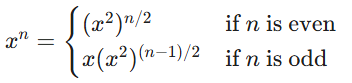
The algorithm follows the mathematical identity of Binary Exponentiation:

  1. Check Exponent: If it’s zero, stop.
  2. Odd Case: If the current exponent is odd, multiply the running result by the current base.
  3. Square and Halve: Regardless of odd/even, square the base and divide the exponent by 2.
  4. Loop: Continue until the exponent is exhausted.

Let’s visualize it’s working for 53.

StepBase ExponentResult Action
Initial531Start loop
Iter 153 (Odd)51 X 5 = 5
Square251552 = 25,
3/2 = 1
Iter 2251 (Odd)1255 X 25 = 125
Square6250125252 = 625,
1/2 = 0
Exit0125Loop terminates
Continue reading 8086 Assembly Program to Compute the Power of a Number Using Exponentiation by Squaring

JUnit 5 @RepeatedTest: Improve Test Reliability with Repeated Test Execution

In the competitive landscape of Java development, flakiness is the ultimate enemy of progress. We have all experienced the “Heisenbug” frustration: you write a test, it passes flawlessly on your local machine, but it fails intermittently once it hits the CI/CD pipeline. These non-deterministic failures erode trust in the build process and waste hours of engineering time. To combat this instability, JUnit 5 introduced a robust solution: the @RepeatedTest annotation.

Whether you are hunting down elusive race conditions, validating random data generators, or stress-testing intermittent network calls, repeating a test is a proven strategy for ensuring long-term stability. Today, we’ll dive deep into how to use @RepeatedTest to transform your test suite from “mostly reliable” to “battle-hardened.”


What is JUnit 5 @RepeatedTest?

The @RepeatedTest annotation is a specialized programming model in JUnit Jupiter that allows you to execute a single test method a specific number of times. Unlike a standard @Test annotation, which executes a method exactly once, @RepeatedTest signals the JUnit Jupiter engine to treat the method as a template. The engine then generates multiple dynamic test invocations based on that template.

Continue reading JUnit 5 @RepeatedTest: Improve Test Reliability with Repeated Test Execution

8086 Assembly Program to Compute the Power of a Number

This blog post details an 8086-assembly program that computes the power of a number, specifically baseexponent. This example demonstrates fundamental assembly concepts like loops, multiplication, and register manipulation to perform iterative arithmetic. Let’s get started!

data segment
    base dw 0003h
    exponent dw 0004h
    result dd ?
data ends

code segment
    assume cs:code, ds:data
start:
    ; Initialize data segment
    mov ax, data
    mov ds, ax

    ; Initialize result to 1 (R = B^0)
    mov word ptr result, 0001h
    mov word ptr result+2, 0000h

    ; Load base and exponent
    mov cx, exponent ; CX = exponent (loop counter)
    mov bx, base     ; BX = base

    cmp cx, 0000h
    je exit          ; If exponent is 0, result is already 1. Jump to exit.

power_loop:
    ; Multiply result by base
    ; The result is a 32-bit number in result[0] (lower word) and result[2] (upper word)
    ; Multiplication requires careful handling of the 32-bit result with a 16-bit multiplier.
    
    ; 1. Multiply the lower word of result by base
    mov ax, word ptr result ; AX = result[0]
    mul bx                  ; AX * BX -> DX:AX (32-bit product)
    push dx                 ; Save the higher word (DX) of the product
    mov word ptr result, ax ; Store the lower word (AX) of the product as the new result[0]

    ; 2. Multiply the upper word of result by base
    mov ax, word ptr result+2 ; AX = result[2]
    mul bx                    ; AX * BX -> DX:AX (32-bit product)
    
    ; 3. Add the two 16-bit 'carry' terms
    pop cx                    ; Retrieve the saved higher word (DX) from step 1 into CX
    add ax, cx                ; AX = AX + CX (Sum of two high words)
    adc dx, 0000h             ; DX = DX + 0 + Carry from the previous ADD (final carry from the 32-bit multiplication)
    
    ; 4. Store the final upper word
    mov word ptr result+2, ax ; Store AX as the new result[2]
    
    ; Handle the 32-bit overflow (DX is the final carry from the 32-bit multiplication)
    ; For a 32-bit result storage, this program assumes the result fits in 32-bits.
    ; If the power is large, overflow might occur, which is a limitation of this 32-bit storage approach.

    loop power_loop ; Decrement CX and jump back to power_loop if CX != 0

exit:
    int 3 ; Program termination
code ends
end start

Continue reading 8086 Assembly Program to Compute the Power of a Number

TypeScript Arithmetic Operators: The Definitive Guide

TypeScript didn’t reinvent JavaScript’s arithmetic — it just gave you a seatbelt.

Under the hood, every +, -, *, /, and ** behaves exactly like in JavaScript, including all the quirky coercion rules that have launched a thousand memes. What TypeScript adds is the ability to catch those bugs at compile time instead of 3 a.m. when a user enters “banana” in a price field.

This guide covers every arithmetic operator in TypeScript with modern, real-world examples, in-depth explanations, common pitfalls, performance notes, and a cheat-sheet you’ll actually use.


1. Unary Operators

Unary Plus +

Purpose: Explicitly converts its operand to a number using the same algorithm as Number() but much faster.

+"42";        // 42
+"3.14";      // 3.14
+"";          // 0            (empty string → 0)
+"   123   "; // 123          (trims whitespace!)
+"0xFF";      // 255          (recognizes hex)
+"abc";       // NaN
+true;        // 1
+false;       // 0
+null;        // 0
+undefined;   // NaN (compile error if strictNullChecks is on)
Continue reading TypeScript Arithmetic Operators: The Definitive Guide

Java HashMap vs ConcurrentHashMap: Complete Interview Guide

In Java collections framework, HashMap and ConcurrentHashMap are two of the most frequently discussed topics in technical interviews. While HashMap provides fast key-value storage for single-threaded environments, ConcurrentHashMap extends these capabilities to support concurrent access. This comprehensive guide covers essential interview questions about both data structures, their internal workings, and key differences.


HashMap Fundamentals

What is HashMap?

HashMap is a hash table based implementation of the Map interface in Java. It stores key-value pairs and provides constant-time performance for basic operations like get() and put() assuming the hash function disperses elements properly. HashMap is part of the Java Collections Framework and resides in java.util package.

How HashMap Works Internally

The internal architecture of HashMap consists of an array of buckets where each bucket is a linked list (or tree in Java 8+) of entries. When you store a key-value pair, HashMap calculates the hash of the key to determine the bucket location. In Java 8+, when a bucket contains too many entries (default threshold is 8), it converts the linked list into a balanced red-black tree for faster lookups.

Continue reading Java HashMap vs ConcurrentHashMap: Complete Interview Guide