
This blog post details an 8086-assembly program that computes the power of a number using the Exponentiation by Squaring algorithm (O(log n) efficiency). While a standard iterative approach multiplies the base n times (taking O(n) time), exponentiation by squaring—also known as binary exponentiation—works by breaking the exponent down into its binary components. By squaring the base in each step and only multiplying it into the result when a bit in the exponent is set, we drastically reduce the computational load. For example, calculating x32 requires only 5 multiplications instead of 31.
This example demonstrates advanced assembly concepts like bitwise manipulation, conditional branching, and efficient arithmetic optimization. Let’s get started!
Logic Breakdown:
The algorithm follows the mathematical identity of Binary Exponentiation:
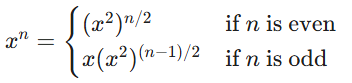
- Check Exponent: If it’s zero, stop.
- Odd Case: If the current exponent is odd, multiply the running result by the current base.
- Square and Halve: Regardless of odd/even, square the base and divide the exponent by 2.
- Loop: Continue until the exponent is exhausted.
Let’s visualize it’s working for 53.
| Step | Base | Exponent | Result | Action |
| Initial | 5 | 3 | 1 | Start loop |
| Iter 1 | 5 | 3 (Odd) | 5 | 1 X 5 = 5 |
| Square | 25 | 1 | 5 | 52 = 25, 3/2 = 1 |
| Iter 2 | 25 | 1 (Odd) | 125 | 5 X 25 = 125 |
| Square | 625 | 0 | 125 | 252 = 625, 1/2 = 0 |
| Exit | – | 0 | 125 | Loop terminates |
Code
data segment
    base dw 0005h
    exponent dw 0003h
    result dw 0001h
data ends

code segment
    assume cs:code, ds:data
start:
    ; Initialize data segment
    mov ax, data
    mov ds, ax

    ; Load initial values
    mov ax, base      ; AX = base (current x)
    mov bx, exponent  ; BX = exponent (current n)
    mov cx, 0001h     ; CX = result (accumulator R)

power_loop:
    ; Check if exponent is 0
    cmp bx, 0000h
    je exit           ; If n = 0, we are done. result is in CX.

    ; Check if exponent is odd (test LSB)
    ; Using TEST instruction to check the 0th bit without changing BX
    test bx, 0001h
    jz even_exponent

odd_exponent:
    ; If exponent is odd: result = result * base
    push ax           ; Save current base (x)
    mov ax, cx        ; Load current result (R)
    mul base          ; AX = R * x
    mov cx, ax        ; Update result (R) in CX
    pop ax            ; Restore current base (x)

even_exponent:
    ; Always perform: base = base * base (x = x^2)
    mul ax            ; AX = AX * AX
    ; Note: For larger numbers, DX would hold the overflow
    mov base, ax      ; Update base in memory for next iteration

    ; Always perform: exponent = exponent / 2 (n = n / 2)
    shr bx, 1         ; Logical shift right (efficiently divides by 2)

    jmp power_loop    ; Repeat the process

exit:
    mov result, cx    ; Store final calculated power in result variable
    int 3             ; Program termination (breakpoint)
code ends
end start
Understanding the Code
This program is more efficient than a linear loop because it follows the binary representation of the exponent. It significantly reduces the number of operations for large exponents.
Data Segment:
- data segment: Defines the variables used in the calculation.
- base dw 0005h: Declares a 16-bit word for the base, initialized to 510.
- exponent dw 0003h: Declares a 16-bit word for the exponent, initialized to 310.
- result dw 0001h: Declares a 16-bit word to store the final power, 53 = 12510 (007Dh).
Code Segment:
The program logic is built around initialization and a control loop that branches based on the exponent’s value:
1. Initialization & Setup
- assume cs:code, ds:data: Directs the assembler on segment register usage.
- mov ax, data / mov ds, ax: Segment Setup. Loads the address of the
datasegment intoAXand then intoDSto make the variables accessible. - mov ax, base: Loads the 16-bit
basevalue into theAXregister. In this algorithm,AXtracks the current squared value of the base (x). - mov bx, exponent: Loads the
exponentinto theBXregister, which acts as the control variable (n). - mov cx, 0001h: Initializes the result accumulator (
CX) to 1 (R = 1).
2. Main Control Loop & Termination Branch
- power_loop: The label marking the start of the algorithm iterations.
- cmp bx, 0000h: Compares the current exponent in
BXwith zero. - je exit: (Branching) “Jump if Equal.” If the exponent is 0, the program branches to the
exitlabel to finalize the result.
3. Odd Exponent Branching
- test bx, 0001h: Performs a bitwise AND between
BXand0001hto check the least significant bit (LSB) without modifyingBX. - jz even_exponent: (Branching) “Jump if Zero.” If the LSB is 0 (exponent is even), the program skips the
odd_exponentblock. - push ax: Saves the current base (
AX) on the stack. - mov ax, cx: Moves the running result (
CX) toAXfor multiplication. - mul base: Multiplies
AX(result) by thebase. Product is inDX:AX. - mov cx, ax: Updates the result accumulator in
CX. - pop ax: Restores the base value to
AX.
4. Squaring & Reduction
- even_exponent: Entry point for even cases or after the odd adjustment.
- mul ax: Squares the base (x = x2).
- mov base, ax: Updates the
basevariable in memory. - shr bx, 1: “Shift Right.” Efficiently divides the exponent by 2 (n = n/2).
- jmp power_loop: An unconditional jump to return to the top of the loop.
5. Program Exit
- exit: Final label reached when n=0.
- mov result, cx: Moves the final power from
CXinto theresultmemory variable. - int 3: A software interrupt used as a breakpoint to stop execution.
Flowchart:
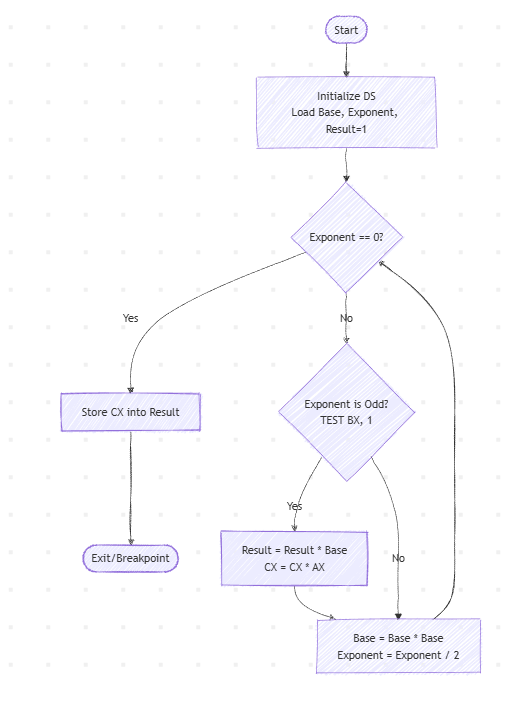
On High-Level
- Initialization: Variables are set, and the result accumulator is set to 1.
- Segment Setup: The data segment is made accessible.
- Binary Exponentiation:
- The program checks the bits of the exponent from right to left.
- If a bit is ‘1’, the result is updated by the current square of the base.
- The base is squared in every step to represent x1, x2, x4, x8…
- Program Termination: Once the exponent reaches zero, the final result is moved from the register to memory and execution is halted.
Output
C:\TASM>masm power_sq.asm
Microsoft (R) Macro Assembler Version 5.00
Copyright (C) Microsoft Corp 1981-1985, 1987.  All rights reserved.

Object filename [power_sq.OBJ]:
Source listing  [NUL.LST]:
Cross-reference [NUL.CRF]:

  50288 + 450368 Bytes symbol space free

      0 Warning Errors
      0 Severe  Errors

C:\TASM>link power_sq.obj

Microsoft (R) Overlay Linker  Version 3.60
Copyright (C) Microsoft Corp 1983-1987.  All rights reserved.

Run File [POWER_SQ.EXE]:
List File [NUL.MAP]:
Libraries [.LIB]:
LINK : warning L4021: no stack segment

C:\TASM>debug power_sq.exe
-g

AX=007D BX=0000 CX=007D DX=0000 SP=0000 BP=0000 SI=0000 DI=0000
DS=0B97 ES=0B87 SS=0B97 CS=0B98 IP=002F  NV UP EI PL NZ NA PO NC
0B98:002F CC     INT 3
-d 0B97:0000
0B97:0000  05 00 03 00 7D 00 00 00-B8 97 0B 8E D8 C7 06 04  ....}...........
-q
Understanding the Memory Dump
This is the memory dump starting from address 0B97:0000, showing the contents of memory. Here is the breakdown:
0B97:0000 05 00 03 00 7D 00 00 00- The value 05 00 (stored as little-endian) represents base = 0005h.
- The value 03 00 (stored as little-endian) represents exponent = 0003h.
- After the program runs: The value 7D 00 represents the result.
- result holds 007Dh, which is the correct decimal result 53 = 12510 (7Dh).
No Comments yet!