
Multiplication in 8086 assembly has one important difference from addition and subtraction: you do not choose the destination. The MUL instruction always multiplies the implicit register AX by the operand you supply, and always puts the 32-bit result into DX:AX. Understanding that implicit contract — and always saving both halves of the result — is the key to correct multiplication programs. This post walks through a working implementation in three environments: MASM/TASM, emu8086, and NASM.
Prerequisites: Familiarity with 8086 registers and the segment setup pattern. Read Understanding DW and DB in 8086 Assembly first if you are new to assembly.
The Problem: Multiplying 1234h by 5678h
We want to multiply 1234h (4660 decimal) by 5678h (22136 decimal) and store the full 32-bit result. Quick check: 4660 × 22136 = 103,153,760 = 06260060h. The debugger confirms AX=0060 (low word) and DX=0626 (high word), giving DX:AX = 06260060h ✓.
FFFFh × FFFFh = FFFE0001h, which requires 32 bits. The 8086 handles this by splitting the result: the lower 16 bits land in AX and the upper 16 bits land in DX. The combined register pair DX:AX represents the full 32-bit product. If your result variable is only 16 bits (dw), you will silently lose the upper half.
Version 1 — MASM / TASM (Classic DOS Toolchain)
data segment
    a dw 1234h      ; 16-bit multiplicand
    b dw 5678h      ; 16-bit multiplier
    c dd ?          ; 32-bit result (dd = define doubleword)
data ends

code segment
assume ds:data, cs:code
start:
    mov ax, data    ; Load data segment address
    mov ds, ax      ; Initialize DS

    mov ax, a       ; Load multiplicand into AX (1234h)
    mov bx, b       ; Load multiplier into BX (5678h)
    mul bx          ; DX:AX = AX * BX  (result: 06260060h)

    mov word ptr c,   ax  ; Store low 16 bits of result (0060h)
    mov word ptr c+2, dx  ; Store high 16 bits of result (0626h)

    int 3           ; Halt for debugging
code ends
end start
mov c, ax and stopping there. That saves only the lower 16 bits of the product and silently discards the upper 16 bits in DX. For the values here, DX=0626h — losing it means c holds 0060h instead of the correct 06260060h. Always store both AX (to c) and DX (to c+2) when working with 16-bit multiplication.
“Writing an 8086 assembly program to multiply two 16-bit numbers is like teaching two toddlers to shake hands — they’ll get there eventually, but expect a lot of shifting and carrying along the way!”
Related Links:
Understanding the Code
Data Segment
a dw 1234h: Defines a 16-bit variableainitialized to1234h.b dw 5678h: Defines another 16-bit variablebinitialized to5678h.c dd ?: Defines a 32-bit doubleword variablecto hold the full product. Usingdd(notdw) is essential — the result of multiplying two 16-bit numbers can be up to 32 bits wide.
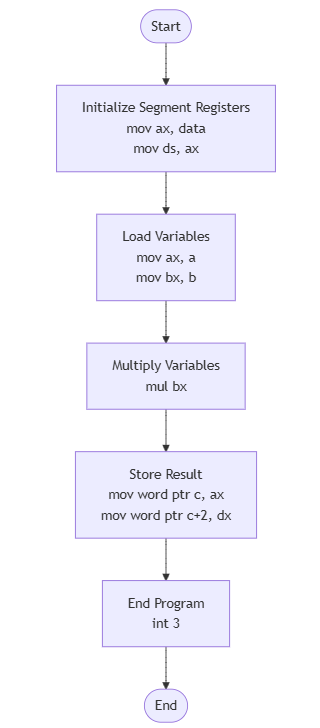
Flowchart
Code Segment
mov ax, a: Loads the multiplicand1234hinto AX. MUL always uses AX as the implicit multiplicand.mov bx, b: Loads the multiplier5678hinto BX.mul bx: Performs unsigned 16-bit multiplication:DX:AX = AX × BX. Lower 16 bits of result go to AX, upper 16 bits to DX.mov word ptr c, ax: Stores the lower 16 bits (0060h) into the first word ofc.mov word ptr c+2, dx: Stores the upper 16 bits (0626h) into the second word ofc, completing the 32-bit result.
High-Level Overview
- Initialize the data segment and load variables.
- Load the 16-bit values into AX and BX.
- Multiply:
DX:AX = AX × BX, producing a 32-bit result. - Store AX (low word) to
cand DX (high word) toc+2.
Output
C:TASM>masm an16mul.asm
Microsoft (R) Macro Assembler Version 5.00
Copyright (C) Microsoft Corp 1981-1985, 1987.  All rights reserved.

Object filename [an16mul.OBJ]:
Source listing  [NUL.LST]:
Cross-reference [NUL.CRF]:

  50326 + 450330 Bytes symbol space free

      0 Warning Errors
      0 Severe  Errors

C:TASM>link an16mul.obj

Microsoft (R) Overlay Linker  Version 3.60
Copyright (C) Microsoft Corp 1983-1987.  All rights reserved.

Run File [AN16MUL.EXE]:
List File [NUL.MAP]:
Libraries [.LIB]:
LINK : warning L4021: no stack segment

C:TASM>debug an16mul.exe
-g

AX=0060  BX=5678  CX=0026  DX=0626  SP=0000  BP=0000  SI=0000  DI=0000
DS=0B97  ES=0B87  SS=0B97  CS=0B98  IP=0015   OV UP EI PL NZ NA PO CY
0B98:0015 CC            INT     3
-d 0B97:0000
0B97:0000  34 12 78 56 60 00 26 06-00 00 00 00 00 00 00 00   4.xV`.&.........
-q
Confirm AX=0060 (low 16 bits) and DX=0626 (high 16 bits). Together: DX:AX = 06260060h — the full product of 1234h × 5678h ✔.
Understanding the Memory Dump
0B97:0000 34 12 78 56 60 00 26 06-00 00 00 00 00 00 00 00
34 12: Value ofa = 1234hin little-endian.78 56: Value ofb = 5678hin little-endian.60 00 26 06: Value ofc = 06260060has a 32-bit little-endian doubleword.60 00is the low word (AX =0060h);26 06is the high word (DX =0626h).
Multiplication Breakdown
1234h × 5678h = 06260060h (103,153,760 decimal)
- Lower 16 bits (AX):
0060h - Upper 16 bits (DX):
0626h
Version 2 — emu8086 (Windows Emulator)
Tested with: emu8086 v4.08 on Windows 10.
The emu8086 version is optimized for the emulator’s streamlined environment. It uses the #make_COM# directive and places the data definitions after the code to prevent the CPU from attempting to execute data as instructions.
; emu8086 version -- 8086 Assembly Program to Multiply Two 16-bit Numbers
#make_COM#

org 100h

; --- Code ---
start:
    mov ax, a           ; Load multiplicand (1234h)
    mov bx, b           ; Load multiplier (5678h)
    mul bx              ; DX:AX = AX * BX  (06260060h)

    mov word ptr c,   ax  ; Store low word (0060h)
    mov word ptr c+2, dx  ; Store high word (0626h)

    mov ax, 4c00h
    int 21h

; --- Data (after code to avoid execution as instructions) ---
a dw 1234h
b dw 5678h
c dd 00000000h
Version 3 — NASM (Modern Open-Source Assembler)
Tested with: NASM 2.16.01, DOSBox 0.74-3.
The NASM version uses modern assembly syntax, including explicit brackets for memory references. This version is designed to be compiled into a flat binary, making it ideal for testing in DOSBox or modern 16-bit environments.
; NASM version -- 8086 Assembly Program to Multiply Two 16-bit Numbers
; nasm -f bin an16mul.asm -o an16mul.com

bits 16
org  100h

start:
    mov ax, [a]         ; Load multiplicand (1234h)
    mov bx, [b]         ; Load multiplier (5678h)
    mul bx              ; DX:AX = AX * BX  (06260060h)

    mov word ,   ax  ; Store low word (0060h)
    mov word , dx  ; Store high word (0626h)

    mov ax, 4c00h
    int 21h

; --- Data ---
a dw 1234h
b dw 5678h
c dd 0
Register State After Execution
| Register | Value | Meaning |
|---|---|---|
| AX | 0060 | Low 16 bits of product |
| DX | 0626 | High 16 bits of product |
| BX | 5678 | Multiplier — unchanged after MUL |
| CF / OF | 1 | Set because DX ≠ 0 (product overflows 16 bits) |
Frequently Asked Questions
Why does MUL take only one operand?
Like DIV, the MUL instruction has one implicit operand (AX) and one explicit operand (the register or memory you supply). The 8086 instruction encoding only supports one explicit register per instruction. AX is always the multiplicand, DX:AX always receives the 32-bit result. You cannot change these — they are hardwired into the CPU microcode.
What do CF and OF indicate after MUL?
After MUL, CF and OF are both set to 1 if DX is non-zero (i.e., the product does not fit in 16 bits and the upper half is significant). Both are 0 if DX = 0. You can use JC or JO after MUL to branch based on whether the product fits in AX alone. Here, DX=0626h so CF=OF=1.
What is the difference between MUL and IMUL?
MUL treats both operands as unsigned numbers. IMUL treats them as signed (two’s complement). For the values here (1234h and 5678h) both instructions produce the same result because neither value has bit 15 set (both are positive in signed interpretation). If your operands can be negative, use IMUL.
Conclusion
16-bit multiplication on the 8086 always produces a 32-bit result split across DX (high) and AX (low). The two things that trip people up most are forgetting to save DX and using a 16-bit variable for the result when a 32-bit one is needed. Use dd for the result variable and always store both AX and DX.
No Comments yet!