
Every keypress, timer tick, and disk operation on an 8086 system is ultimately driven by interrupts. When hardware raises a signal, the CPU stops what it’s doing, saves its position, runs a handler routine, and returns to exactly the instruction it left — all in hardware, with zero polling overhead. The mechanism that makes this work is a 1 KB lookup table at the very bottom of memory, and a precise six-step acknowledgment sequence that every interrupt triggers. Understanding both is fundamental to writing system-level 8086 code.
The Interrupt Vector Table
The IVT sits at physical addresses 00000h–003FFh — the first 1 KB of memory. It holds 256 entries, one for each possible interrupt number (0–255). Each entry is a 4-byte far pointer: first the 16-bit IP offset (little-endian), then the 16-bit CS segment. Together they tell the CPU exactly where to jump when that interrupt fires.
To find the entry for interrupt N: multiply N by 4. INT 0 lives at 00000h, INT 1 at 00004h, INT 21h (the DOS API) at 00084h, INT FFh at 003FCh.
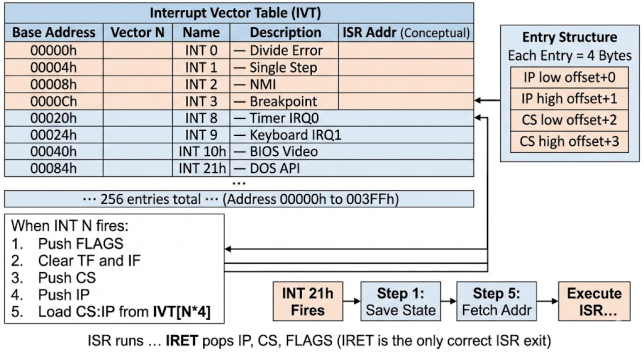
In protected mode (80286+), the IVT is replaced by the Interrupt Descriptor Table (IDT). Unlike the IVT, which is always fixed at 00000h, the IDT can reside anywhere in memory — its base address and size limit are stored in the IDTR register, loaded with the LIDT instruction. Each IDT entry is 8 bytes (an interrupt gate, trap gate, or task gate descriptor) rather than the IVT’s 4-byte far pointer. Hardware and software interrupts in protected mode also pass through privilege-level checks: a user-mode program at ring 3 cannot invoke a ring-0 handler directly unless the gate’s DPL explicitly permits it, making it impossible for application code to hook system interrupts without OS cooperation.
Three Sources of Interrupts
| Source | Mechanism | Blocked by CLI? | Example |
|---|---|---|---|
| Hardware INTR pin | 8259 PIC asserts INTR; CPU reads vector on /INTA | Yes — IF must be 1 | Timer, keyboard, disk |
| Hardware NMI pin | Rising edge on NMI pin; always vector 2 | No — always fires | RAM parity error |
| Software INT n | Instruction in code | No — always fires | INT 21h, INT 10h |
| CPU exception | Internal CPU fault | No — always fires | INT 0 divide error |
CLI sets IF=0 and stops the CPU from acknowledging the INTR pin — but it cannot block NMI, software INT n, or CPU exceptions. All three fire regardless of IF. This means a critical section protected by CLI is still vulnerable to divide-by-zero or a RAM parity NMI. Keep CLI sections as short as possible: they delay every timer tick and keyboard scan for the entire duration.
Writing a Correct Hardware ISR
A hardware ISR fires at any point in your program’s execution — between any two instructions, with the program in an unknown register state. Your ISR must leave every register exactly as it found it. Four non-negotiable rules: save every register you touch, reload DS to your own segment, send EOI to the 8259 before returning, and use IRET (not RET) to exit.
my_isr PROC FAR
    PUSH AX
    PUSH BX
    PUSH DS
    MOV  AX, SEG my_data   ; reload DS -- interrupted code had its own DS
    MOV  DS, AX

    ; --- ISR work here ---
    INC  WORD PTR [tick_count]

    ; Chain to original handler (it sends EOI and updates system time)
    PUSHF
    CALL DWORD PTR [old_handler]  ; original BIOS timer ISR

    POP  DS
    POP  BX
    POP  AX
    IRET                    ; pops IP, CS, FLAGS -- not RET, not RETF
my_isr ENDPEvery hardware ISR must follow these four rules without exception: (1) PUSH every register you modify — the interrupted program doesn’t know you ran. (2) Reload DS to your own data segment — the interrupted code’s DS is not yours. (3) Send EOI (MOV AL,20h / OUT 20h,AL) to the 8259 before returning — skipping it freezes all further hardware interrupts. (4) Exit with IRET, never RET — RET pops only IP and leaves FLAGS and CS on the stack, corrupting SP immediately.
Installing and Restoring Vectors
Always use DOS INT 21h functions 35h (get vector) and 25h (set vector) rather than directly patching the IVT. DOS manages the IVT correctly across program loads and unloads. And always restore the original vector before your program exits — DOS does not do this for you.
.data
    old_timer  DD 0     ; storage for original INT 08h far pointer
    tick_count DW 0

.code
; --- Install ---
    ; 1. Save original vector
    MOV AH, 35h
    MOV AL, 08h         ; INT 08h = timer
    INT 21h             ; ES:BX = current handler
    MOV WORD PTR [old_timer],   BX
    MOV WORD PTR [old_timer+2], ES

    ; 2. Install new handler
    MOV AH, 25h
    MOV AL, 08h
    PUSH CS
    POP  DS
    MOV  DX, OFFSET my_isr
    INT  21h

; --- Main loop ---
    MOV AX, @data
    MOV DS, AX
wait_loop:
    CMP [tick_count], 182
    JB  wait_loop           ; wait ~10 seconds (182 ticks at 18.2 Hz)

; --- Restore ---
    MOV AH, 25h
    MOV AL, 08h
    LDS DX, [old_timer]     ; DS:DX = original handler
    INT 21h

    MOV AH, 4Ch
    INT 21h
Key DOS and BIOS Services
| INT | AH | Function | Key registers |
|---|---|---|---|
| 21h | 09h | Print $-terminated string | DS:DX = string |
| 21h | 08h | Read key (no echo) | AL = ASCII |
| 21h | 2Ch | Get time | CH=hr CL=min DH=sec |
| 21h | 35h | Get interrupt vector | AL=vector; ES:BX=handler |
| 21h | 25h | Set interrupt vector | AL=vector; DS:DX=handler |
| 21h | 4Ch | Terminate program | AL = exit code |
| 10h | 00h | Set video mode | AL=mode (03h=80×25 text) |
| 10h | 02h | Set cursor position | BH=page DH=row DL=col |
| 16h | 00h | Wait for keystroke | AH=scan AL=ASCII |
Common ISR Mistakes
| Mistake | What happens | Fix |
|---|---|---|
| RET instead of IRET | FLAGS left on stack, SP wrong, immediate crash | Always IRET |
| No EOI to 8259 | No further IRQs delivered; system freezes | MOV AL,20h / OUT 20h,AL |
| DS not reloaded | ISR reads/writes wrong memory segment | PUSH DS; load your segment; POP DS |
| No CLI when patching IVT directly | Interrupt fires with half-written vector; crash | CLI before write; STI after (or use INT 21h) |
| Vector not restored on exit | Next IRQ jumps to deallocated code; crash | Always restore with INT 21h AH=25h |
Expanded BIOS Services
INT 10h — Video Services
| AH | Function | Key input registers | Output |
|---|---|---|---|
| 00h | Set video mode | AL = mode (03h = 80×25 text, 13h = 320×200 256-color) | — |
| 02h | Set cursor position | BH = page, DH = row (0-24), DL = col (0-79) | — |
| 03h | Get cursor position | BH = page | DH = row, DL = col, CX = cursor shape |
| 06h | Scroll window up | AL = lines (0 = clear), BH = attr, CH/CL = top-left, DH/DL = bottom-right | — |
| 09h | Write character + attribute | AL = char, BH = page, BL = attribute, CX = repeat count | — |
| 0Eh | Write char (teletype mode) | AL = char, BL = color (graphics mode) | Advances cursor automatically |
| 0Fh | Get current video mode | — | AL = mode, AH = cols, BH = page |
; Clear screen and print 'A' at row 5, col 10 in bright red on black
    MOV AH, 06h     ; scroll up (clear)
    MOV AL, 00h     ; 0 lines = clear entire window
    MOV BH, 07h     ; fill attribute: white on black
    MOV CX, 0000h   ; top-left corner (row 0, col 0)
    MOV DX, 184Fh   ; bottom-right (row 24, col 79)
    INT 10h

    MOV AH, 02h     ; set cursor position
    MOV BH, 00h     ; page 0
    MOV DH, 05h     ; row 5
    MOV DL, 0Ah     ; col 10
    INT 10h

    MOV AH, 09h     ; write character + attribute
    MOV AL, 'A'
    MOV BH, 00h     ; page 0
    MOV BL, 0Ch     ; attribute: bright red on black
    MOV CX, 1       ; repeat count
    INT 10h
INT 13h — Disk Services
| AH | Function | Key registers | Output / Error |
|---|---|---|---|
| 00h | Reset disk system | DL = drive (00h=A, 80h=HDD0) | CF=1 on error |
| 02h | Read sectors | AL=count, CH=cyl, CL=sector, DH=head, DL=drive, ES:BX=buffer | CF=1 + AH=error code on failure |
| 03h | Write sectors | Same as 02h | CF=1 on error |
| 08h | Get drive parameters | DL = drive | CH=max cyl, CL=max sector, DH=max head, BL=drive type |
; Read boot sector (sector 1, head 0, cylinder 0) of floppy A: into buffer
.data
    disk_buffer DB 512 DUP(0)

.code
    MOV AH, 02h         ; read sectors
    MOV AL, 01h         ; read 1 sector
    MOV CH, 00h         ; cylinder 0
    MOV CL, 01h         ; sector 1 (sectors start at 1)
    MOV DH, 00h         ; head 0
    MOV DL, 00h         ; drive A:
    MOV BX, OFFSET disk_buffer
    INT 13h
    JC  disk_error      ; CF=1: read failed; AH = error code
INT 16h — Keyboard Services
| AH | Function | Blocks? | Output |
|---|---|---|---|
| 00h | Read next keystroke | Yes — waits until key pressed | AH = scan code, AL = ASCII (0 for extended keys) |
| 01h | Check if keystroke available | No — returns immediately | ZF=1: no key waiting. ZF=0: AH=scan, AL=ASCII (key stays in buffer) |
| 02h | Get shift state | No | AL = shift flags (bit 0=RShift, 1=LShift, 2=Ctrl, 3=Alt) |
; Non-blocking key poll: process keys while doing other work
poll_loop:
    MOV AH, 01h         ; check keyboard buffer (non-blocking)
    INT 16h
    JZ  no_key          ; ZF=1: buffer empty, continue main work

    MOV AH, 00h         ; consume the key
    INT 16h             ; AH = scan code, AL = ASCII
    CMP AL, 1Bh         ; ESC key?
    JE  exit_loop
    ; process AL here
no_key:
    ; main work continues here
    JMP poll_loop
TSR Programs — Terminate and Stay Resident
A TSR (Terminate and Stay Resident) is a program that hooks one or more interrupt vectors, then exits in a way that leaves its code and data permanently in memory. The next time that interrupt fires — hardware timer tick, keyboard press, any software INT — the TSR’s handler runs before (or instead of) the original handler. DOS provides two ways to go resident: INT 27h (legacy, limited to 64 KB) and INT 21h AH=31h (modern, supports any size and sets an exit code).
The critical rule: the memory the TSR occupies must be declared to DOS as used. If you exit normally with INT 21h AH=4Ch, DOS marks your segment free and will overwrite it the moment another program loads. Using AH=31h tells DOS to keep that memory allocated permanently — until the next reboot.
.MODEL SMALL
.STACK 100h
.DATA
    old_timer   DD 0        ; storage for original INT 08h vector
    tick_count  DW 0

.CODE
; ---- TSR handler: intercepts timer tick (INT 08h, IRQ0) ----
new_timer PROC FAR
    PUSH AX
    PUSH DS
    MOV  AX, @data
    MOV  DS, AX

    INC  tick_count         ; count ticks

    POP  DS
    POP  AX

    PUSHF
    CALL DWORD PTR [old_timer]  ; chain to original BIOS timer (sends EOI)
    IRET
new_timer ENDP

; ---- Initialization: runs once, then goes resident ----
main PROC NEAR
    MOV  AX, @data
    MOV  DS, AX

    ; 1. Save original INT 08h vector
    MOV  AH, 35h
    MOV  AL, 08h
    INT  21h                    ; ES:BX = current handler
    MOV  WORD PTR [old_timer],   BX
    MOV  WORD PTR [old_timer+2], ES

    ; 2. Install our handler
    MOV  AH, 25h
    MOV  AL, 08h
    PUSH CS
    POP  DS                     ; DS:DX = our handler
    MOV  DX, OFFSET new_timer
    INT  21h

    ; 3. Go resident: keep (paragraphs of code + data + stack)
    ;    DX = number of paragraphs to keep resident
    ;    Calculate: (end_of_program - start) / 16 + 1
    MOV  AH, 31h                ; Terminate and Stay Resident
    MOV  AL, 00h                ; exit code
    MOV  DX, (OFFSET main - OFFSET new_timer + 15) / 16 + 10h
    INT  21h                    ; DOS: stay resident, keep DX paragraphs
main ENDP

END main
Read Next & Related Articles
- ⑦ Stack Operations — INT pushes FLAGS, CS, IP onto SS:SP; IRET unwinds all three
- ⑥ Flag Register — how INT clears TF and IF; how IRET restores them
- ④ BIU/EU Architecture — the /INTA bus cycle sequence and 8259 initialization in full detail
- Handling the Timer Interrupt (INT 08h) — complete working ISR example
- Top 60 8086 Viva Questions and Answers (2026) — Sunday-exam-prep companion covering the whole series, each answer linked back to the post it comes from
- 8086 Architecture — the /INTA bus cycle sequence and 8259 initialization
- 8086 Flag Register — how INT clears TF and IF; how IRET restores them
- 8086 Stack Operations — the three-item push that INT performs
- Handling the Timer Interrupt (INT 08h) — complete working ISR example
FAQs
Q: Can software INT n be blocked by CLI?
No. CLI only blocks maskable hardware interrupts on the INTR pin. Software INT n, NMI, and CPU exceptions always fire regardless of IF.
Q: Why is INT 3 encoded as one byte (CCh) while INT 03h is two bytes?
Debuggers need to replace exactly one byte at any instruction address to set a breakpoint. The one-byte CCh encoding lets them do this without disturbing adjacent code. No other interrupt has this one-byte form.
Q: Does DOS restore interrupt vectors when my program exits?
No. If your ISR code is deallocated but your vector still points to it, the next interrupt crashes the system. Always restore with INT 21h AH=25h before calling INT 21h AH=4Ch to terminate.
No Comments yet!