
Java’s ExecutorService.invokeAny(): Winning the Race for the First Result

In the world of concurrent programming, we often face scenarios where we need to perform the same task in multiple ways, but we only care about the first successful result. Imagine querying three different microservices for the same piece of data. You don’t care which service responds, as long as you get the data as quickly as possible. Once you have it, the other requests become redundant.

How do you efficiently manage this “race”? You could manually spin up threads, use a CountDownLatch or a Phaser, and manage a shared result variable with locks. But that’s complicated and error-prone. Fortunately, Java’s ExecutorService provides a clean, powerful, and built-in solution: the invokeAny() method.

Let’s dive into how invokeAny() works and how you can use it to write cleaner, more efficient concurrent code.

What is ExecutorService.invokeAny()?

The invokeAny() method is a blocking operation that submits a collection of Callable tasks to an ExecutorService. It doesn’t wait for all of them to finish. Instead, it waits for the first task to complete successfully (i.e., without throwing an exception) and returns its result.

As soon as one task finishes, invokeAny() returns its result and immediately attempts to cancel all other running or pending tasks.

This “fire-and-forget-the-rest” behavior makes it the perfect tool for tasks involving redundancy and speed.

Continue reading Java’s ExecutorService.invokeAny(): Winning the Race for the First Result
Don’t Specify Version Numbers in Spring XML Schema References

If you’ve been working with Spring Framework for a while, especially with its XML-based configuration, you’ve likely encountered a pattern in the <beans> element where schema locations are defined. It often looks something like this:

<?xml version="1.0" encoding="UTF-8"?>
<beans xmlns="http://www.springframework.org/schema/beans"
       xmlns:xsi="http://www.w3.org/2001/XMLSchema-instance"
       xsi:schemaLocation="
           http://www.springframework.org/schema/beans
           http://www.springframework.org/schema/beans/spring-beans-3.0.xsd
           http://www.springframework.org/schema/context
           http://www.springframework.org/schema/context/spring-context-3.0.xsd">

    <!-- Your bean definitions here -->

</beans>

Notice the -3.0.xsd at the end of the schema locations? This explicitly ties your configuration to a specific version of the Spring schema. While this might seem harmless or even like a good idea for precision, it can actually lead to unnecessary headaches and maintenance overhead.

Why You Shouldn’t Include Version Numbers

The Spring Framework is designed with backward compatibility in mind. When a new version of Spring is released (e.g., Spring 3.0, 4.0, 5.0, etc.), the XML schemas are generally updated to include new features or deprecate old ones, but they usually remain compatible with configurations written for previous versions, especially if you’re not using any of the very latest, specific features.

Continue reading Don’t Specify Version Numbers in Spring XML Schema References

Configuring ResourceBundleViewResolver in Spring MVC

In a Spring MVC application, a ViewResolver is responsible for mapping logical view names that your controllers return to actual .jsp files (or Thymeleaf templates, etc.). When you need to support multiple locales and provide messages or titles that vary per language, a ResourceBundleViewResolver is a convenient choice. This post walks through a minimal, but complete, configuration that you can drop into any Spring MVC project.

Problem Statement

Suppose you want a home.jsp that displays a greeting, a welcome message, and a page title, all of which should change depending on the user’s locale. You also want to keep the JSPs simple, so you delegate the translation of these messages to a standard Java ResourceBundle (properties file).

Solution Overview

  1. Define the view resolver so it first looks for a messages_*.properties file.
  2. Configure the ViewResolver hierarchy to fall back to the default view resolver if a match isn’t found.
  3. Create a simple controller that forwards to a logical view name.
  4. Write the JSP that pulls values from the resource bundle.
Continue reading Configuring ResourceBundleViewResolver in Spring MVC

Troubleshoot: java.lang.ClassNotFoundException: com.sun.jersey.spi.container.servlet.ServletContainer

Encountering a ClassNotFoundException is a common rite of passage for any Java developer. Specifically, the error java.lang.ClassNotFoundException: com.sun.jersey.spi.container.servlet.ServletContainer can be a head-scratcher when you’re working with web services, particularly when migrating or setting up a new project.

This exception typically indicates that your application server (like Tomcat, JBoss, or Jetty) can’t find the necessary Jersey Servlet container class. Let’s break down why this happens and how to fix it.

Understanding the Problem

The class com.sun.jersey.spi.container.servlet.ServletContainer is a core component of the older **Jersey 1.x** framework. It’s responsible for bootstrapping and handling requests for your RESTful services. If your application attempts to load this class and it’s not present in the classpath, you’ll get the ClassNotFoundException.

The most common reasons for this are:

  1. Missing Dependency: The required Jersey servlet JAR file is not included in your project’s build path or deployed WAR file.
  2. Incorrect Version: You’re using a mix of Jersey 1.x and Jersey 2.x (or later) dependencies, or your configuration points to a Jersey 1.x class while you’re using Jersey 2.x.
  3. Build Tool Misconfiguration: Your build tool (Maven, Gradle) isn’t correctly packaging the dependency.
  4. Deployment Issue: The JAR file isn’t correctly placed in the application server’s classpath (e.g., in WEB-INF/lib for web applications).
Continue reading Troubleshoot: java.lang.ClassNotFoundException: com.sun.jersey.spi.container.servlet.ServletContainer

A Practical Guide to Monitoring Spring Boot Microservices with Prometheus & Grafana

Microservices are powerful. They allow us to build scalable, resilient, and independently deployable systems. But this power comes with a cost: complexity. When you have dozens or even hundreds of services interacting, figuring out what’s going on—especially when something goes wrong—can feel like searching for a needle in a haystack of haystacks.

This is where observability comes in. It’s more than just “monitoring”; it’s about gaining deep, actionable insights into your system’s behavior. We can break observability down into three pillars:

  • Logs: Structured, event-based records of what happened. “User X failed to log in at 10:05 PM.”
  • Metrics: Aggregated, numerical data over time. “The average API response time over the last 5 minutes was 200ms.”
  • Traces: The end-to-end journey of a request as it travels through multiple services. “Request ABC started at the API gateway, went to the user-service, then the auth-service, and took 350ms in total.”

In this guide, we’ll focus on the cornerstone of observability: metrics. We’ll build a complete, production-grade monitoring stack for a Spring Boot microservice using an industry-standard toolkit.

The Monitoring Dream Team

We’ll use a combination of powerful tools that work seamlessly together:

  1. Spring Boot Actuator: Provides production-ready features for our app, including a wealth of internal metrics out-of-the-box.
  2. Micrometer: An application metrics facade that acts as a universal translator. Spring Boot uses it to format its metrics so that various monitoring systems can understand them. We’ll configure it to talk “Prometheus”.
  3. Prometheus: The powerhouse of our stack. It’s a time-series database that periodically “scrapes” (pulls) metrics from our application and stores them efficiently.
  4. Grafana: The visualization layer. Grafana connects to Prometheus, queries the stored metrics, and turns them into beautiful, insightful dashboards.

Here’s the data flow we’re building:

Spring Boot App → Actuator → Micrometer → a /prometheus endpoint → Prometheus Scraper → Grafana Dashboard

Let’s get building!

Continue reading A Practical Guide to Monitoring Spring Boot Microservices with Prometheus & Grafana

A Developer’s Deep Dive into Java Memory Management and Garbage Collection

As Java developers, we are blessed with one of the most sophisticated features a programming platform can offer: automatic memory management. We don’t have to manually allocate and deallocate memory like our C++ brethren, which saves us from a whole class of painful bugs. This “magic” is handled by the Java Virtual Machine (JVM) and its Garbage Collector (GC).

But here’s the thing: relying on magic without understanding it can lead to trouble. The dreaded OutOfMemoryError, mysterious performance slowdowns, and long application pauses can all be symptoms of memory management woes. To truly master Java, you need to peek behind the curtain.

In this post, we’ll demystify how the JVM manages memory and how the Garbage Collector works its magic to keep our applications running smoothly.

The JVM’s Memory Blueprint: Where Everything Lives

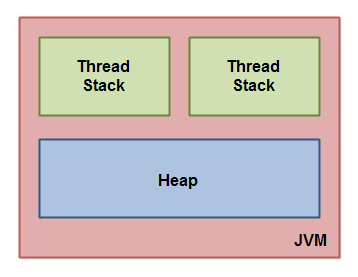
When you start a Java application, the JVM carves out a chunk of memory from the operating system. This memory isn’t just one big, messy pile; it’s a highly organized space, divided into several key areas. While there are a few, we’ll focus on the two most relevant to our day-to-day coding: the Stack and the Heap.

A simplified view of where our data goes.

Continue reading A Developer’s Deep Dive into Java Memory Management and Garbage Collection

Understanding Variable Hoisting in JavaScript

Let’s dive into a fundamental concept in JavaScript that often trips up beginners (and even seasoned developers occasionally): variable hoisting. Understanding how hoisting works is crucial for writing predictable and bug-free JavaScript code. Let’s break it down.

What is Hoisting?

In simple terms, “hoisting” is JavaScript’s default behavior of moving declarations to the top of their current scope (either the global scope or the function scope) during the compilation phase, before the code is actually executed. It’s important to note that only the declaration is hoisted, not the initialization.

Think of it like this: before your JavaScript engine runs a single line of code, it scans through your script and pulls all variable and function declarations to the top. This means you can use a variable or call a function before it’s “physically” declared in your code.

Continue reading Understanding Variable Hoisting in JavaScript