Nobody can tell you if what you’re doing is good, meaningful or worthwhile. The more compelling the path, the more lonely it is.
By Hugh Macleod via quotesondesign.com

Nobody can tell you if what you’re doing is good, meaningful or worthwhile. The more compelling the path, the more lonely it is.
By Hugh Macleod via quotesondesign.com
Decompiling an Android APK lets you inspect an app’s resources, understand its structure, perform security audits, or modify open-source applications for personal use. Whether you’re a developer reverse-engineering a library, a security researcher auditing an app’s permissions, or just curious how an app works under the hood, there are several mature tools available in 2026 to get the job done. This guide walks you through each one so you can pick the right tool for your situation.
Continue reading Decompile, Edit, and Recompile Android Apps with APK Studio
app/, src/, vendor/, web/ with app.php/app_dev.php front controllers), which changed fundamentally in Symfony 4 (2018). Modern Symfony uses public/ instead of web/, config/ instead of app/config/, and bin/console instead of app/console. See the current Symfony documentation. This post is preserved for historical reference.
Symfony 2 is a PHP framework. When you download it, if noticed, Symfony 2 has a directory structure. By default there are 5 directories like app, bin, src,vendor, web. If you had developed any kind of application with Symfony 2 then you might have followed something like put your source code in src, put all static assets in web, write config files in app etc. Again this directory structure is configurable, that means you can customize it according to your project needs. Even though the directory names are self-explanatory, let’s have a deeper look of this structure.
By default Symfony consists of following directories,
‘app’ directory in Symfony 2 holds the application configuration. You can find all configuration related stuff in ‘app/config’ folder. If you need to configure your database or Swiftmailer then you will need to change parameters/settings from here. Apart from that this directory holds the ‘cache’. While writing code in Symfony 2 you will be working with lots of files ranging from xml, yml to php, twig, html etc. Controllers will be written in some file, routes will be defined in some another files, views will be written in some other file and so on. So while serving request Symfony has to read all these necessary files. Since the count of files is too high, to achieve great performance Symfony 2 has inbuilt caching. And this cached data will be stored in ‘cache’ directory. Again there is a ‘log’ directory which has debugging related data, especially useful in development.
Continue reading Understanding Directory Structure of Symfony 2
app_dev.php front controller described here were replaced in Symfony 4+. For current Symfony setup, use composer create-project symfony/skeleton my_project — see symfony.com/doc/current/setup.html. This post is preserved for historical reference.
If you are a web developer then you might have heard something called as “Symfony“. So what is this Symfony? Framework? Language? Tool? or something else? Let’s have a quick look on this.
Symfony is nothing but a set of reusable PHP components, a web application framework. Symfony is a leading PHP framework, which has a large user base and used to create websites and web applications.
Symfony is basically set of components. Depending on your needs, you can either choose individual component, you can choose set of components or you can go with full framework. Before going to Why Symfony? Let’s first see why you should use a Framework?
Continue reading Getting Started With Symfony 2: Quick Setup
CSS Custom Properties — commonly known as CSS variables — let you define reusable values directly in your stylesheets and reference them anywhere with var(). They cut down on repetition, make theming and dark-mode toggles trivial, and can even be updated at runtime with JavaScript.
Lost or dismissed your important notification from your android device? Now you want to get it back? Well if you are having Android JellyBean or later, you can get back your dismissed notification with few easy steps.
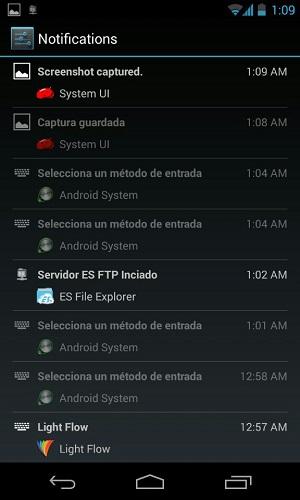
Simple go to your android home screen and tap App icon. Switch to Widgets tab, and look for 1×1 Settings Shortcut. Place it on your home screen. Now tap on that newly placed icon and select Notifications from list. That’s all. Tap on it to see all pushed notification history in reverse chronological order.
Image via ibtimes.com and Kārlis Dambrāns
Back in 2013, WordPress automatically added width and height attributes to every image element (i.e. every <img> tag) you inserted into a post. At the time, this often caused headaches: responsive themes relied on fluid CSS layouts, and a hard-coded width="600" height="400" on an image could fight with that fluid sizing, causing images to look stretched, squashed, or oddly cropped on different screen sizes. So a common “fix” floating around the WordPress community was to strip those attributes out entirely with a regex filter.
This post originally shared that old hack. It is now outdated, and the original advice will actively hurt your site if you still use it. Read on for why, and for what to do instead.
Continue reading WordPress Hack: Remove Width And Height Attributes From Images