

git clone creates a full local copy of a remote repository — every branch, every tag, and the entire commit history, not just the current snapshot. This is the second post in this site’s Git command guide: once you’ve decided you’re not starting a project from scratch with git init, this is how you get an existing one onto your machine.
Apache Commons Collection – MultiValuedMap
The first time I needed a one-to-many map in Java, I reached for Map<String, List<String>> and wrote the same computeIfAbsent boilerplate I’d written a dozen times before. Apache Commons Collections’ MultiValuedMap exists specifically to kill that boilerplate — it’s a Map variant that lets a single key hold multiple values natively, without you manually managing the inner list. This post covers what it actually buys you over rolling your own, how it stacks up against Guava’s Multimap, and a realistic use case: grouping form-validation errors by field name.
Here’s the minimal example to see the API shape:
import org.apache.commons.collections4.MultiValuedMap;
import org.apache.commons.collections4.multimap.ArrayListValuedHashMap;

public class MultiValuedMapDemo {
    public static void main(String[] args) {
        MultiValuedMap<String, String> multiValuedMap = new ArrayListValuedHashMap<>();
        multiValuedMap.put("Key1", "Value1");
        multiValuedMap.put("Key1", "Value2");
        multiValuedMap.put("Key2", "Value3");
        System.out.println(multiValuedMap.get("Key1"));
    }
}
Git Init
git init is the command that turns an ordinary folder into a Git repository. It creates a hidden .git subdirectory containing the object database, refs, and config that Git needs to start tracking history. You only run it once per project — after that, every git add and git commit writes into that same .git directory. This is the first post in this site’s Git command guide, so if you’re setting up a brand-new project, this is where you start.
Geolocation API
The Geolocation API lets a web page ask the browser for the user’s latitude and longitude. It’s a small API on the surface — one method, one callback — but the parts that actually matter in production are the parts most tutorials skip: it’s been HTTPS-only since 2016, permission state can be checked before you even prompt the user, and the error callback has three distinct failure modes that each need different handling.
Here’s the minimal version:
if ("geolocation" in navigator) {
  navigator.geolocation.getCurrentPosition(position => {
    const latitude = position.coords.latitude;
    const longitude = position.coords.longitude;
    console.log(`Your location is (${latitude}, ${longitude})`);
  });
} else {
  console.log("Geolocation is not supported by this browser.");
}
Setting up your Angular development environment
Hey there, fellow coders! Ever wanted to build amazing web applications with Angular but felt a bit overwhelmed by the setup process? Don’t worry, you’re not alone! Today, we’re going to walk through setting up your local environment, making it as easy as pie.
What You’ll Need Before We Begin
Before we jump into the nitty-gritty, let’s make sure you’re familiar with a few basics:
- JavaScript, HTML, and CSS: These are the building blocks of web development. A solid understanding of these will make your Angular journey much smoother.
- Command Line Interface (CLI): You’ll be using commands in your terminal or command prompt. Don’t worry, we’ll guide you through them.
- TypeScript (Optional): Angular is built with TypeScript, which adds static typing to JavaScript. While it’s helpful, you can start without deep knowledge.
Let’s Get Started: Dependencies and Installation
1. Node.js and npm:
Angular CLI relies on Node.js and npm (Node Package Manager).
Head over to the official Node.js (https://nodejs.org/en) website and download the latest LTS (Long Term Support) version by clicking Download Node.js button.
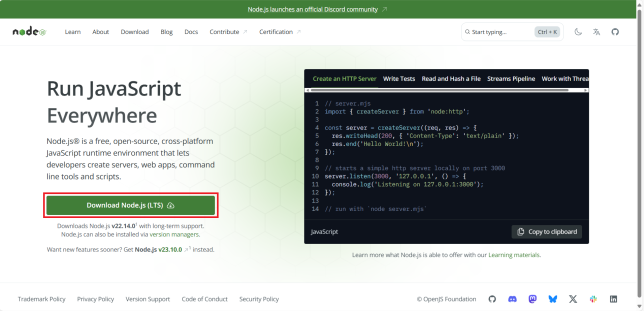
Once it is downloaded, double click on the downloaded file to start its installation. Installing Node.js will automatically install npm.
As stated in the angular documentation, it is important to use an active or maintenance LTS version of node.js. Please refer to the angular version compatibility guide for more details.
Continue reading Setting up your Angular development environmentSpring Cloud: Getting started with Hystrix Dashboard
⚠️ This tutorial is outdated. Hystrix Dashboard was removed from Spring Cloud and does not work with Spring Boot 3.x. The modern approach is Resilience4j metrics with Prometheus & Grafana — see the Spring Cloud Netflix migration guide. This post remains online for teams maintaining legacy systems.
This is a quick tutorial on Hystrix dashboard. Hystrix dashboard allows you to view the overall status of your Spring cloud application at a single glance. It provides access to vital metrics of your application and gives you a graphical representation of those for better understanding.
This post is the continuation of Spring Cloud: Adding Hystrix Circuit Breaker and Spring Cloud: Playing with Hystrix Circuit Breaker. Please go through those post, if you haven’t. Those posts explain about Hystrix circuit breaker.
TL;DR You can download whole project by clicking following link.
Continue reading Spring Cloud: Getting started with Hystrix DashboardSpring Cloud Config Server on Spring Boot 3.x: Git Mode, Native Mode, and Runtime Refresh
Spring Cloud Config is, alongside Eureka, one of the two survivors of the original Spring Cloud stack — still maintained, still the standard answer for centralized configuration outside Kubernetes. This post is a complete rewrite of my 2020 Config Server tutorials for Spring Boot 3.x: a Config Server backed by Git (with native/filesystem mode for local development), clients using the modern spring.config.import mechanism instead of the long-gone bootstrap.properties, and runtime refresh that actually works.