
8-bit multiplication on the 8086 is simpler than its 16-bit counterpart in one important way: the result always fits in a single register pair. MUL with an 8-bit operand multiplies the implicit AL register by that operand and places the full 16-bit result in AX — no separate DX needed. This post walks through a working implementation in three environments: MASM/TASM, emu8086, and NASM.
Prerequisites: Familiarity with 8086 registers and the segment setup pattern. Read 8086 Assembly Program to Multiply Two 16-bit Numbers for the 16-bit version first if needed.
The Problem: Multiplying 09h by 02h
We want to multiply 09h (9 decimal) by 02h (2 decimal) and store the result. Quick check: 9 × 2 = 18 = 12h. The debugger confirms AX=0012 ✓.
MUL src with an 8-bit operand, the 8086 computes AX = AL × src. The full 16-bit product lands in AX — AH holds the high byte, AL holds the low byte. The maximum possible product is FFh × FFh = FE01h, which fits in AX. No DX is involved for 8-bit multiplication.
Version 1 — MASM / TASM (Classic DOS Toolchain)
data segment
    a db 09h        ; 8-bit multiplicand
    b db 02h        ; 8-bit multiplier
    c dw ?          ; 16-bit result
data ends

code segment
assume cs:code, ds:data
start:
    mov ax, data    ; Load data segment address
    mov ds, ax      ; Initialize DS

    mov ax, 0000h   ; Clear AX
    mov al, a       ; Load multiplicand into AL (09h)
    mul b           ; AX = AL * b  (AX = 09h * 02h = 0012h)

    mov c, ax       ; Store result in c

    int 3           ; Halt for debugging
code ends
end start
mul b: Some versions of this program load mov bl, b before calling mul b. The BL load is completely unused — mul b reads the multiplier directly from the memory variable b, not from BL. If you want to multiply by a register, write mul bl; if you want to multiply by a memory variable, write mul b. Mixing them (loading BL then calling mul b) just wastes a register load.
Related Links:
Step-by-Step Explanation
1. Data Segment
a db 09h: Stores the first operand (9 decimal) as an 8-bit value.b db 02h: Stores the second operand (2 decimal) as an 8-bit value.c dw ?: Reserves a 16-bit word for the result — wide enough to hold any 8-bit product.
2. Code Segment
mov ax, data/mov ds, ax: Initialize the data segment register.mov ax, 0000h: Clear AX so AH=0 before loading AL.mov al, a: Load the multiplicand (09h) into AL.mul b: Multiply AL by the memory byteb. Result:AX = AL × b = 09h × 02h = 0012h.mov c, ax: Store the 16-bit result inc.int 3: Breakpoint interrupt — halts execution for debugging.
Flowchart
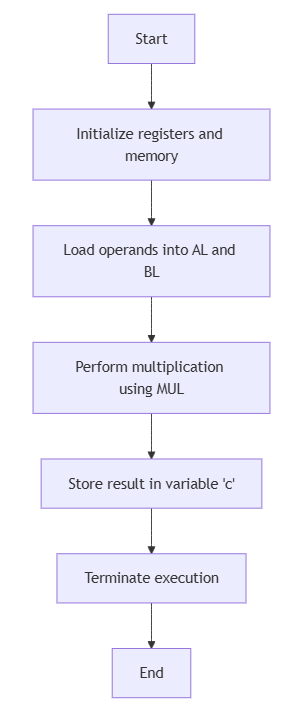
High-Level Overview
- Initialize DS and clear AX.
- Load multiplicand into AL.
- Execute
MUL b: AX = AL × b. - Store AX into result variable
c.
Output
C:TASM>masm an8mul.asm
Microsoft (R) Macro Assembler Version 5.00
Copyright (C) Microsoft Corp 1981-1985, 1987.  All rights reserved.

Object filename [an8mul.OBJ]:
Source listing  [NUL.LST]:
Cross-reference [NUL.CRF]:

  50402 + 450254 Bytes symbol space free

      0 Warning Errors
      0 Severe  Errors

C:TASM>link an8mul.obj

Microsoft (R) Overlay Linker  Version 3.60
Copyright (C) Microsoft Corp 1983-1987.  All rights reserved.

Run File [AN8MUL.EXE]:
List File [NUL.MAP]:
Libraries [.LIB]:
LINK : warning L4021: no stack segment

C:TASM>debug an8mul.exe
-g

AX=0012  BX=0002  CX=002A  DX=0000  SP=0000  BP=0000  SI=0000  DI=0000
DS=0B97  ES=0B87  SS=0B97  CS=0B98  IP=0019   NV UP EI PL NZ NA PO NC
0B98:0019 CC            INT     3
-d 0B97:0000
0B97:0000  09 02 12 00 00 00 00 00-00 00 00 00 00 00 00 00   ................
-q
Confirm AX=0012: AH=00 (high byte, zero because the product fits in AL), AL=12h (18 decimal, the result). c is stored at offset 2 as 12 00 in little-endian ✔.
Understanding the Memory Dump
| Address | Hex | Decimal | Explanation |
|---|---|---|---|
0B97:0000 | 09 | 9 | Multiplicand a = 09h |
0B97:0001 | 02 | 2 | Multiplier b = 02h |
0B97:0002 | 12 00 | 18 | Result c = 0012h in little-endian (AL=12h, AH=00h) |
Version 2 — emu8086 (Windows Emulator)
Tested with: emu8086 v4.08 on Windows 10.
; emu8086 version -- 8086 Assembly Program for Multiplication of Two 8-bit Numbers
#make_COM#

org 100h

; --- Code ---
start:
    mov ax, 0000h   ; Clear AX
    mov al, a       ; Load multiplicand into AL (09h)
    mul b           ; AX = AL * b  (0012h)
    mov c, ax       ; Store result

    mov ax, 4c00h
    int 21h

; --- Data (after code to avoid execution as instructions) ---
a db 09h
b db 02h
c dw 0000h
Version 3 — NASM (Modern Open-Source Assembler)
Tested with: NASM 2.16.01, DOSBox 0.74-3.
; NASM version -- 8086 Assembly Program for Multiplication of Two 8-bit Numbers
; nasm -f bin an8mul.asm -o an8mul.com

bits 16
org  100h

start:
    xor ax, ax       ; Clear AX
    mov al, [a]      ; Load multiplicand into AL (09h)
    mul byte [b]     ; AX = AL * b  (0012h)
    mov [res], ax    ; Store result

    mov ax, 4c00h
    int 21h

; --- Data (after code to avoid execution as instructions) ---
a   db 09h
b   db 02h
res dw 0
Register State After Execution
| Register | Value | Meaning |
|---|---|---|
| AL | 12 | Low byte of product: 09h × 02h = 12h (18 decimal) |
| AH | 00 | High byte — zero because product fits in 8 bits |
| AX | 0012 | Full 16-bit result |
| CF / OF | 0 | Clear because AH=0 (product fits in AL) |
Frequently Asked Questions
Why is the result stored in the 16-bit AX when both operands are 8 bits?
Because the product of two 8-bit numbers can be up to 16 bits wide: FFh × FFh = FE01h. The 8086 always writes the full 16-bit product to AX so no precision is lost. In practice, when the result fits in 8 bits (AH=0), you can safely use only AL. When AH is non-zero, you need the full AX — which is why c is declared as dw.
What is the difference between mul b and mul bl?
mul b reads the multiplier from the memory address of variable b. mul bl reads the multiplier from the BL register. Both produce the same result here (since b = 02h and BL was loaded with the same value), but they are different instructions with different encodings. Using mul b is slightly more direct and avoids the need to load BL first.
What do CF and OF indicate after 8-bit MUL?
After 8-bit MUL, CF and OF are both 0 if AH=0 (the product fits entirely in AL). Both are 1 if AH is non-zero (the product overflows into AH). This lets you use JC or JO after MUL to detect whether the result fits in a single byte. Here, 09h × 02h = 12h — AH=0, so CF=OF=0.
Conclusion
8-bit multiplication on the 8086 multiplies AL by an 8-bit register or memory operand and places the 16-bit product in AX. The operand you supply to MUL is the multiplier — AL is always the implicit multiplicand. Declare the result variable as dw (not db) to handle products that overflow into AH.
None of your programs are running in tasm for win 10. File is compiling but output is blank
Yes, Change ur career u are a failure. Children are suffering by learning 43 year old language and you are adding to that suffering.
He helped as to pass off our clg lab sessions. I am a pro in C, but I cant do this becoz i started my programming carrier for embedded right from C.