
In this post, we implement gray-level slicing in MATLAB — a point processing technique used in digital image processing to highlight a specific range of gray levels while suppressing everything outside that range. The program reads a grayscale image, asks the user to specify a lower and upper gray-level boundary, and produces two sliced images: one that preserves the background and one that blacks it out.
MATLAB Code
% Gray-Level Slicing in MATLAB
% Highlights pixels within a user-defined gray-level range.
% Two sliced versions are produced:
%   b - background preserved (pixels below r1 unchanged)
%   c - background suppressed (only the range [r1,r2] is shown in white)

clc;        % Clear the command window
clear all;  % Clear all workspace variables

% --- Load image ---
% Place your image file in the MATLAB working directory.
originalImage = imread('sample.jpg');       % Read the image file
grayImage     = rgb2gray(originalImage);    % Convert to grayscale

imageSize = size(grayImage);  % [rows, cols]

% --- User inputs ---
lowerLevel = input('Enter lower gray level : ');   % e.g. 20
upperLevel = input('Enter upper gray level : ');   % e.g. 50

% --- Slicing: preserve background ---
% Pixels above upperLevel are set to 255 (white); others stay the same.
slicedPreserve = grayImage;
for row = 1:imageSize(1)
    for col = 1:imageSize(2)
        if grayImage(row, col) > lowerLevel
            if grayImage(row, col) > upperLevel
                slicedPreserve(row, col) = 255;  % Highlight bright pixels
            end
        end
    end
end

% --- Slicing: suppress background ---
% Pixels inside [lowerLevel, upperLevel] -> white; outside -> black.
slicedSuppress = grayImage;
for row = 1:imageSize(1)
    for col = 1:imageSize(2)
        if grayImage(row, col) > lowerLevel
            if grayImage(row, col) > upperLevel
                slicedSuppress(row, col) = 255;  % In range -> white
            else
                slicedSuppress(row, col) = 0;    % Out of range -> black
            end
        end
    end
end

% --- Display all three images side by side ---
subplot(1, 3, 1);
imshow(grayImage);
title('Original Grayscale');

subplot(1, 3, 2);
imshow(slicedPreserve);
title('Sliced (Background Preserved)');

subplot(1, 3, 3);
imshow(slicedSuppress);
title('Sliced (Background Suppressed)');
How the Code Works
- Image loading —
imread('sample.jpg')reads the image from the working directory.rgb2gray()converts it to a single-channel (8-bit) grayscale matrix where each pixel value is in the range 0–255. - User-defined range — The user enters a lower bound (
lowerLevel) and an upper bound (upperLevel) that define the gray-level band of interest. - Background-preserved slicing — The outer loop walks every pixel. If the gray value is above both thresholds, it is set to 255 (white). Pixels between 0 and
lowerLevelare left unchanged. This preserves the scene context. - Background-suppressed slicing — The same scan is performed, but now pixels inside the range are set to 255 and pixels outside the range are forced to 0 (black). This isolates only the highlighted band.
- Display —
subplot(1, 3, k)shows all three images side by side so the effect of each slicing strategy is easy to compare.
Sample Input / Output
Enter lower gray level : 20
Enter upper gray level : 50
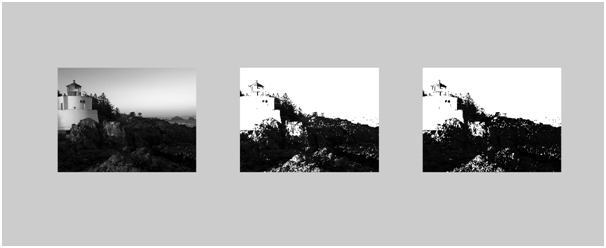
MATLAB opens a figure window showing three subplots: the original grayscale image, the background-preserved sliced image, and the background-suppressed sliced image.
Output Explanation
- Original Grayscale — The image after
rgb2gray(). Pixel values range from 0 (black) to 255 (white). - Background Preserved — Pixels with intensity above 50 are turned white. Pixels with intensity 0–20 are unchanged. The resulting image looks like the original but with bright areas bleached to pure white.
- Background Suppressed — Only pixels in the range 20–50 remain visible (turned white); everything else becomes black. This produces a high-contrast image isolating the chosen gray-level band.
See Also
- Implementing Digital Negative and Grayscale of Image in MATLAB
- Implementation of Histogram Processing in MATLAB
- Implementing Edge Detection in MATLAB
- Program for Threshold in MATLAB
Conclusion
Gray-level slicing is a simple yet powerful point processing operation. By defining a brightness window, we can highlight features of interest — such as bones in an X-ray or specific tissue in an MRI — and either preserve or discard the surrounding context. This program demonstrates both strategies and provides a foundation for more advanced intensity transformation techniques in digital image processing.
No Comments yet!